Oct 22, 2026
12 Best Power BI Sales Dashboard Examples and Templates
Explore 12 real Power BI sales dashboards for revenue, profit, targets, customers, conversion, e-commerce, and returns, with interactive templates.
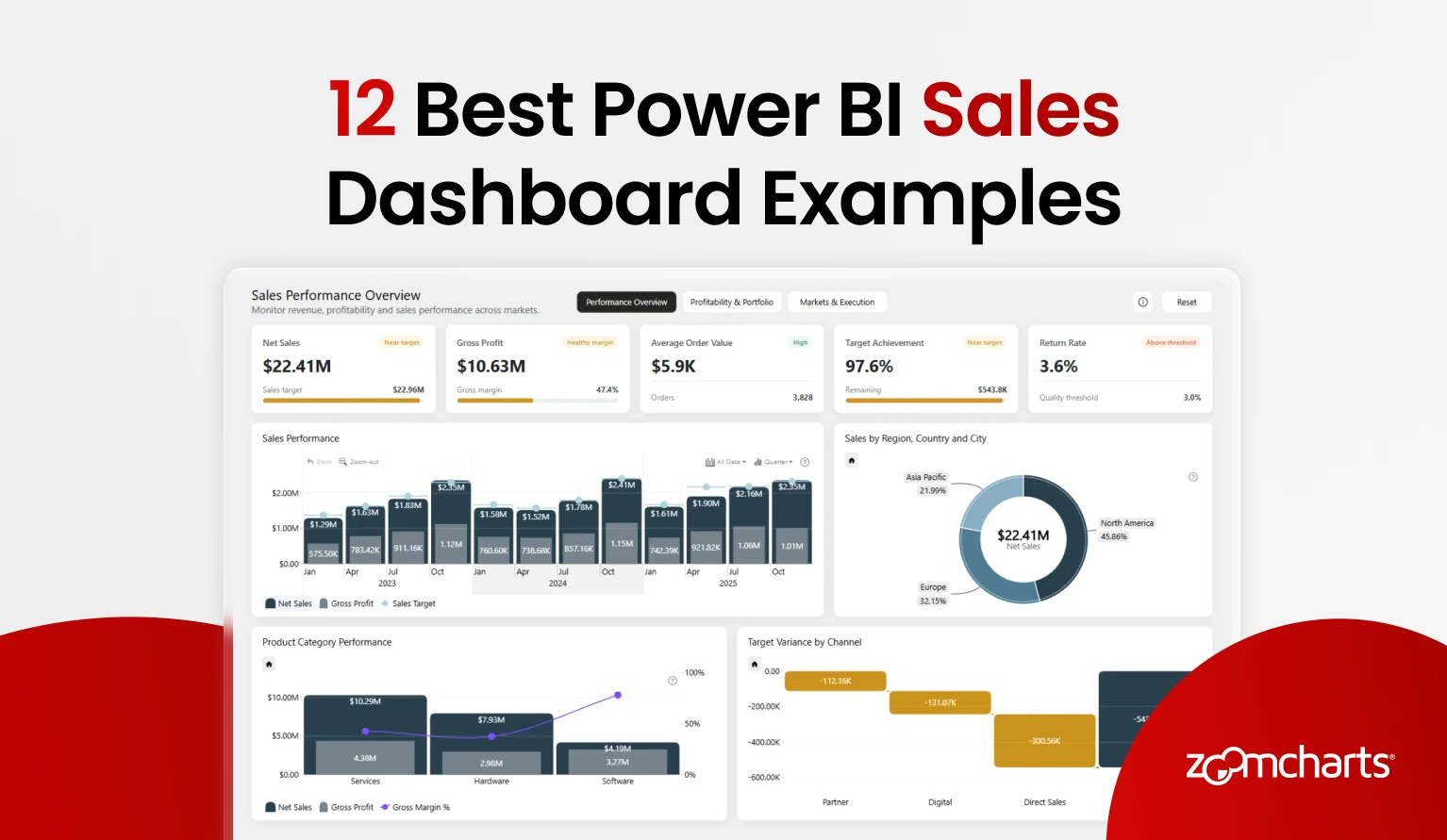
Explore 12 real Power BI sales dashboards for revenue, profit, targets, customers, conversion, e-commerce, and returns, with interactive templates.
1. B2B Sales Performance Dashboard in Power BI
Best for: A ZoomCharts-built B2B sales report that connects sales results, profitability, targets, markets, customers, channels, and sales execution
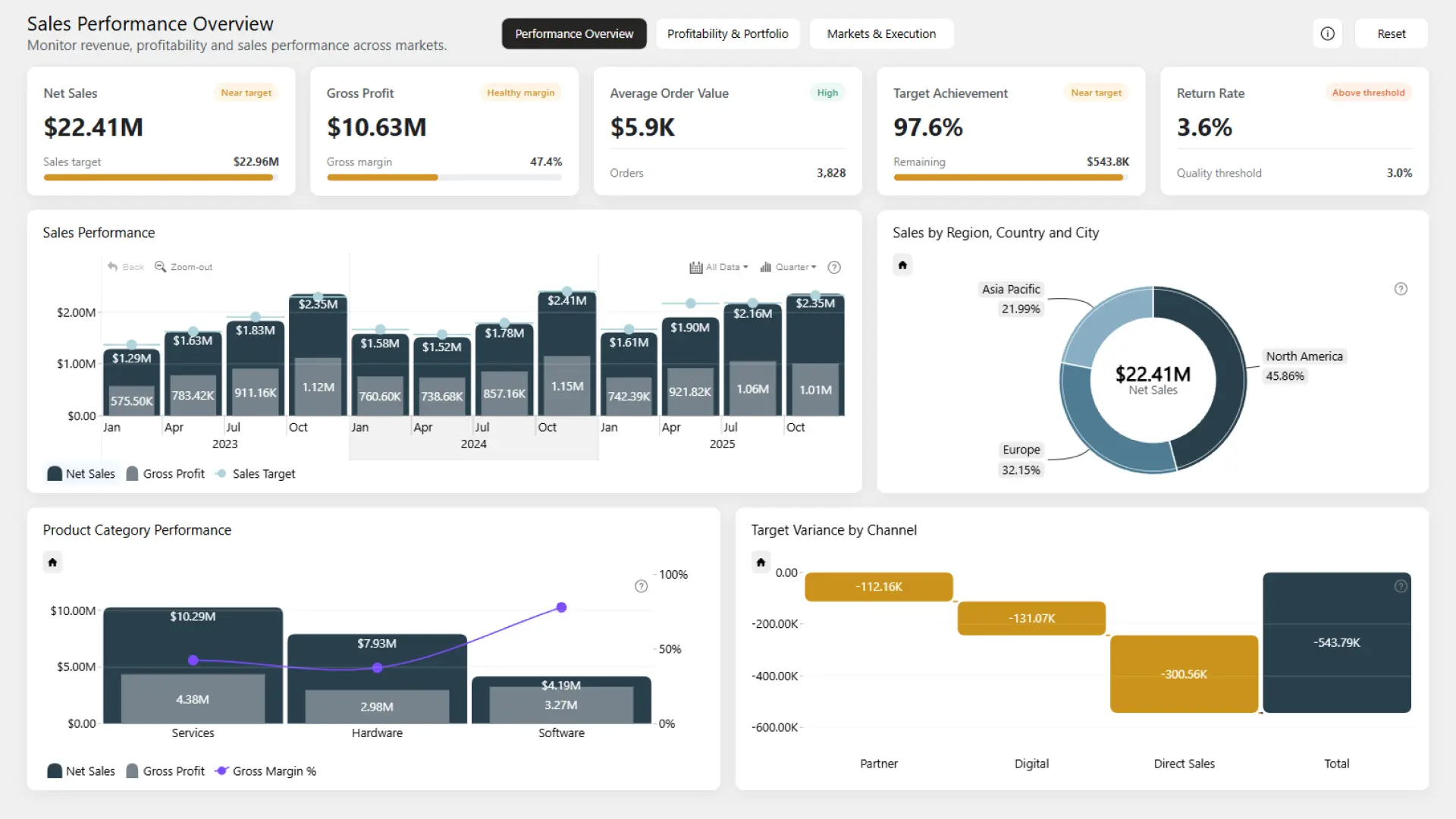
This three-page ZoomCharts report is organized into Performance Overview, Profitability and Portfolio, and Markets and Execution. It tracks Net Sales, Gross Profit, Target Achievement, Average Order Value, and Return Rates across products, markets, channels, customers, and sales teams.
The report supports several routes from an executive KPI to its cause. Users can compare net sales and gross profit with targets, examine product margin and discounts, review customer and channel performance, and analyze sales execution by team, order status, priority, and payment method. Cross-chart filtering, supported drill-down hierarchies, page navigation, and reset controls help keep the exploration focused.
Explore this dashboard template
ZoomCharts visuals used:
Drill Down Timeline PRO and Drill Down Donut PRO.
2. Power BI E-Commerce Profitability Dashboard
Best for: Understanding how discounts, refunds, product costs, shipping revenue, and operating costs affect e-commerce contribution margin
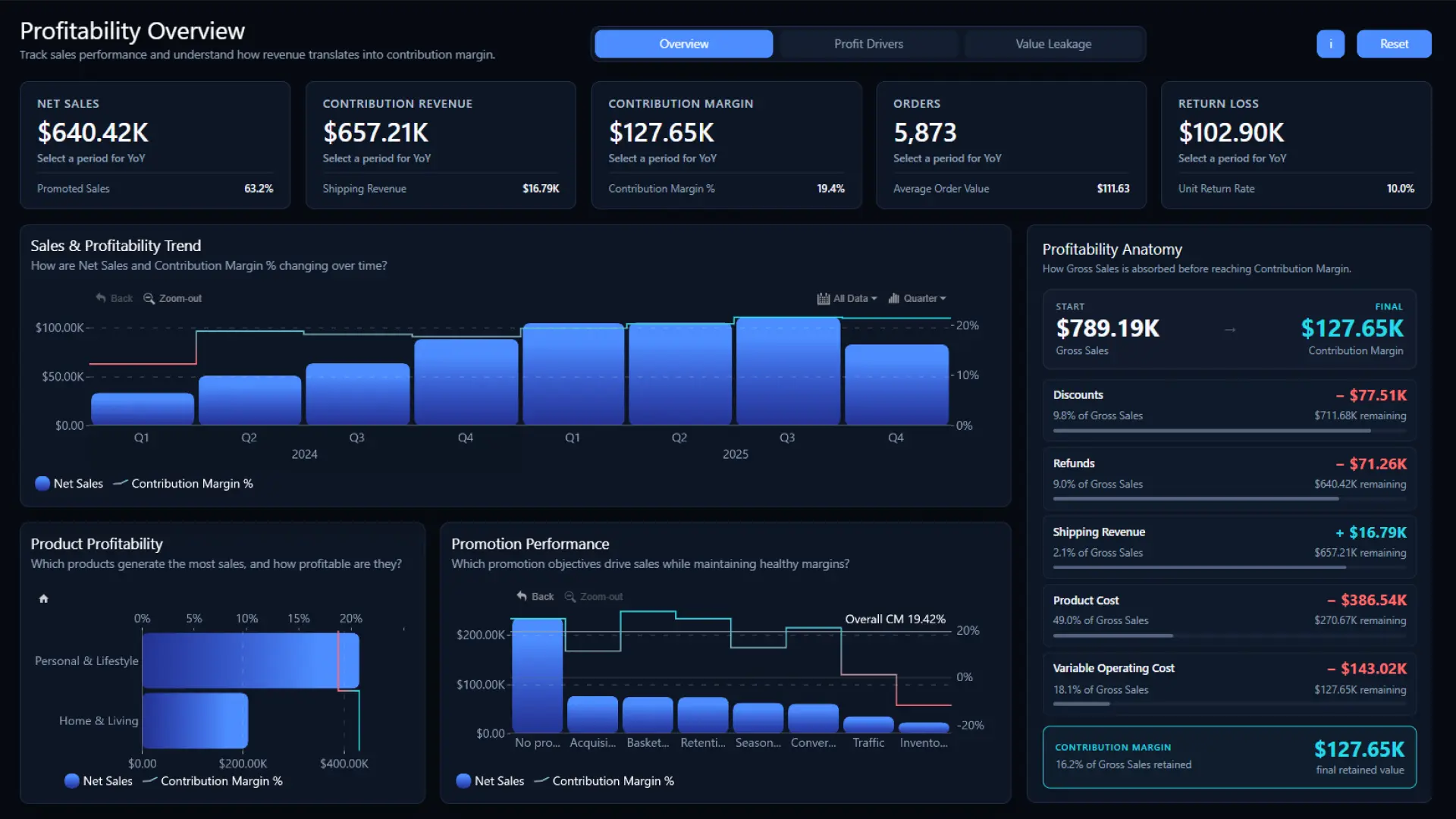
This three-page ZoomCharts report moves from Overview to Profit Drivers and Value Leakage. It shows how sales revenue becomes contribution margin after discounts, refunds, shipping revenue, product costs, and variable operating costs.
The report connects financial performance with the operational factors behind it. Users can compare profitability across brands, customer segments, acquisition channels, sales channels, and European markets, then inspect return losses, shipping costs, on-time delivery, fulfillment networks, operating costs, and lost sales. This structure is useful when revenue growth alone does not explain whether an e-commerce business is creating value.
Explore this dashboard template
ZoomCharts visuals used:
Drill Down Bubble PRO, Drill Down Combo PRO, Drill Down Combo Bar PRO, and Drill Down Timeline PRO.
3. Power BI Sales Performance KPI Dashboard
Best for: A decision-ready B2B sales report that connects executive KPIs with targets, profitability, and commercial performance
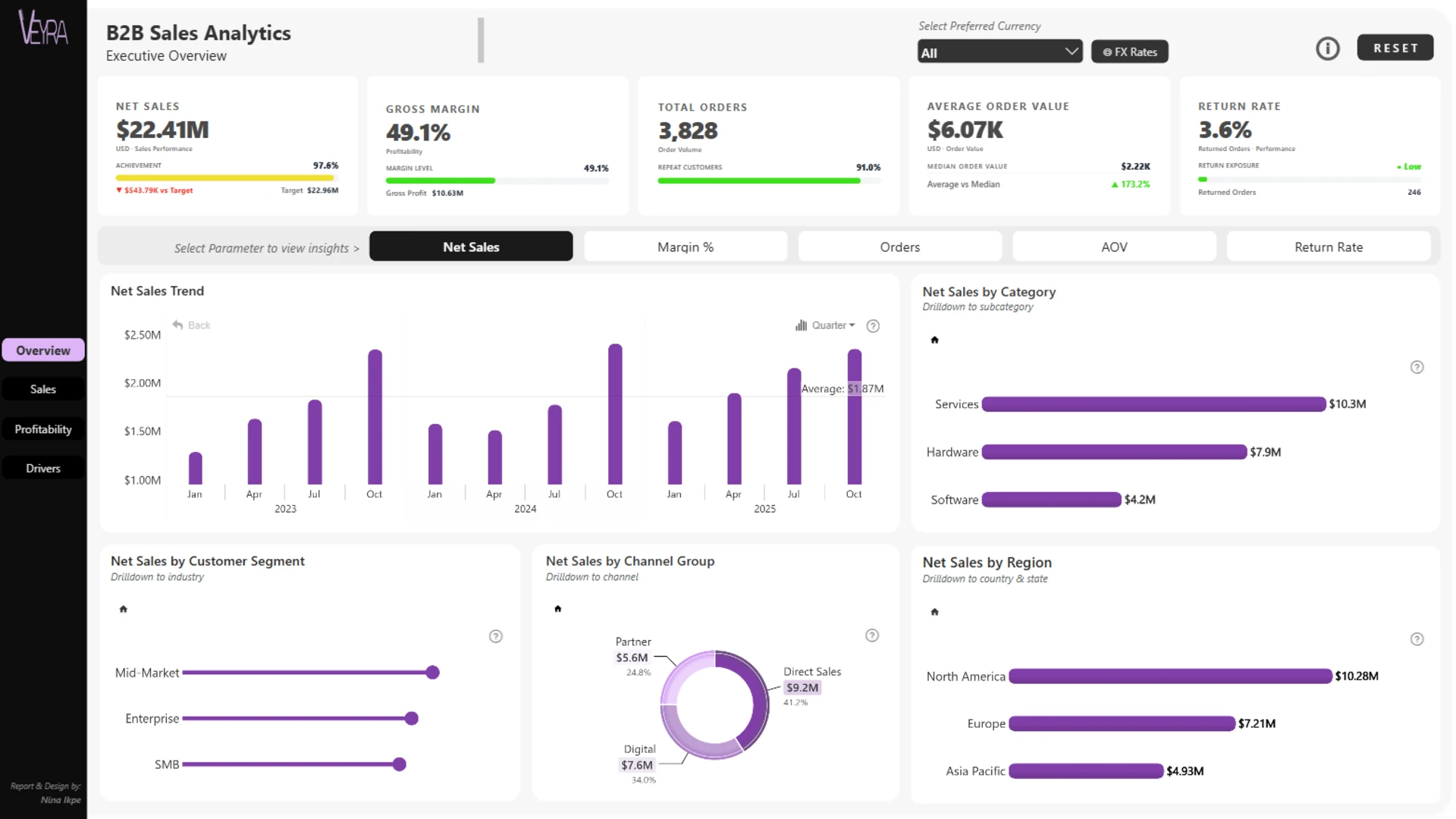
Nina Ikpe created this four-page report for the August 2026 ZoomCharts 4U Report Challenge, where it won first place. It tracks Net Sales, Order Volume, Average Order Value, Gross Profit, Gross Margin, Target Achievement, and Returns across regions, channels, customer segments, industries, products, and sales teams.
The page sequence is especially useful as a design reference. It moves from Executive Sales Performance to Sales and Target Achievement, Revenue and Profitability, and Commercial Performance. Promotions, discounts, returns, order types, and business events sit in the final layer, so the report can explain why profitability changed after the headline result is clear.
Explore this dashboard template
ZoomCharts visuals used:
Drill Down Scatter PRO, Drill Down Combo Bar PRO, Drill Down Map PRO, Drill Down Timeline PRO, and Drill Down Donut PRO.
4. Power BI Product Sales Dashboard
Best for: Senior leaders who need to connect product performance and target delivery with commercial effectiveness and revenue leakage
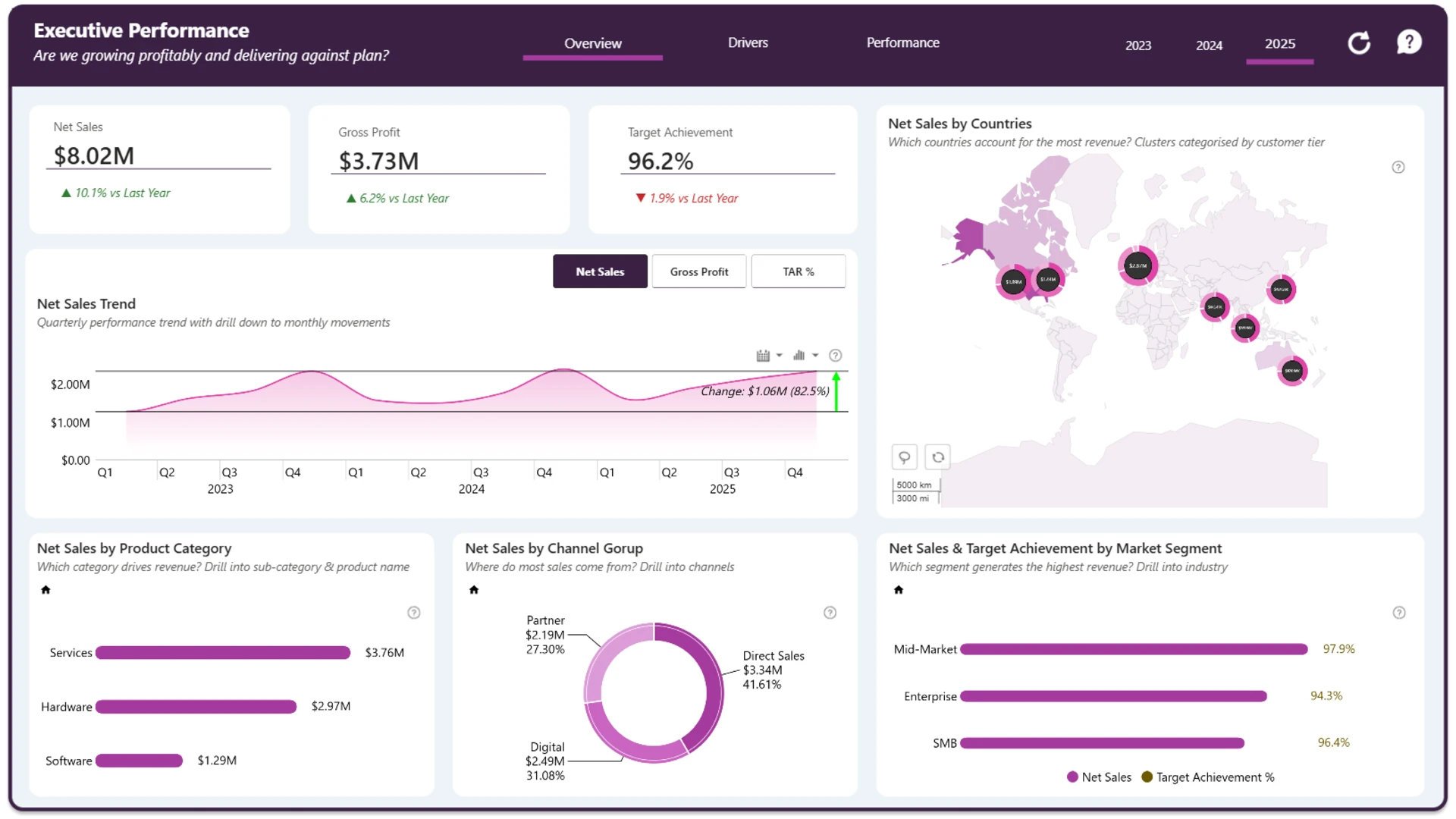
Ugo Ndu built this interactive B2B product sales report, which placed second in the August 2026 challenge. The report combines executive KPIs with analysis of performance, profitability, target delivery, customers, products, channels, and global markets.
It is a strong model for a sales report that needs to go beyond a product ranking. The analysis also covers promotions, returns, business events, commercial effectiveness, and revenue leakage. That broader frame helps users distinguish strong topline performance from sales that may carry weaker margin or higher commercial cost.
Explore this dashboard template
ZoomCharts visuals used:
Drill Down Bubble PRO, Drill Down Combo PRO, Drill Down Waterfall PRO, Drill Down Combo Bar PRO, Drill Down Map PRO, Drill Down Timeline PRO, and Drill Down Donut PRO.
5. Power BI Global Sales Dashboard
Best for: Comparing B2B sales performance across North America, Europe, and Asia Pacific
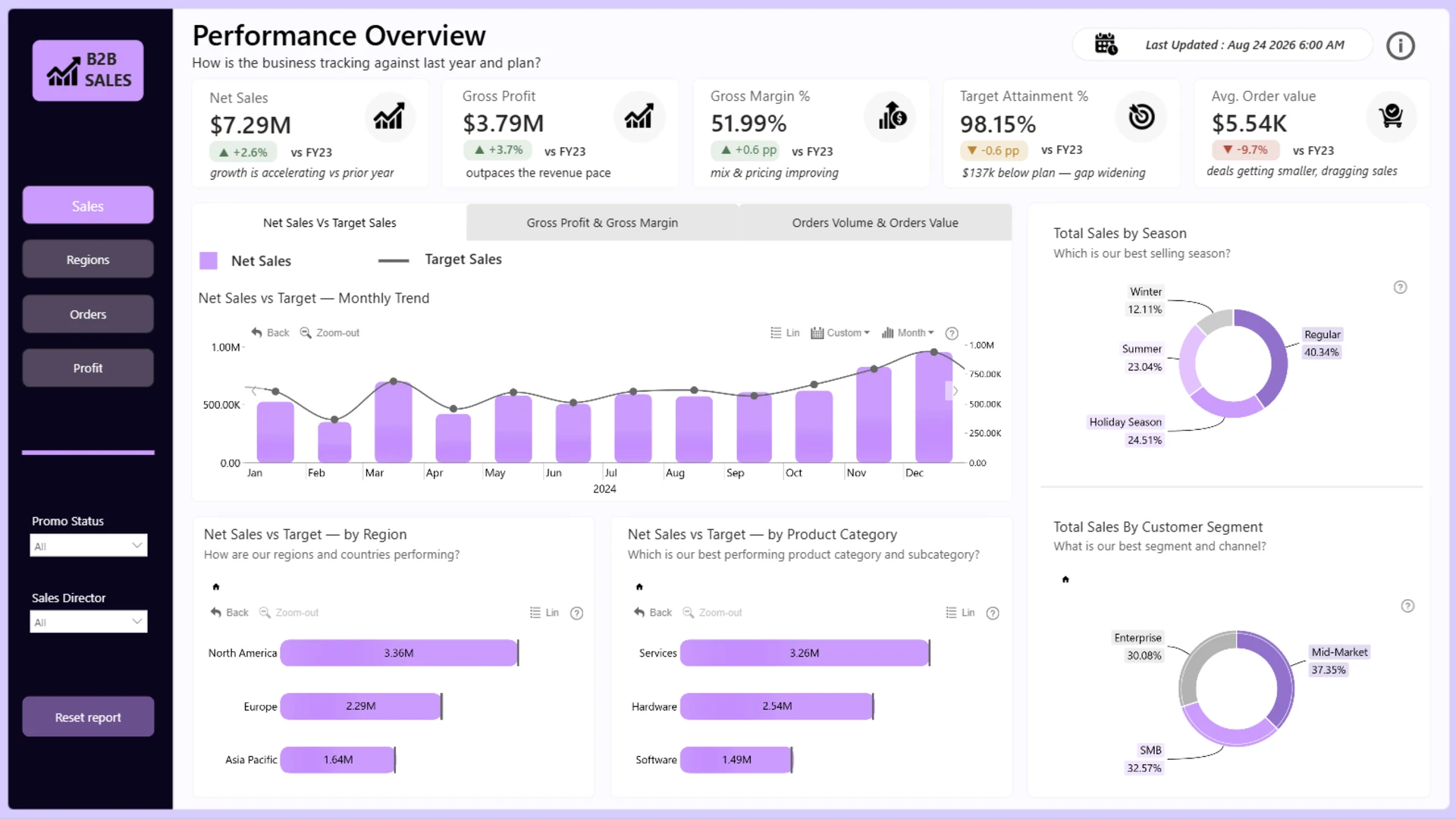
Okeh Dono Efasa created this report for the same August 2026 challenge, where it placed third. It examines B2B performance across three major regions and supports comparison of revenue, profitability, targets, products, customers, channels, and sales teams by market.
Choose this type of design when regional context is central to the sales conversation. The timeline and category visuals support comparison over time and across business dimensions, while the report keeps the geographic view tied to the same commercial measures used elsewhere in the analysis.
Explore this dashboard template
ZoomCharts visuals used:
Drill Down Combo PRO, Drill Down Combo Bar PRO, Drill Down Timeline PRO, and Drill Down Donut PRO.
6. Power BI Revenue and Profitability Dashboard
Best for: Separating revenue growth from the products, customers, costs, and returns that shape real profitability
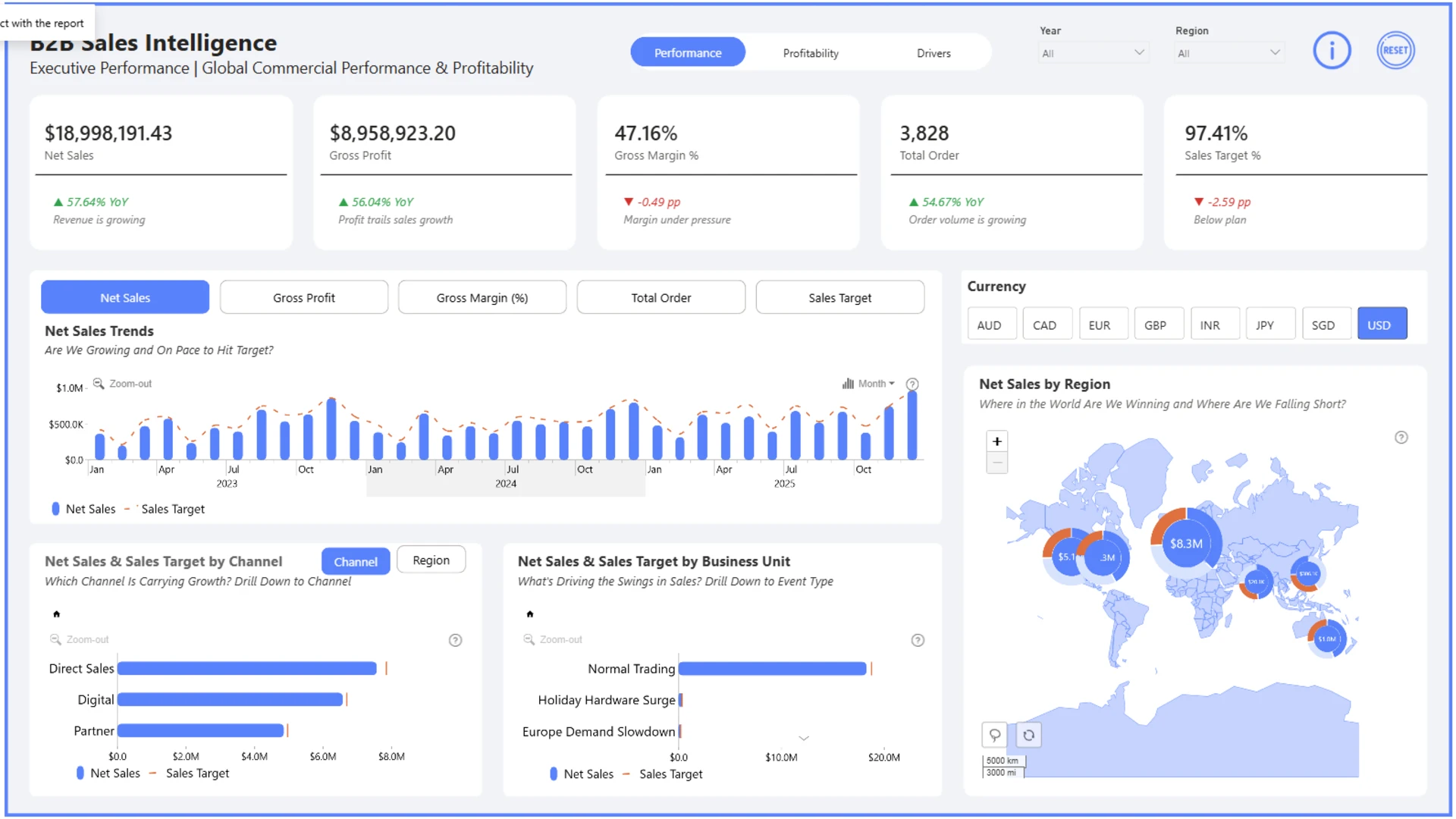
Alani Joshua, a Top 5 finalist in the August 2026 challenge, organized this report as a three-page narrative. The Performance page asks whether the business is winning, the Profitability page examines where value is created, and the Drivers and Actions page looks at revenue variance, return costs, and promotion effectiveness.
The report also documents practical developer choices: synced Year, Region, and Scenario slicers, a dynamic currency parameter with eight currencies, and DAX-driven insight sentences that respond to the selected filter context. This is a useful reference for teams that want explanatory text and financial formatting to stay aligned with user selections.
Explore this dashboard template
ZoomCharts visuals used:
Drill Down Scatter PRO, Drill Down Combo PRO, Drill Down Waterfall PRO, Drill Down Combo Bar PRO, Drill Down Map PRO, Drill Down Timeline PRO, and Drill Down Donut PRO.
7. Power BI Sales and Returns Dashboard
Best for: Showing how return activity affects revenue and profitability across products, customers, markets, channels, and teams
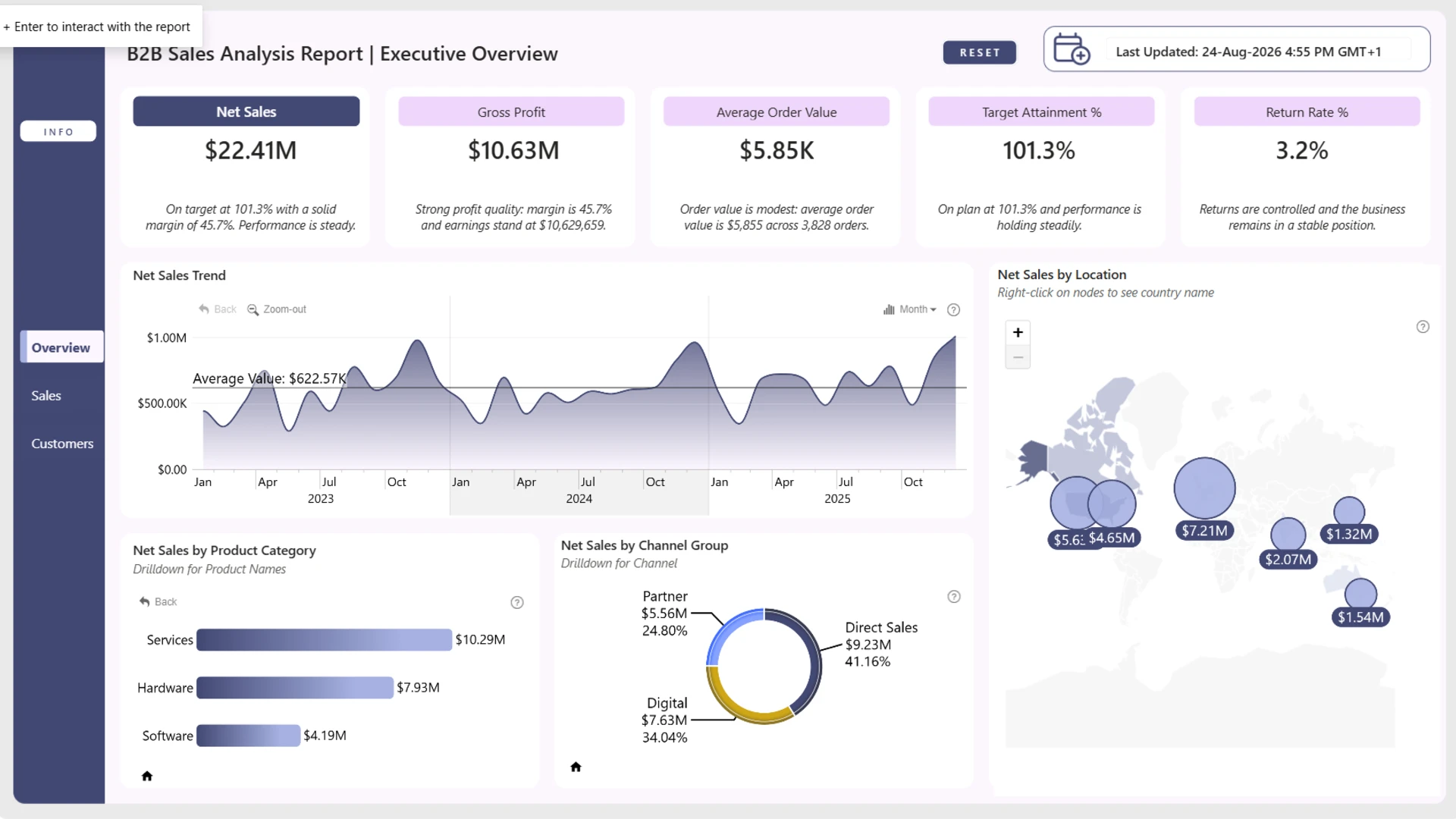
This three-page report by Abdulsamad Kudehinbu received an honorable mention in the August 2026 challenge. It connects sales and profitability with returns, and it breaks the analysis down by product category, sales channel, geographic region, customer tier, and sales representative.
The design works for both executive and operational review because returns are part of the main performance story. Users can review Net Sales, units sold, profitability, and returns with dynamic filtering and drill-down, rather than treating returns as a separate report that may never be opened during the sales meeting.
Explore this dashboard template
ZoomCharts visuals used:
Drill Down Bubble PRO, Drill Down Combo PRO, Drill Down Shape Map PRO, Drill Down Timeline PRO, and Drill Down Donut PRO.
8. Sales Conversion Analytics Power BI Dashboard
Best for: Reviewing funnel progression, conversion outcomes, and areas where sales activity is not turning into results
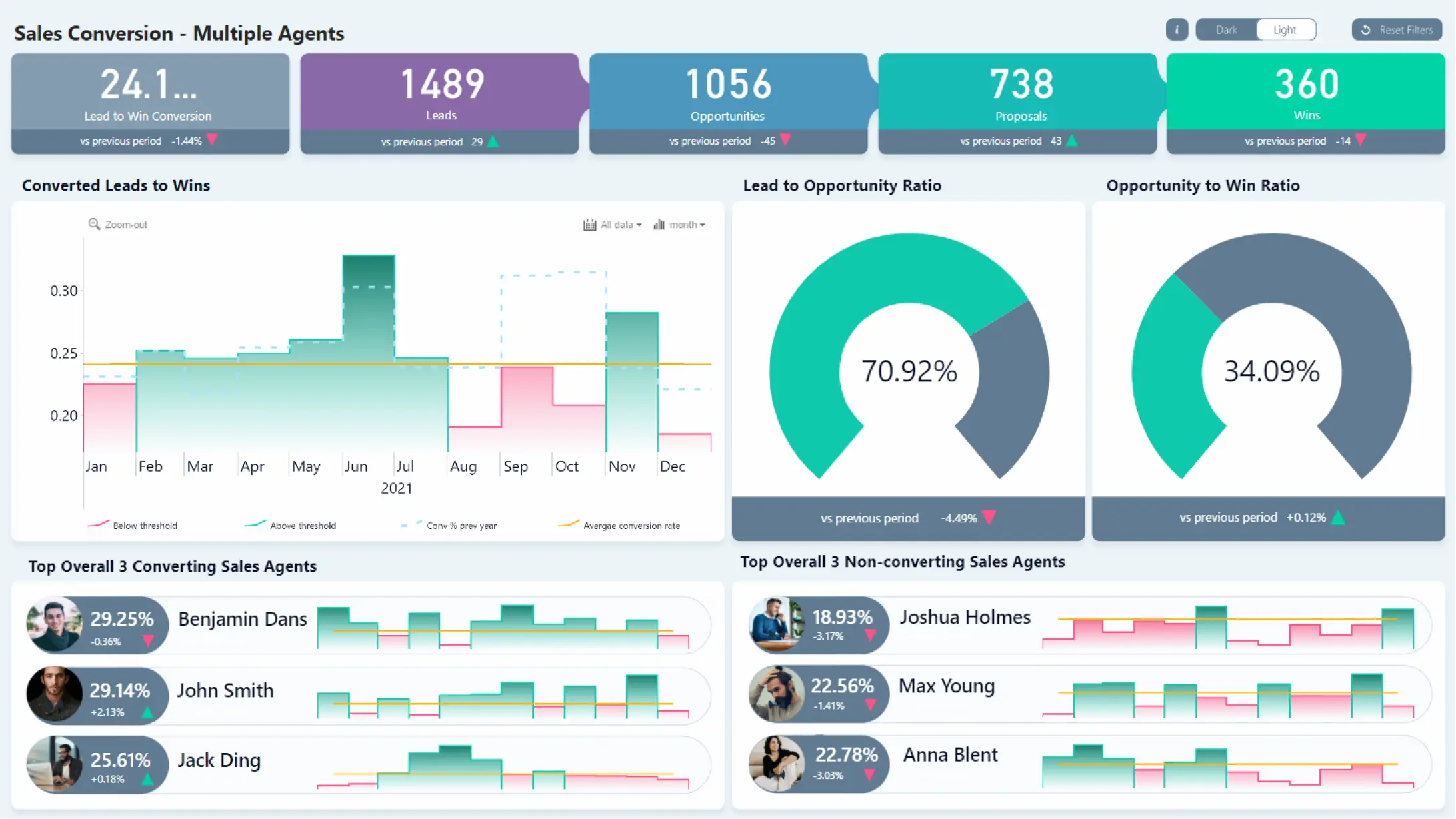
This ZoomCharts template focuses on the movement from sales activity to successful outcomes. It is designed to help users examine conversion performance, review funnel progression, identify conversion gaps, and compare results across the dimensions available in the report.
The narrower scope is a strength when pipeline health is the main question. Instead of mixing conversion with every commercial KPI, the report keeps attention on progression and outcomes. Filters and active chart selections let users narrow the view and inspect the part of the process that needs follow-up.
Explore this dashboard template
ZoomCharts visuals used:
Drill Down Combo PRO and Drill Down Timeline PRO.
9. Sales Overview Power BI Dashboard Example
Best for: An executive sales overview with time trends, geographic performance, product detail, and theme options
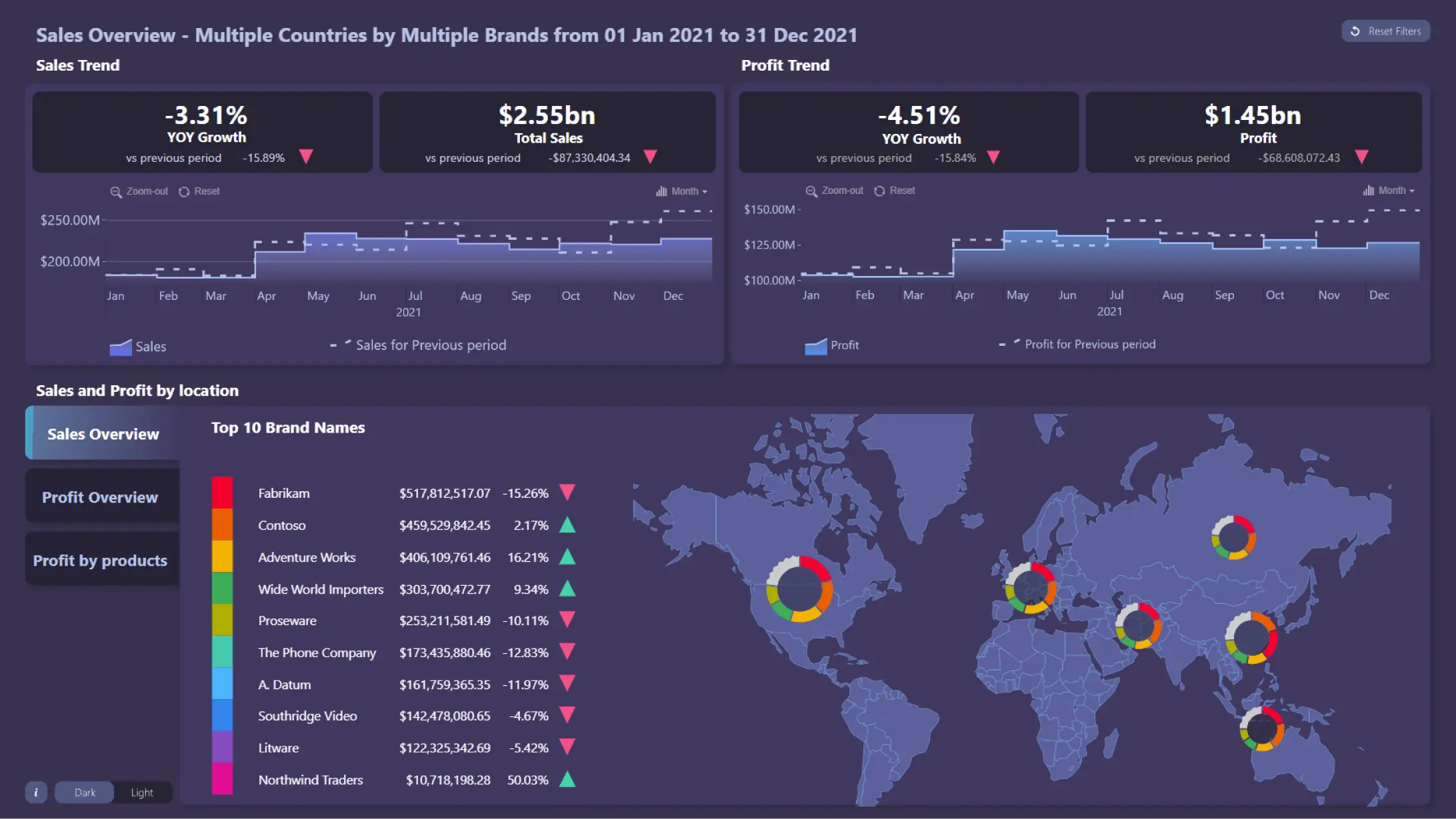
This ZoomCharts report compares Sales and Profit trends and adds geographic context with Drill Down Map PRO. Three tabs show how the Top 10 brands perform by sales, profit, and profit by product, and map donut charts can filter products by brand.
The template also demonstrates small usability details that matter in an executive report: dynamic titles, report and visual reset controls, cross-chart filtering, KPI cards, an information overlay, and a dark or light theme switch. Use it as a reference when the same report must support both quick scanning and direct chart interaction.
Explore this dashboard template
ZoomCharts visuals used:
Drill Down Map PRO and Drill Down Timeline PRO.
10. Budget vs. Actual Sales Dashboard Example
Best for: Reviewing sales against plan and investigating positive or negative variance
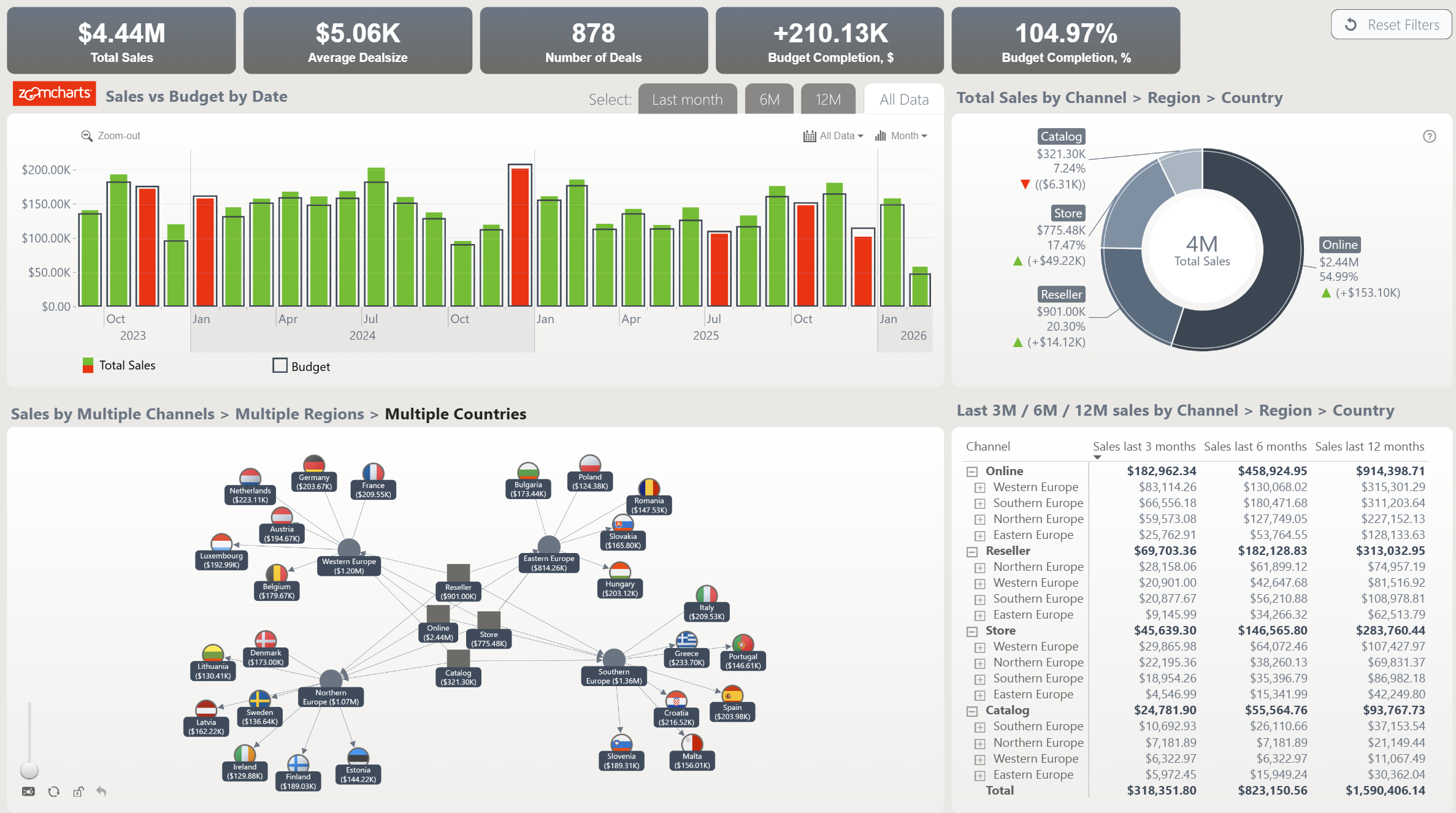
This ZoomCharts dashboard brings budget and actual sales into one comparison. It helps users identify where achieved results differ from plan, then examine the variance across the dimensions available in the report.
The design is relevant when sales reviews are built around commitments. Keep planned and actual measures in the same visual context, make the variance direction clear, and give users a short route from the total gap to the category or period that created it.
Explore this dashboard template
ZoomCharts visuals used:
Drill Down Network PRO, Drill Down Timeline PRO, and Drill Down Donut PRO.
11. Sales and Customer Profile Dashboard Template
Best for: Connecting sales performance with customer characteristics and comparisons between customer groups
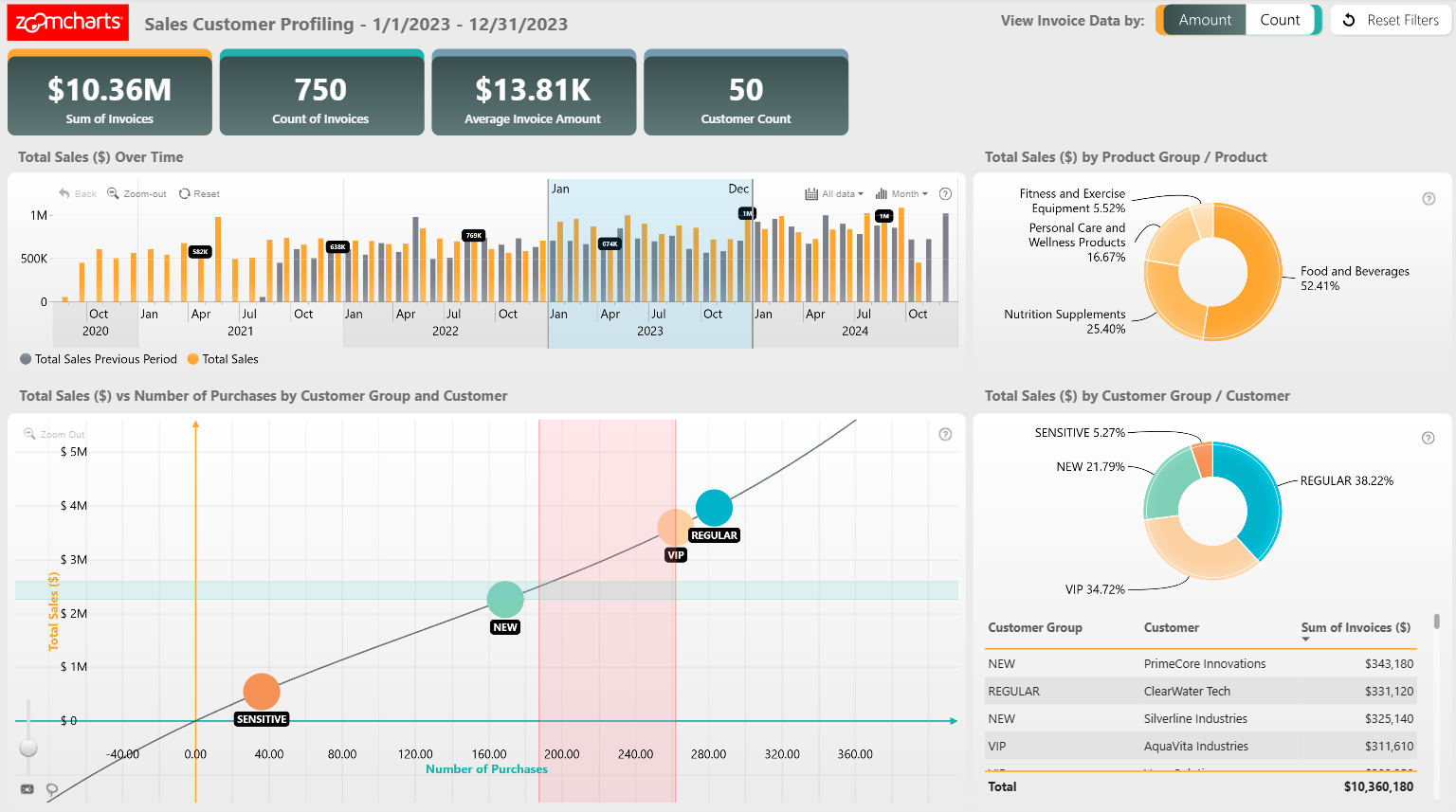
This ZoomCharts template combines a sales overview with customer analysis. Users can compare results across customer groups and investigate how the customer attributes available in the report relate to sales outcomes.
It is a useful starting point when the question is not only what sold, but who bought it. Filters, chart selections, and cross-filtering support movement from the overall result to a focused customer group or reporting period. Developers can use the PBIX to review the report structure, calculations, visual settings, and interactions.
Explore this dashboard template
ZoomCharts visuals used:
Drill Down Scatter PRO, Drill Down Timeline PRO, and Drill Down Donut PRO.
12. Sales Inquiry Analysis Dashboard Example
Best for: Organizing inquiry activity and comparing how inquiry patterns change over time and across categories
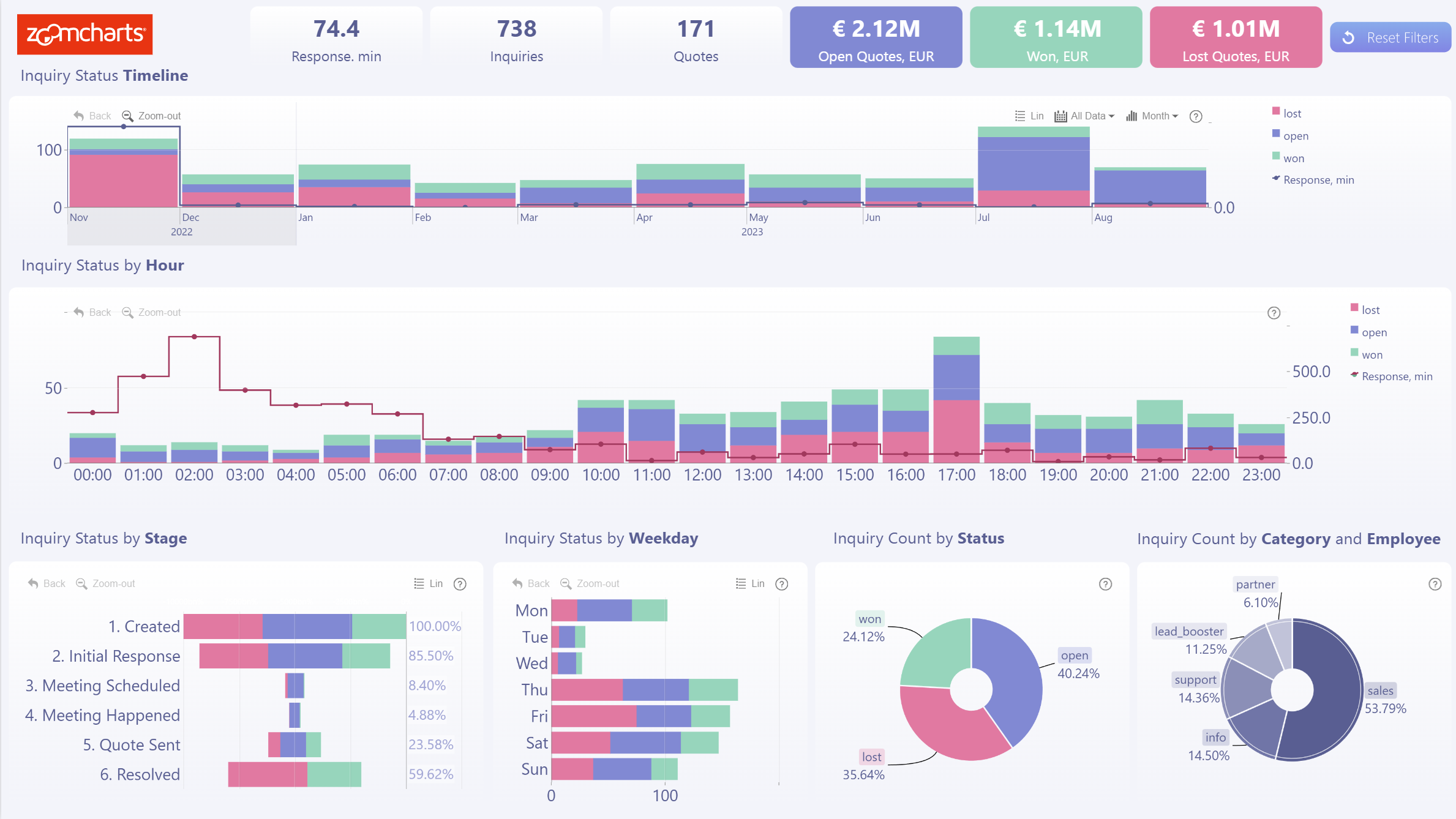
This ZoomCharts report turns inquiry records and measures into a focused operational view. It supports an inquiry overview, activity trends, and comparisons across the categories and dimensions included in the dataset.
Use this type of report when early sales activity needs its own operational view. The combination of time, ranked comparisons, and category breakdowns can help teams inspect changing inquiry patterns without forcing that analysis into a broader revenue dashboard.
Explore this dashboard template
ZoomCharts visuals used:
Drill Down Combo PRO, Drill Down Combo Bar PRO, Drill Down Timeline PRO, and Drill Down Donut PRO.
Frequently Asked Questions
Can I use these Power BI sales dashboard templates with my own data?
Yes. The ZoomCharts Template Gallery provides PBIX files that can be opened in Power BI Desktop. Replace the sample data source, map your fields to the report structure, refresh the model, and validate the measures and interactions before publishing.
How should I choose a sales dashboard template?
Choose the report whose questions are closest to your own. Start with the required KPIs and review workflow, then compare page structure, drill paths, filters, visual types, and the data fields needed to support them.
Explore More Power BI Sales Dashboard Templates
The right starting point depends on the decisions your sales team needs to make. Open the examples that match your reporting questions, test the live interactions, and compare the PBIX structure before choosing a design.
Browse Power BI sales dashboard examples and templates, or explore the full ZoomCharts Power BI Template Gallery.
Try ZoomCharts Drill Down Visuals Free for 30 Days
Build and test interactive sales reports with ZoomCharts Drill Down visuals in Power BI.

Want more info like this?
Subscribe to our newsletter and be the first to read our latest articles and expert data visualization tips!