Oct 23, 2026
10 Best Power BI CRM Dashboard Designs and Templates for 2027
This guide features 10 real Power BI CRM dashboard designs from the ZoomCharts Template Gallery. Every report can be previewed online, and the PBIX template can be downloaded for closer inspection or adaptation.
This guide features 10 real Power BI CRM dashboard designs from the ZoomCharts Template Gallery. Every report can be previewed online, and the PBIX template can be downloaded for closer inspection or adaptation.
What Is a Power BI CRM Dashboard?
A Power BI CRM dashboard is an interactive report that turns customer relationship and sales pipeline data into views for monitoring performance and investigating individual segments. Depending on the use case, it may cover leads, accounts, opportunities, activities, deal stages, expected value, conversion, sales cycle length, customer status, and sales representative performance.
The strongest designs do more than place CRM KPIs on a canvas. They give users a short path from a top-level result to the customers, deals, teams, regions, or periods behind it. In Power BI, that path can include filters, cross-filtering, drill-down, and multiple report pages designed for different review tasks.
What Should a Power BI CRM Dashboard Include?
The exact measures depend on the CRM process and the decisions the report must support. Common starting points include:
- Lead and opportunity volume: new leads, active opportunities, closed deals, and lost deals.
- Pipeline value: open pipeline, weighted pipeline, forecast value, and closed revenue.
- Conversion: win rate, lead-to-opportunity conversion, opportunity-to-win conversion, and stage movement.
- Sales cycle: average days to close, deal age, time in stage, and stalled opportunities.
- Activity and engagement: calls, meetings, emails, follow-ups, and account engagement measures available in the source data.
- Performance comparisons: results by sales representative, team, region, industry, product, company, or customer segment.
- Pipeline risk: aging deals, stage SLA breaches, probability gaps, forecast confidence, and revenue exposure.
Use only the measures that support a real review process. A sales manager may need a pipeline and representative view, while a RevOps team may need deal aging, forecast logic, activity efficiency, and model-level detail.
1. Power BI CRM Dashboard Example
Best for: A polished CRM overview that connects leads, conversion, deal value, sales cycle, customer status, geography, and sales agents
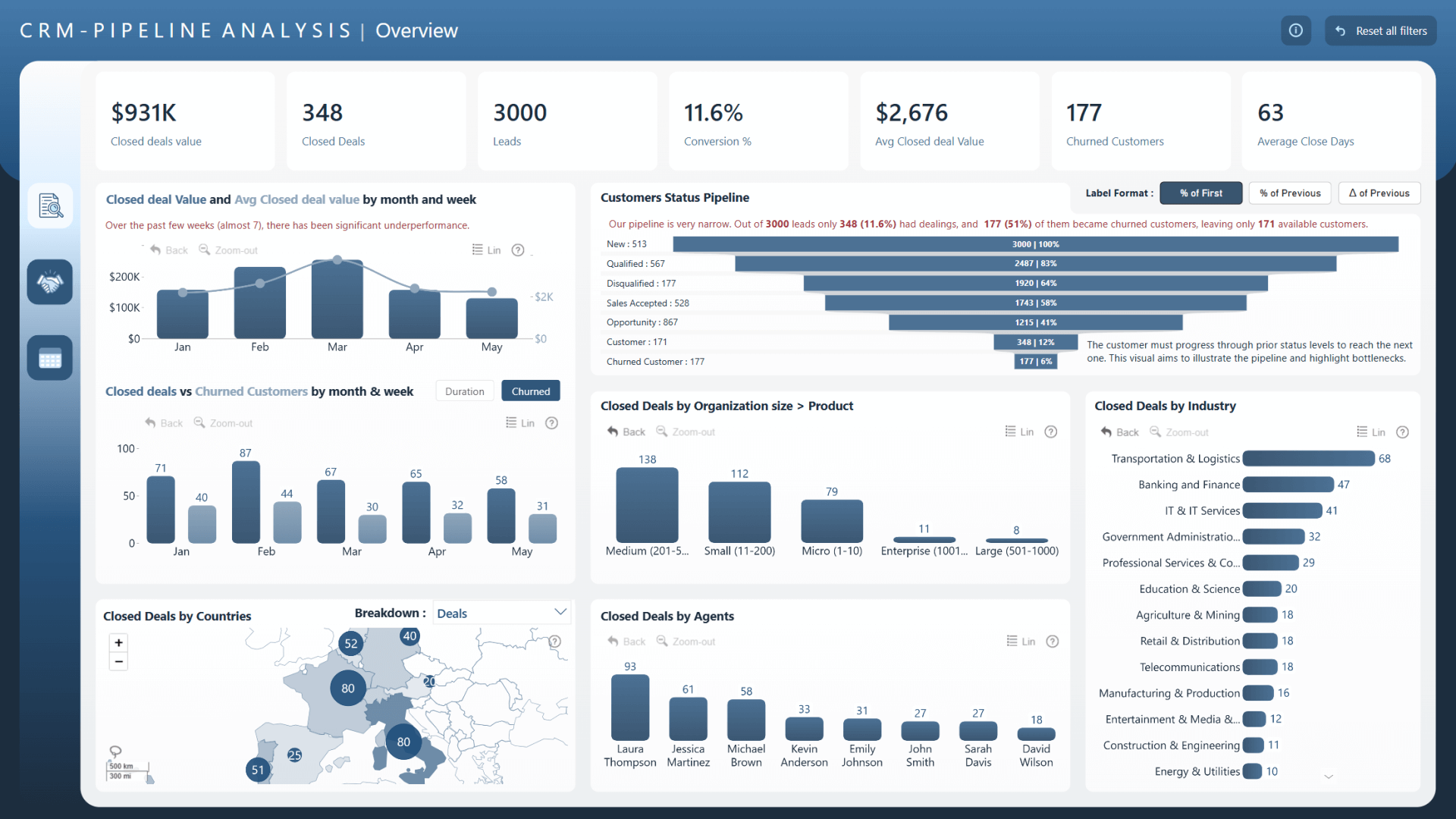
This three-page report is based on the winning entry from the FP20 Analytics July 2024 ZoomCharts Challenge and was refined by the ZoomCharts team. It covers the number of leads and closed deals, average and total closed deal value, average days to close, and conversion percentage.
The design is a useful general-purpose CRM reference because the same measures can be filtered by date, industry, customer status, country, sales agent, and other dimensions in the report. That makes it possible to move from the overall pipeline to practical follow-up questions about agent performance, churn, markets, and customer groups.
Explore this CRM dashboard template
ZoomCharts visuals used:
Drill Down Shape Map PRO, Drill Down Combo PRO, Drill Down Combo Bar PRO, and Drill Down Donut PRO.
2. CRM & Sales Pipeline Power BI Dashboard
Best for: Connecting customer relationships, pipeline activity, sales performance, and growth opportunities
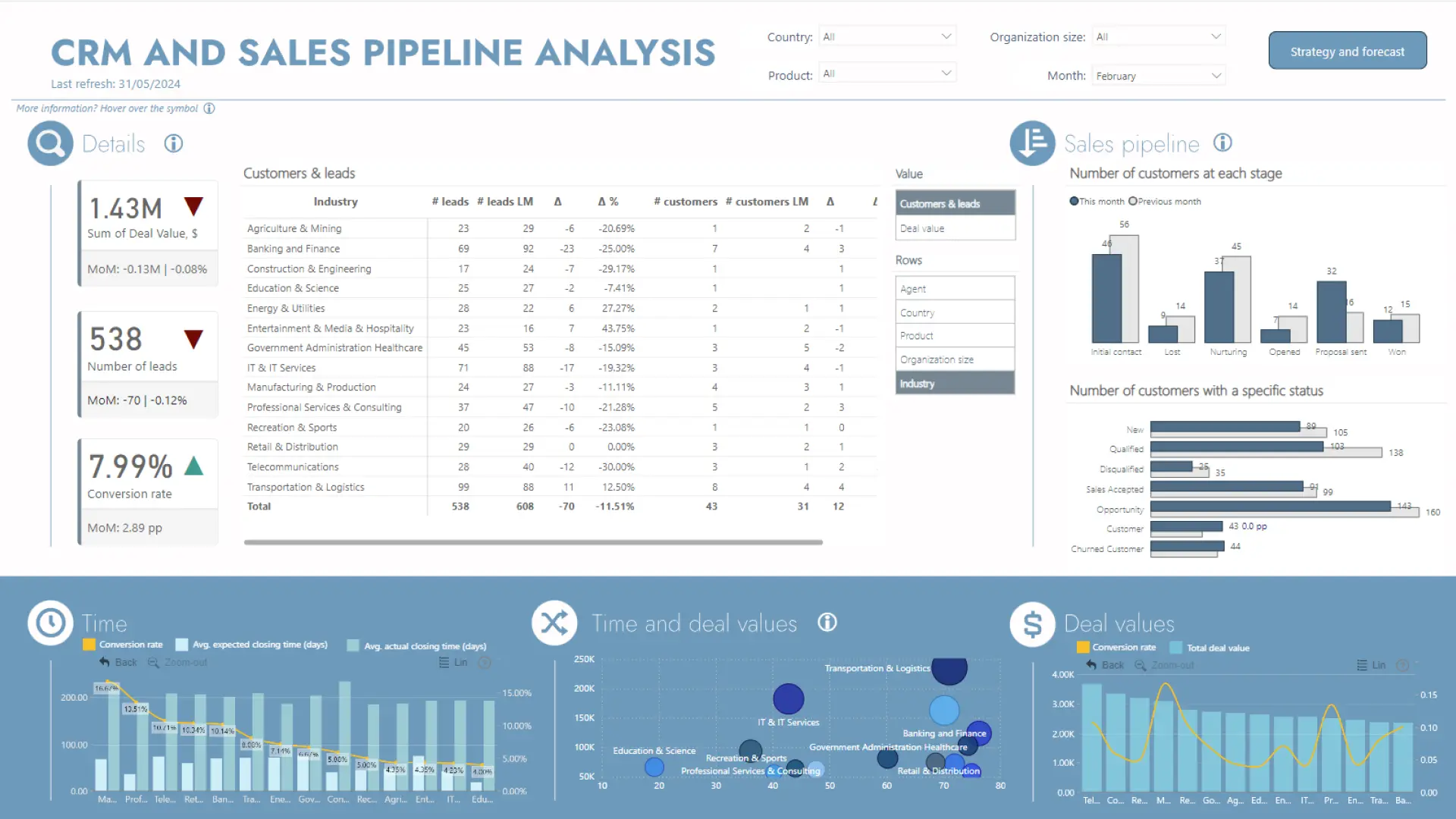
Agata Filawska created this three-page dashboard with the CRM & Sales Pipeline Analysis dataset from the FP20 Analytics July 2024 Challenge. It brings customer relationships, account activity, opportunity progress, sales KPIs, and growth opportunities into one report.
The report is especially relevant when CRM analysis must serve several roles. Sales managers can monitor pipeline performance, CRM teams can examine customer and account activity, and analysts can compare outcomes across customers, opportunities, time periods, and business segments.
Explore this CRM dashboard template
ZoomCharts visuals used:
Drill Down Combo PRO, Drill Down Combo Bar PRO, and Drill Down Donut PRO.
3. CRM and Sales Pipeline Analysis Power BI Dashboard
Best for: Following opportunity movement and comparing pipeline performance across reps, customers, products, regions, and time
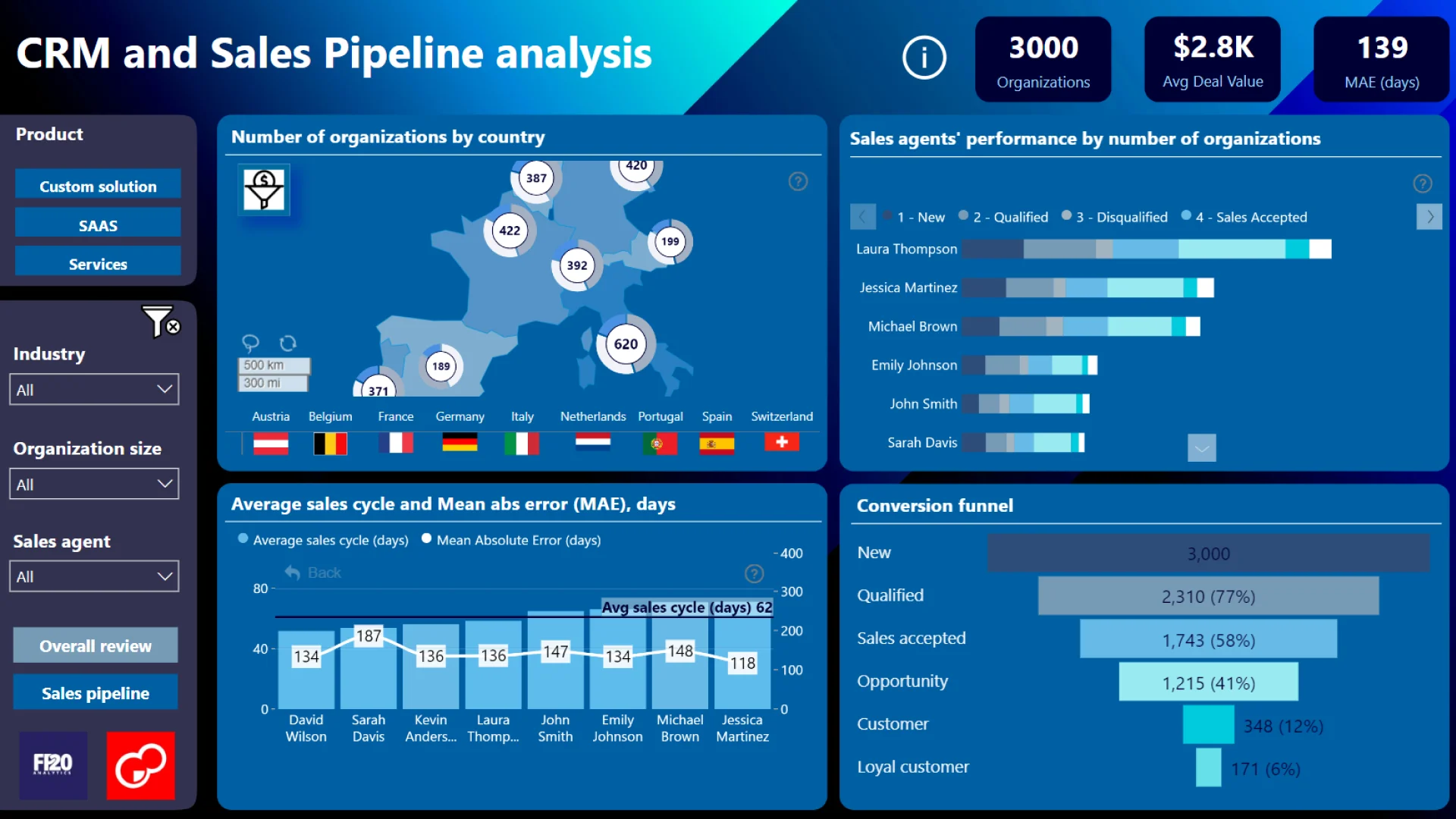
Ekaterina Vorobets designed this two-page report for CRM and pipeline analysis. It covers leads, accounts, opportunities, sales outcomes, deal value distribution, pipeline health, and revenue growth drivers.
The report supports comparison across sales representatives, customer segments, products, regions, and time periods. Use it as inspiration when stakeholders need to see both the direction of pipeline movement and the business dimensions associated with successful, delayed, or lost opportunities.
Explore this CRM dashboard template
ZoomCharts visuals used:
Drill Down Combo PRO, Drill Down Combo Bar PRO, Drill Down Map PRO, and Drill Down Timeline PRO.
4. B2B Sales Funnel and Prioritization Power BI Dashboard
Best for: Managing complex B2B sales cycles, large opportunity volumes, multiple markets, and high-priority accounts
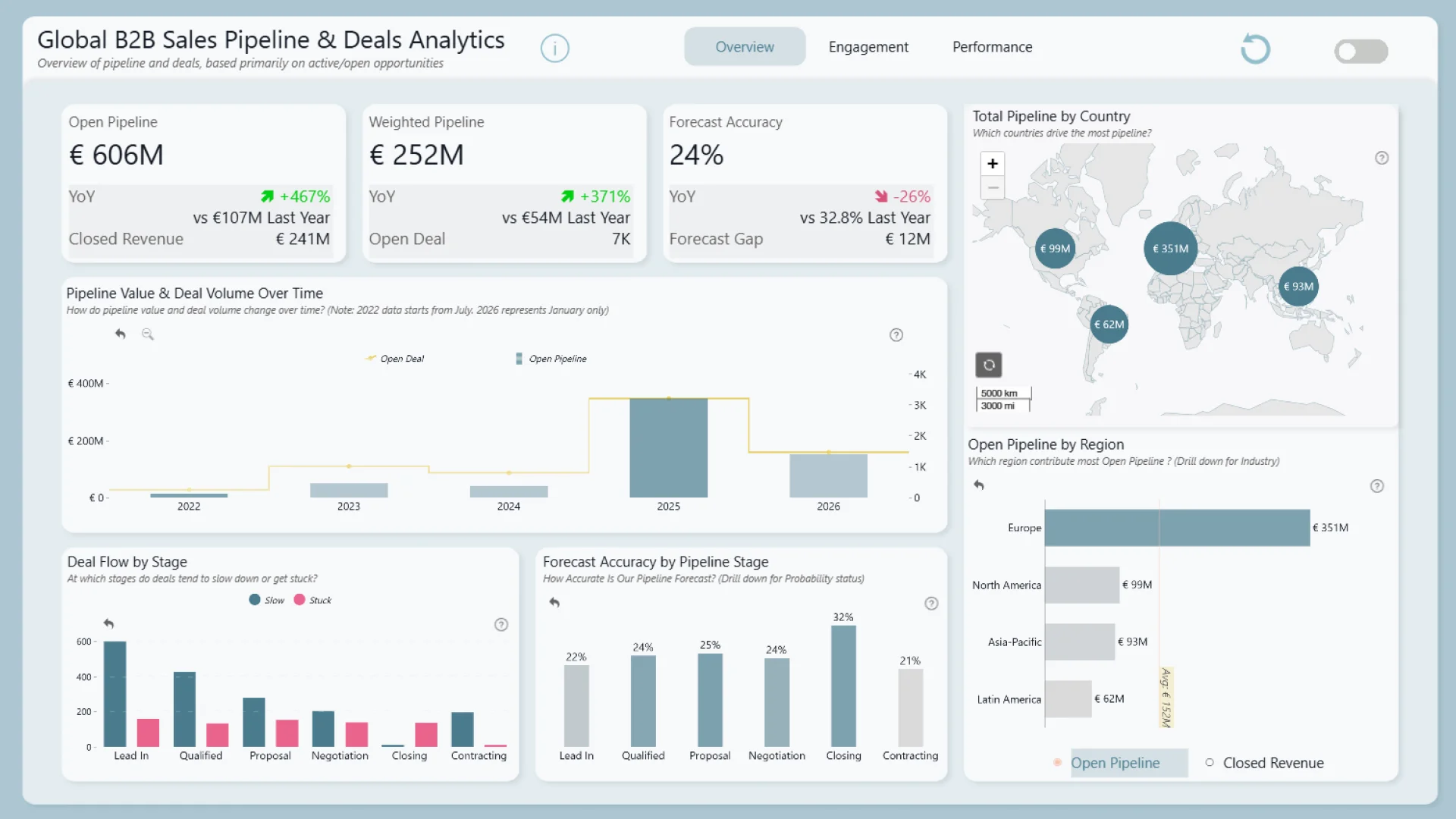
Odunlami Zainab created this four-page report for organizations with complex sales cycles and many active opportunities. It examines pipeline value and volume, sales funnel distribution, deal progression, regional and market performance, industry and customer segments, and sales activity.
The account-prioritization angle makes the design particularly useful for B2B pipeline reviews. Sales leaders can connect pipeline measures with activity and customer engagement, then narrow the view to the stages, markets, industries, company sizes, or opportunities that require closer attention.
Explore this CRM dashboard template
ZoomCharts visuals used:
Drill Down Scatter PRO, Drill Down Combo PRO, Drill Down Combo Bar PRO, and Drill Down Map PRO.
5. Power BI B2B Sales Pipeline Health Dashboard
Best for: Diagnosing pipeline risk, aging, forecast confidence, revenue exposure, and representative performance
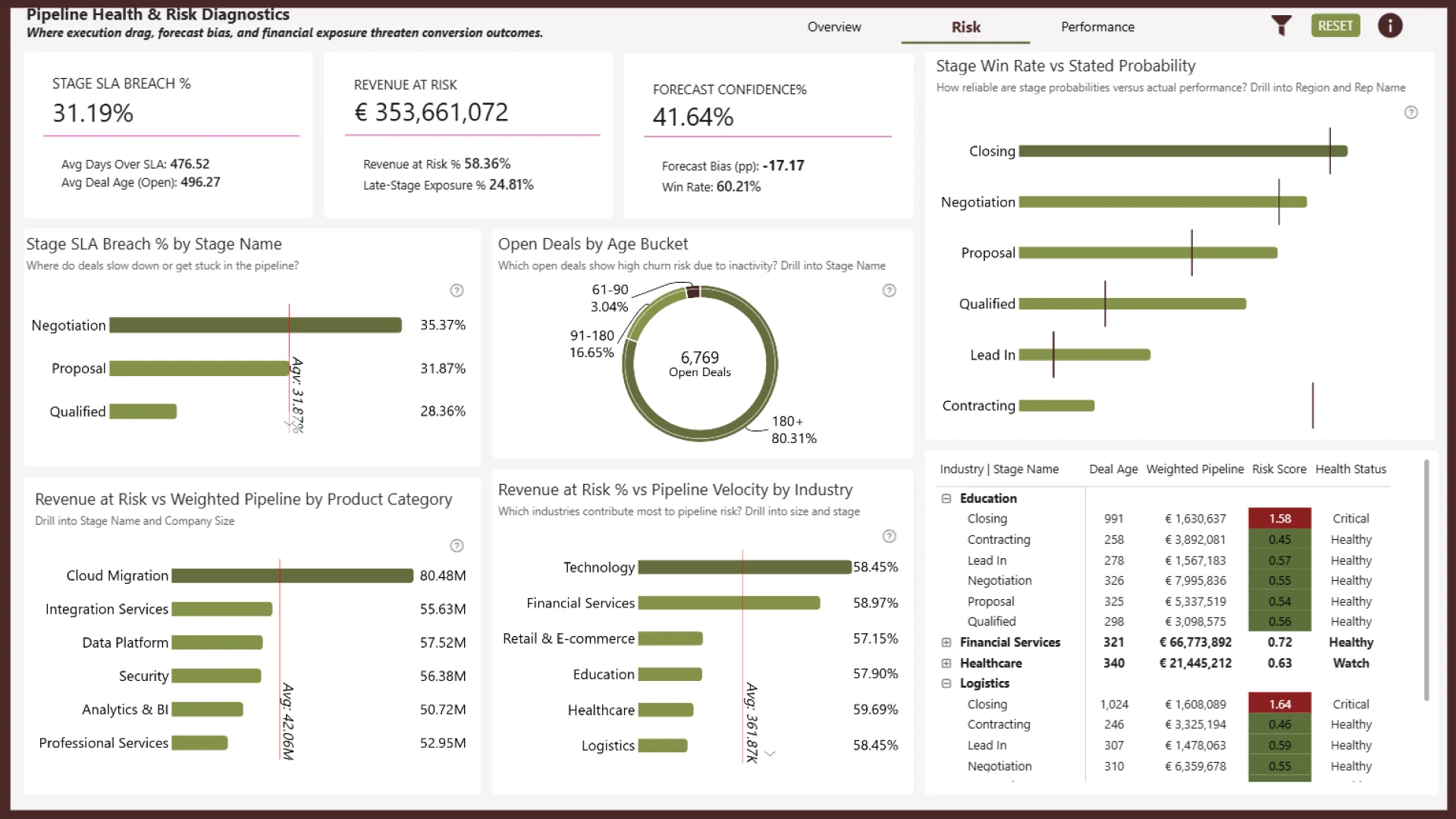
Akindele Omolayo structures this three-page report around an overview, health and risk diagnostics, and sales representative performance. It tracks total and weighted pipeline value, closed revenue, win rate, pipeline velocity, stage distribution, and regional forecast confidence.
The second page adds diagnostic depth with stage SLA breaches, deal aging, probability gaps, stalled deals, and revenue exposure. The final page covers productivity, activity efficiency, revenue, conversion, and engagement impact. This is the strongest example in the list for teams that need a repeatable pipeline inspection process.
Explore this CRM dashboard template
ZoomCharts visuals used:
Drill Down Scatter PRO, Drill Down Combo Bar PRO, Drill Down Timeline PRO, and Drill Down Donut PRO.
6. Power BI Sales Pipeline Dashboard Example
Best for: Comparing pipeline, forecast, conversion, activity, products, customer segments, regions, and sales teams
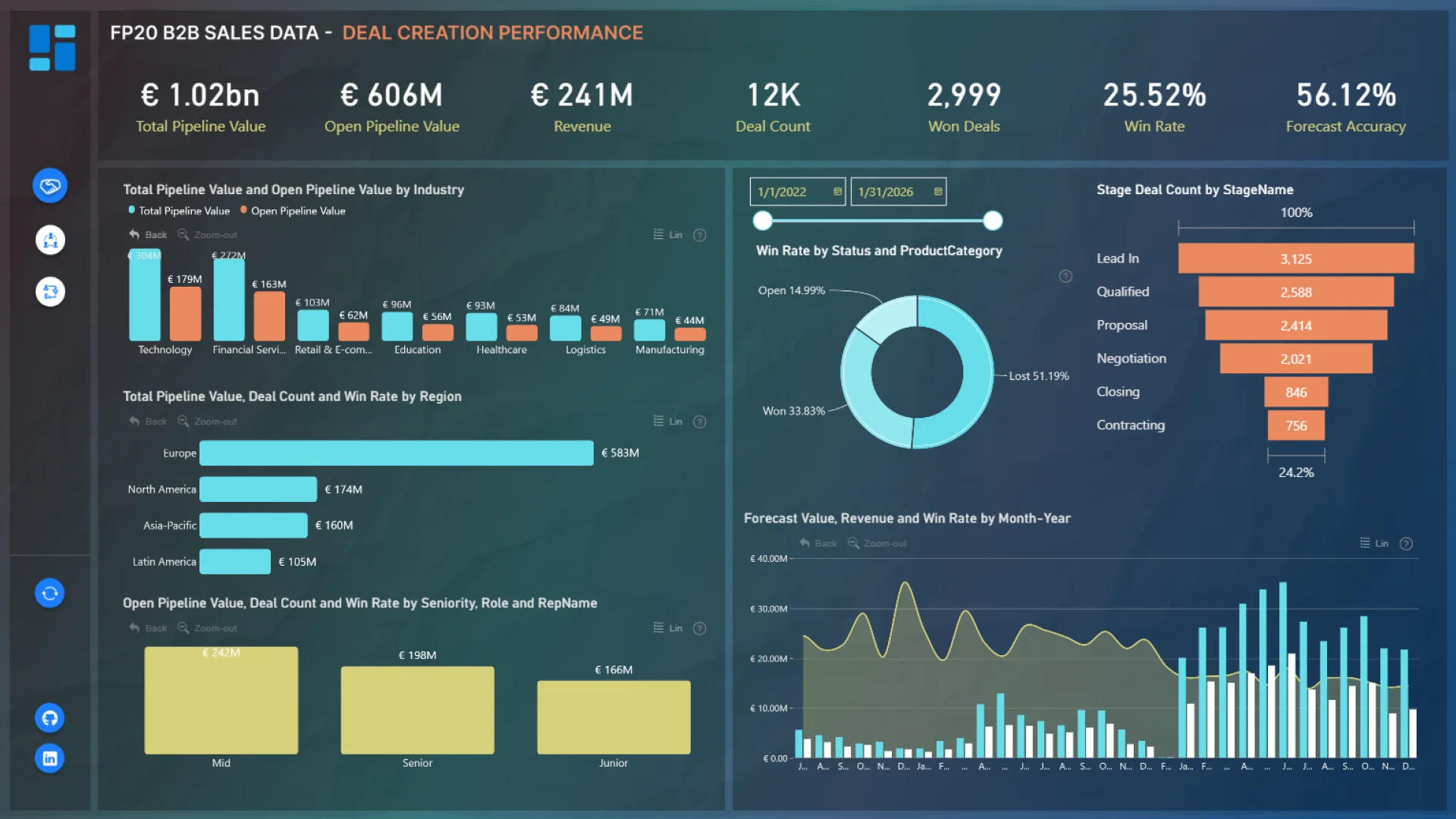
Crystal Andrea Dsouza created this three-page dashboard to track total and open pipeline value, active opportunities, revenue, won deals, win rate, forecast performance, sales activity, engagement, and sales cycle duration.
Its broad comparison set is the main design lesson. Users can examine results across regions, industries, products, customer segments, and sales teams without losing the common pipeline measures. It is a good fit when one CRM report must support both management review and deeper segmentation.
Explore this CRM dashboard template
ZoomCharts visuals used:
Drill Down Scatter PRO, Drill Down Combo PRO, Drill Down Combo Bar PRO, and Drill Down Donut PRO.
7. Power BI Sales Pipeline Dashboard Template
Best for: A focused three-page view of active pipeline, won revenue, win rate, activity, deal progression, and representative performance
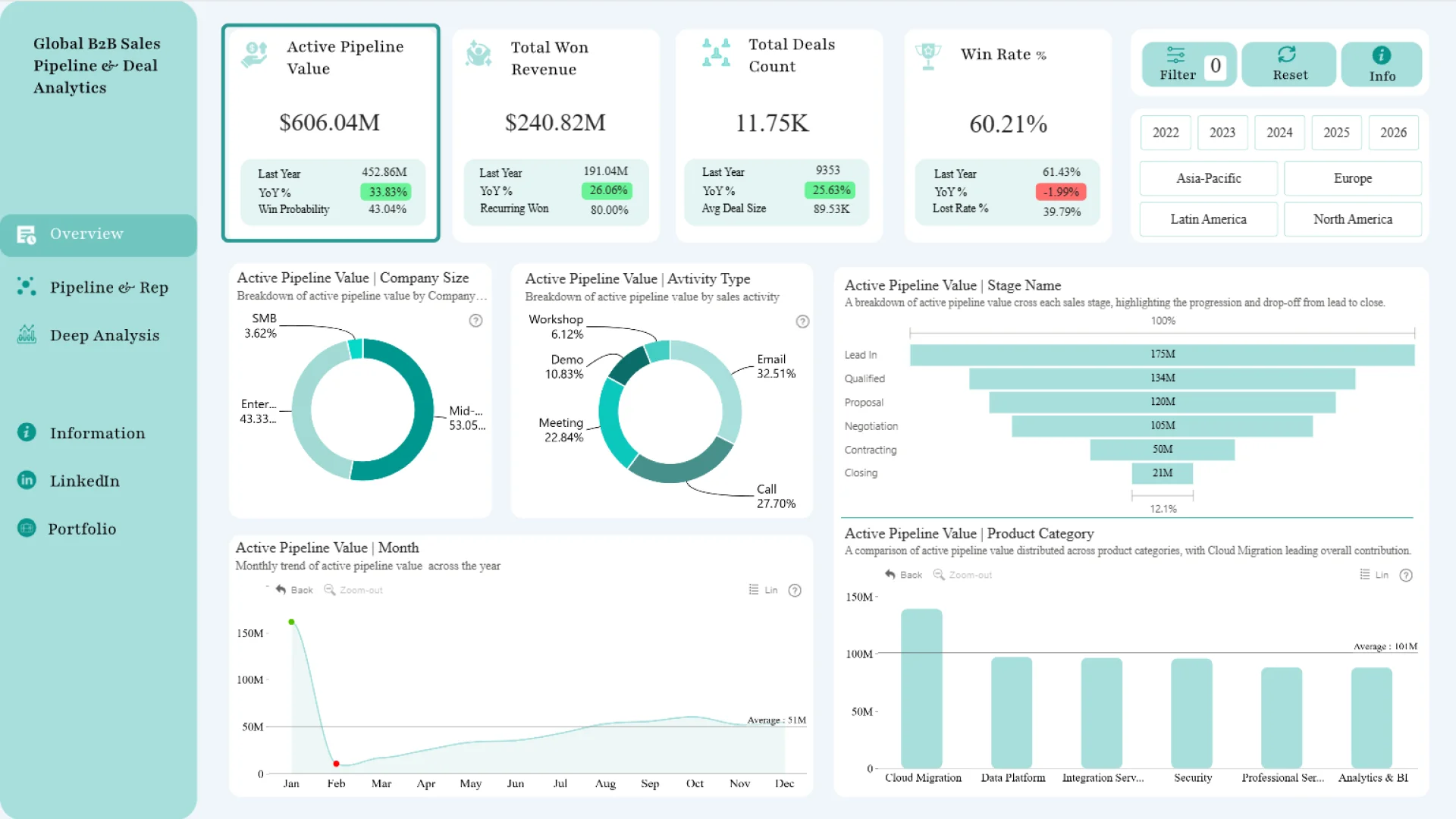
Aakash M built this three-page report around active pipeline value, won revenue, deal count, win rate, sales activity, opportunity progression, and sales representative performance. The available filters include company, industry, region, representative, activity type, and deal segment.
The limited visual set is part of the appeal. Combo charts handle multi-metric trends and comparisons, while donut charts show category composition. It is a useful template when a sales team needs several analytical views but wants to keep the interaction model consistent.
Explore this CRM dashboard template
ZoomCharts visuals used:
Drill Down Combo PRO and Drill Down Donut PRO.
8. Power BI B2B Deal Momentum & Pipeline Trends Dashboard
Best for: Examining how deal momentum, activity, engagement, and pipeline composition change over time
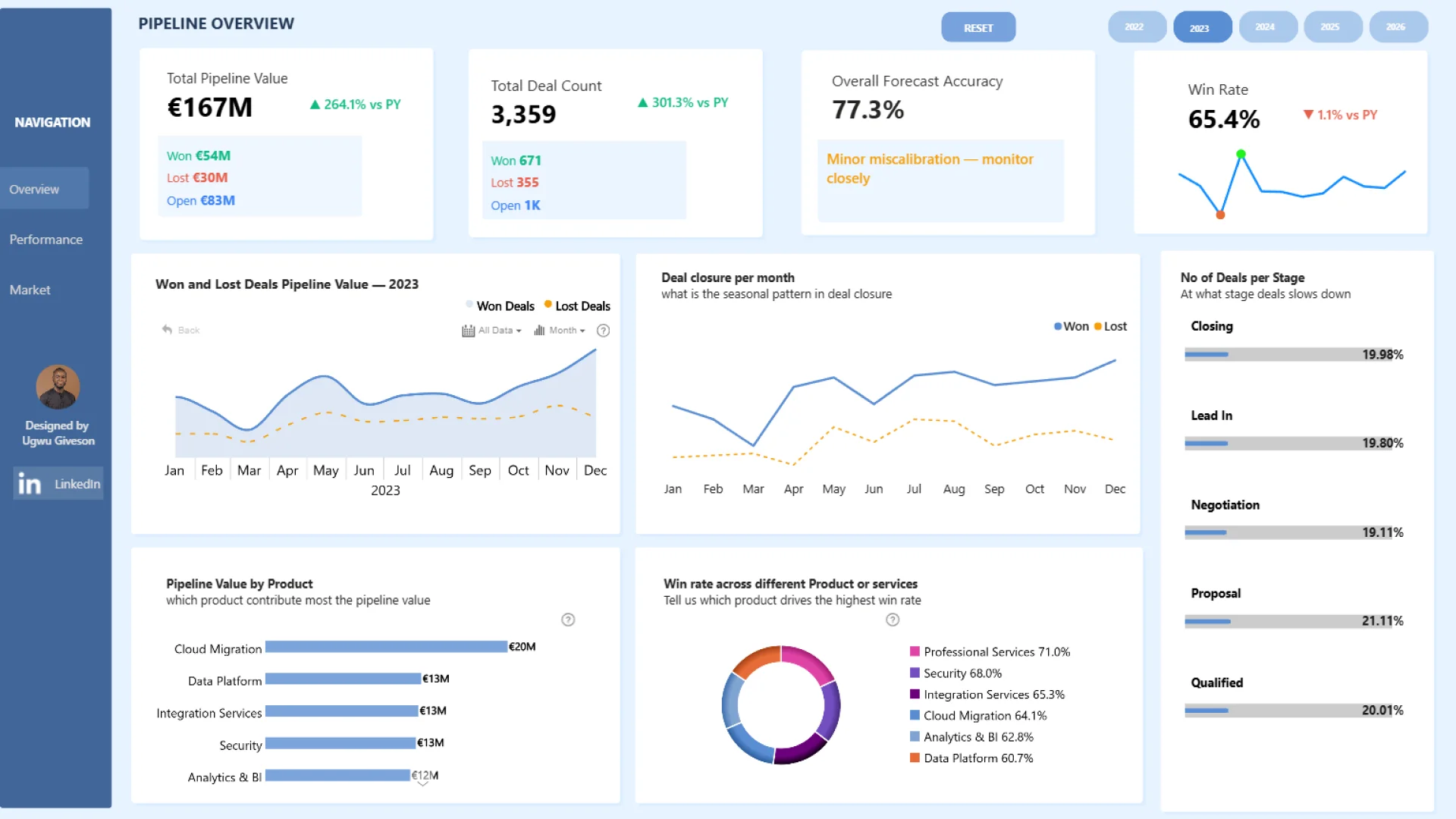
Ugwu Giveson designed this three-page report to connect time-based pipeline analysis with deal momentum, sales activity, and client engagement. It also covers pipeline composition, regional and industry performance, and opportunities that may be stalled or at risk.
This is a useful reference when a static stage snapshot is not enough. The timeline and relationship views help users examine whether opportunities are progressing, whether engagement is changing, and which periods or segments deserve closer investigation.
Explore this CRM dashboard template
ZoomCharts visuals used:
Drill Down Scatter PRO, Drill Down Combo PRO, Drill Down Combo Bar PRO, Drill Down Timeline PRO, and Drill Down Donut PRO.
9. Power BI B2B Sales Pipeline Analytics Dashboard
Best for: Combining pipeline health, geographic analysis, sales representative rankings, deal outcomes, and attention-needed opportunities
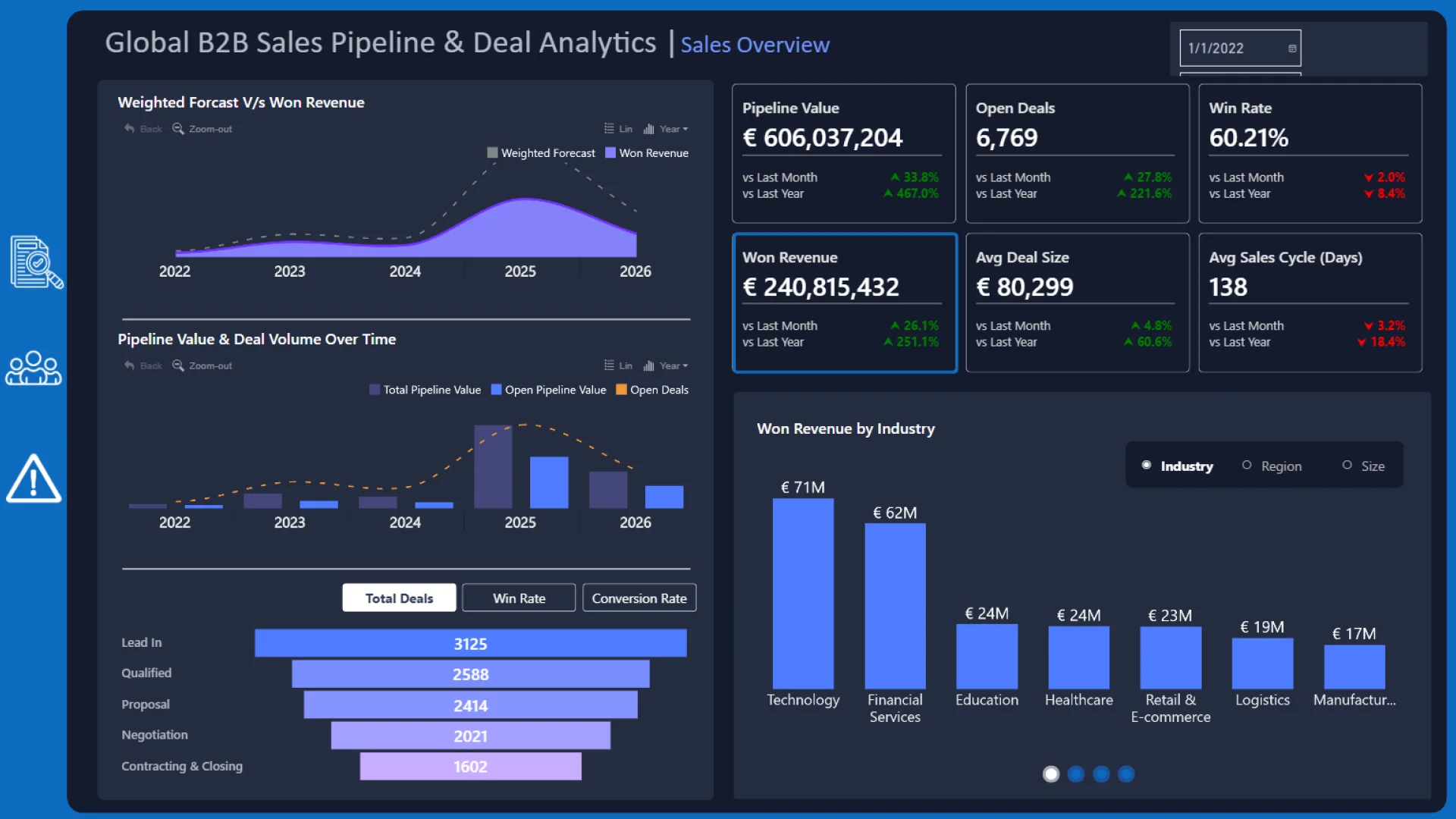
Aashriya Rawat created this three-page dashboard for pipeline value, deal progression, won revenue, win rate, activity, engagement, and performance across representatives, regions, and industries.
The report adds an interactive leaderboard for comparing won, open, and lost deals across sales representatives. Geographic, time, relationship, ranking, and composition views can cross-filter the same pipeline, making this a strong example for teams that need several analytical perspectives in one report.
Explore this CRM dashboard template
ZoomCharts visuals used:
Drill Down Scatter PRO, Drill Down Combo PRO, Drill Down Combo Bar PRO, Drill Down Map PRO, Drill Down Timeline PRO, and Drill Down Donut PRO.
10. Power BI B2B Pipeline Value & Deal Stage Dashboard
Best for: A clear view of pipeline value, stage distribution, deal movement, activity, engagement, regions, and industries
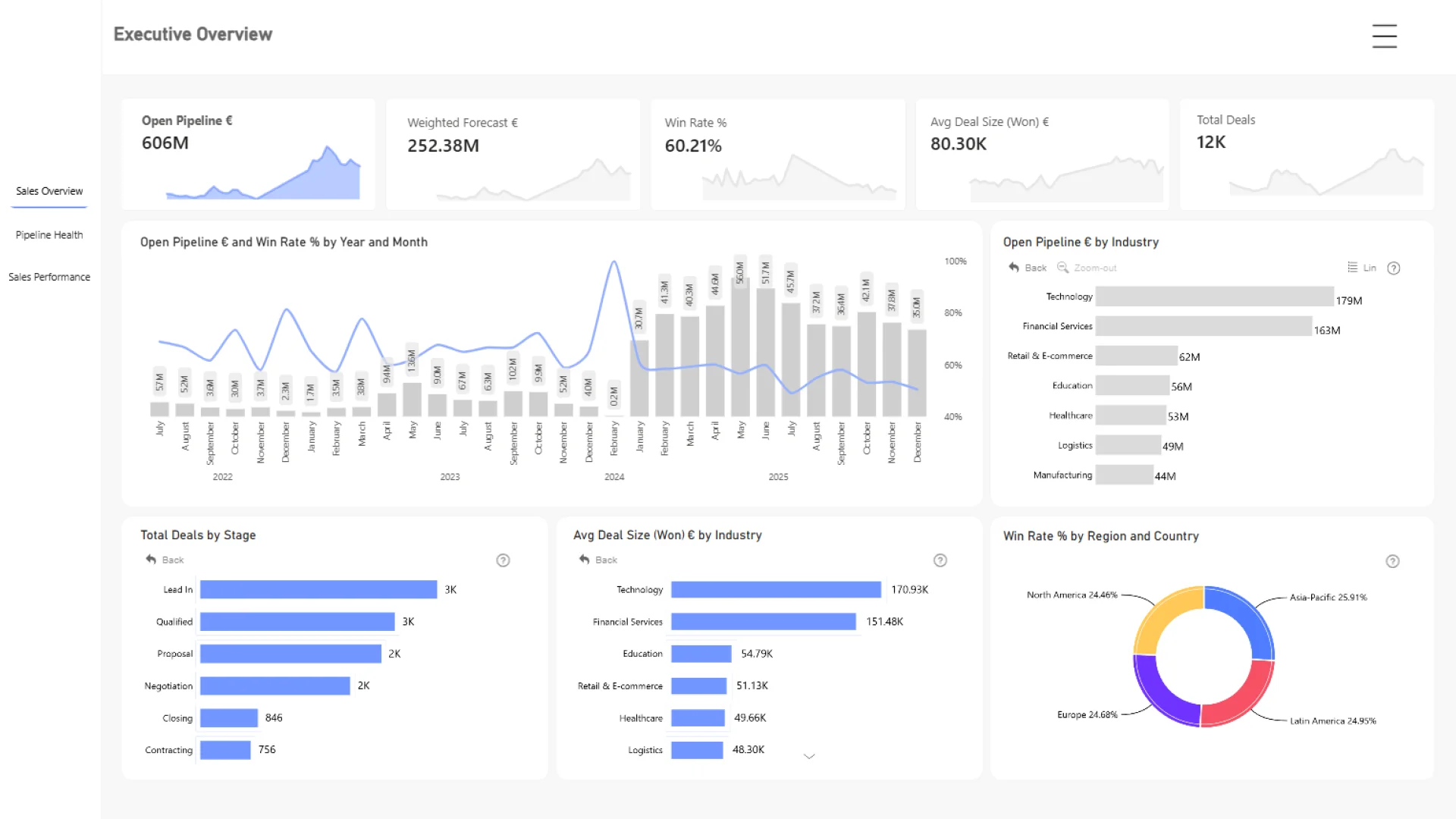
Abu Bakar Awan built this three-page dashboard to monitor pipeline value and composition, opportunity distribution across stages, deal movement, sales activity, client engagement, and performance across regions and industries.
The report is a practical closing example because it stays focused on the core mechanics of a B2B pipeline. Users can select chart series, bars, categories, or donut segments to move from the total pipeline to a stage, market, activity type, or engagement segment that needs follow-up.
Explore this CRM dashboard template
ZoomCharts visuals used:
Drill Down Combo PRO, Drill Down Combo Bar PRO, and Drill Down Donut PRO.
Frequently Asked Questions
What is the difference between a CRM dashboard and a sales dashboard?
A sales dashboard often focuses on achieved results such as revenue, profit, units, and targets. A CRM dashboard usually reaches earlier into the process, covering leads, accounts, opportunities, activities, stages, conversion, deal age, and forecast measures. Many practical Power BI reports combine both.
What are the most important CRM KPIs in Power BI?
Common CRM KPIs include lead volume, active opportunities, open and weighted pipeline value, won revenue, win rate, conversion rate, average deal size, sales cycle length, deal age, activity, and forecast confidence. Choose the smallest set that supports the decisions made in the report.
Can I use these Power BI CRM dashboard templates with my own data?
Yes. Open the downloaded PBIX in Power BI Desktop, replace the sample connection, map your CRM fields to the report structure, refresh the model, and validate the measures and interactions. You may need to adjust stage names, activity types, probability logic, territories, currencies, and date fields.
How do I choose the right Power BI CRM template?
Start with the decisions the report must support. Choose a general CRM overview for leads, conversion, customers, and agents; a funnel report for stage progression and prioritization; or a pipeline health report for aging, risk, forecast confidence, and representative performance. Preview the live report before comparing its PBIX structure with your own data model.
Explore More Power BI CRM Dashboard Templates
Open the examples that match your CRM questions, test the live interactions, and compare the available pages, filters, drill paths, and visual types. The right template is the one that shortens the route from a pipeline result to the account, opportunity, activity, or team behind it.
Browse Power BI CRM dashboard examples and templates, explore the Power BI sales dashboard collection, or visit the full ZoomCharts Power BI Template Gallery.
Try ZoomCharts Drill Down Visuals Free for 30 Days
Build and test interactive CRM and sales pipeline reports with ZoomCharts Drill Down visuals in Power BI.

Want more info like this?
Subscribe to our newsletter and be the first to read our latest articles and expert data visualization tips!