logo
For Power BI Report Templates
  • Products

    Drill Down Visuals for Power BI

    Discover the most customizable custom visuals for Power BI.

    Pricing & licensing
    • Drill Down Donut Pro
      Drill Down Donut Category Composition
    • Drill Down Pie Pro
      Drill Down Pie Proportional Breakdown
    • Drill Down Combo Pro
      Drill Down Combo Multi-Metric Trends
    • Drill Down Combo Bar Pro
      Drill Down Combo Bar Cross-Metric Trends
    • Drill Down Line Pro
      Drill Down Line Trend Analysis
    • Drill Down Bubble Pro
      Drill Down Bubble Value Relationships
    • Drill Down Scatter Pro
      Drill Down Scatter Correlation Analysis
    • Drill Down Network Pro
      Drill Down Network Entity Connections
    • Drill Down Graph Pro
      Drill Down Graph Relationship Mapping
    • Drill Down Map Pro
      Drill Down Map Geographic Insights
    • Drill Down Waterfall Pro
      Drill Down Waterfall Change Breakdown
    • Drill Down Timeline Pro
      Drill Down Timeline Time-Based Metrics
    • Drill Down TimeSeries Pro
      Drill Down TimeSeries Temporal Patterns
    • Drill Down Line Pro
      Drill Down Line Trend Analysis

    Visuals in Planning

    Discover visuals we’re exploring, share your feedback, and help us decide what to build next.

    Browse concepts
  • Template Reports
    • Browse Report Templates
      Browse Report Templates Explore 2000+
      Power BI reports
    • Pricing Report Templates
      unlimited access

    Explore Report Templates

    Industry

    • Logistics
    • Education
    • Healthcare
    • Transportation
    • Banking
    • Ecommerce
    • Crime analytics
    • Retail
    • Manufacturing

    Business Domain

    • Sales
    • Marketing
    • Accounting & Finance
    • Human Resources
    • Research
    • Project Management
    • CRM
    • Support
    • Customer experience
  • Resources

      Learn

    • Video Tutorials Step-by-step Power BI guides
    • Webinars Live and recorded expert sessions
    • Visuals Gallery Explore all custom Power BI visuals
    • Blog Power BI tips, updates, and guides
    • Documentation Setup, features, and API reference

    Support

    • ZoomCharts Assistance Help from our product experts
    • Contact Sales Questions about pricing or licensing
    • Contact Support Technical help and troubleshooting
    • FAQ Quick answers to common questions
  • Services
    • Power BI Report Development
      Power BI Report Development End-to-end custom
      Power BI reports.
    • Custom Visual Development
      Custom Visual Development Custom visuals for
      your business needs.
  • Challenges
  • Pricing
Request a quote Get Developer License Sign in
Request a quote Book a Demo Get Developer License Sign in
Get it now
Go back

Contents

Blog Product Updates July 2025 Update: Tooltip Fields for Map Shapes

Jul 15, 2025

July 2025 Update: Tooltip Fields for Map Shapes

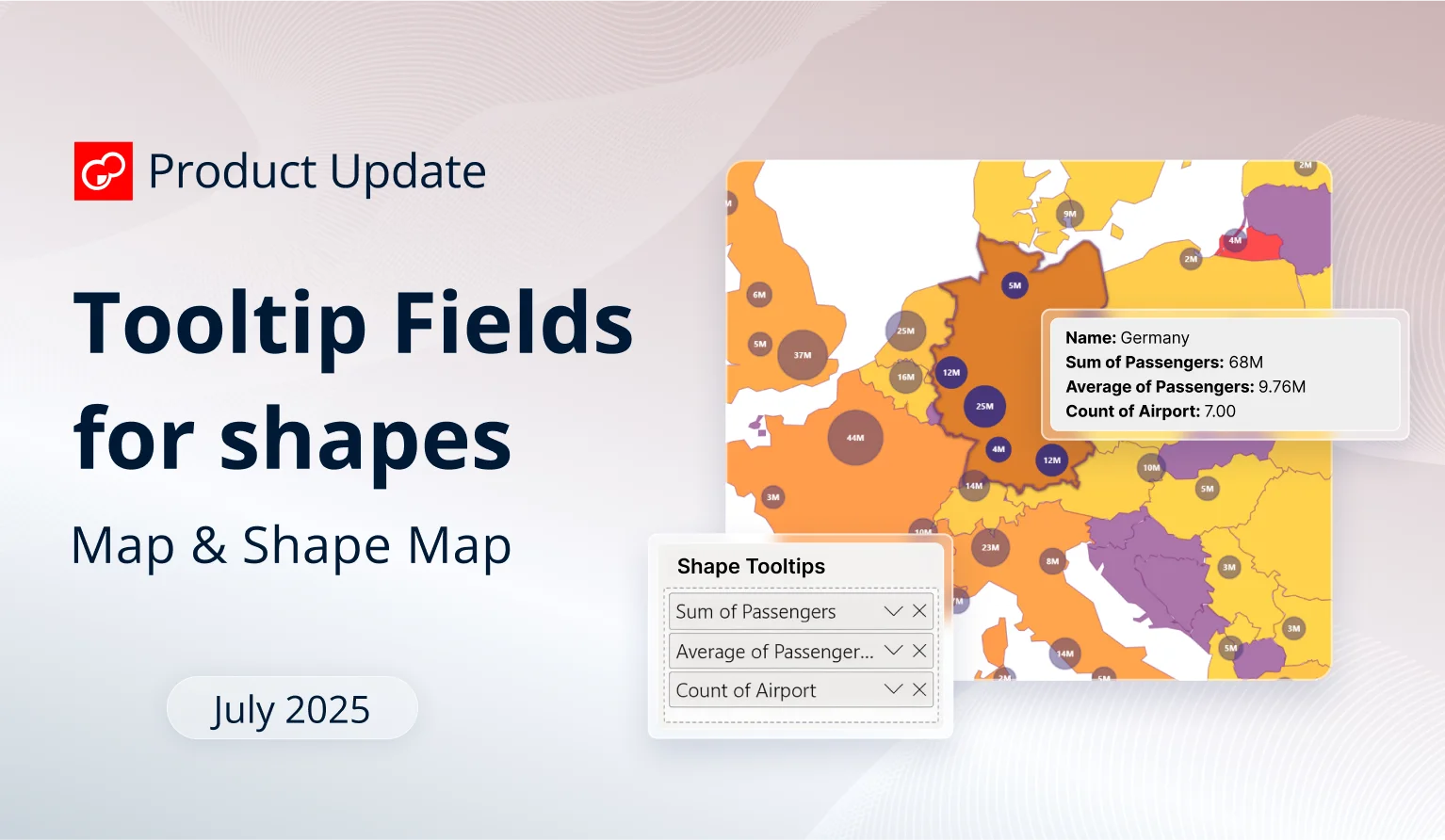
The latest ZoomCharts update brings a new field to Map and Shape Map visuals, which allows you to display columns or measures in shape tooltips for additional insights.
Title image
Title image

The latest ZoomCharts update brings a new field to Map and Shape Map visuals, which allows you to display columns or measures in shape tooltips for additional insights.

Contents

Share this article

While our main focus for the past months has been the launch of two new visuals – the recently released Drill Down Line PRO, and a new visual which is coming soon (stay tuned!), we’ve also made continuous improvements to our existing line-up.

Most of it has been various bugfixes (for example, we’ve resolved the issue that prevented applying different node outline types for Graph and Scatter). We also implemented support for Power BI Modern visual tooltips, and done other under-the-hood improvements. Let’s go through the highlights of the most recent ZoomCharts release!

Your visuals should update automatically from AppSource. If your visuals have not received the updates automatically, read this documentation article that explains the manual update process.

Map, Shape Map: New Field for 'Shape Tooltip'
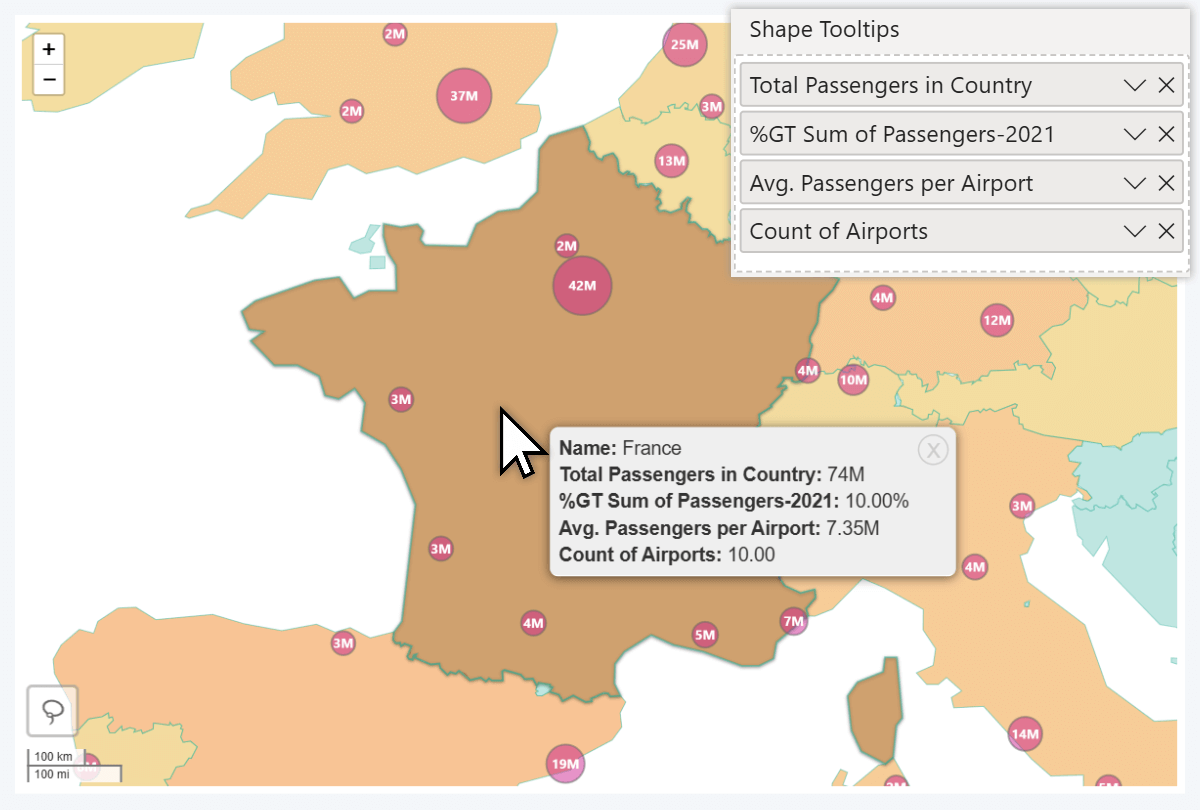
Shape Tooltip field in Power BI Drill Down Map visual

The latest update to our Map and Shape Map visuals have replaced the old Tooltip Fields with two new fields – Node Tooltips and Shape Tooltips. With this change, you can display additional insights to the user in the tooltip when they right-click on a shape – previously, Tooltip Fields would only apply to node tooltips and not shapes.

Why it matters: In both of our Power BI map visuals, you can enable up to 10 different shape layers: country/state borders, custom Lasso Tool shapes, or external KML/GeoJSON files (only in Map). They can be used to visually distinguish multiple regions, and act as a convenient way to select all data within a region with just a click.

Previously, when you added columns or measures to Tooltip Fields, that data would only display when right-clicking directly on a node. The shape tooltip would not be affected and show just the shape’s name.
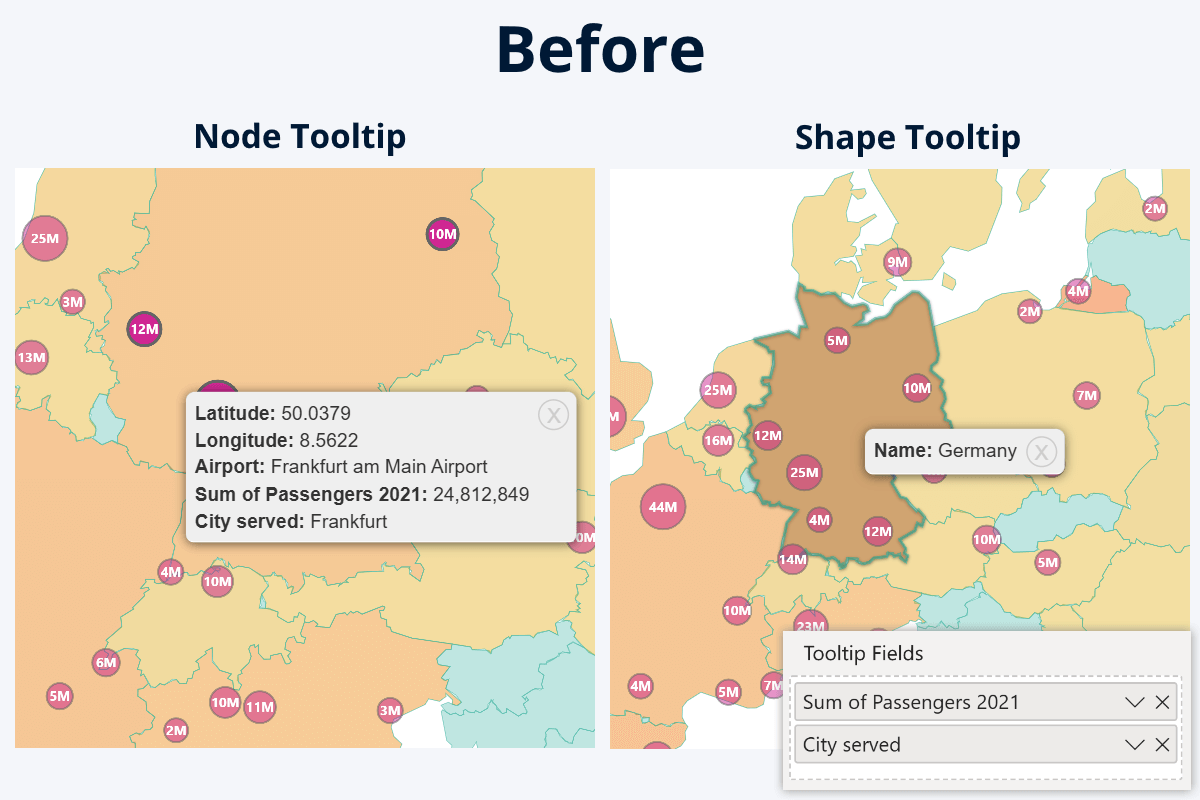
Old 'Tooltip Fields' in Drill Down Map & Shape Map

Now, with the two separate fields, you can control what is displayed in node tooltip, and what is displayed in shape tooltip.
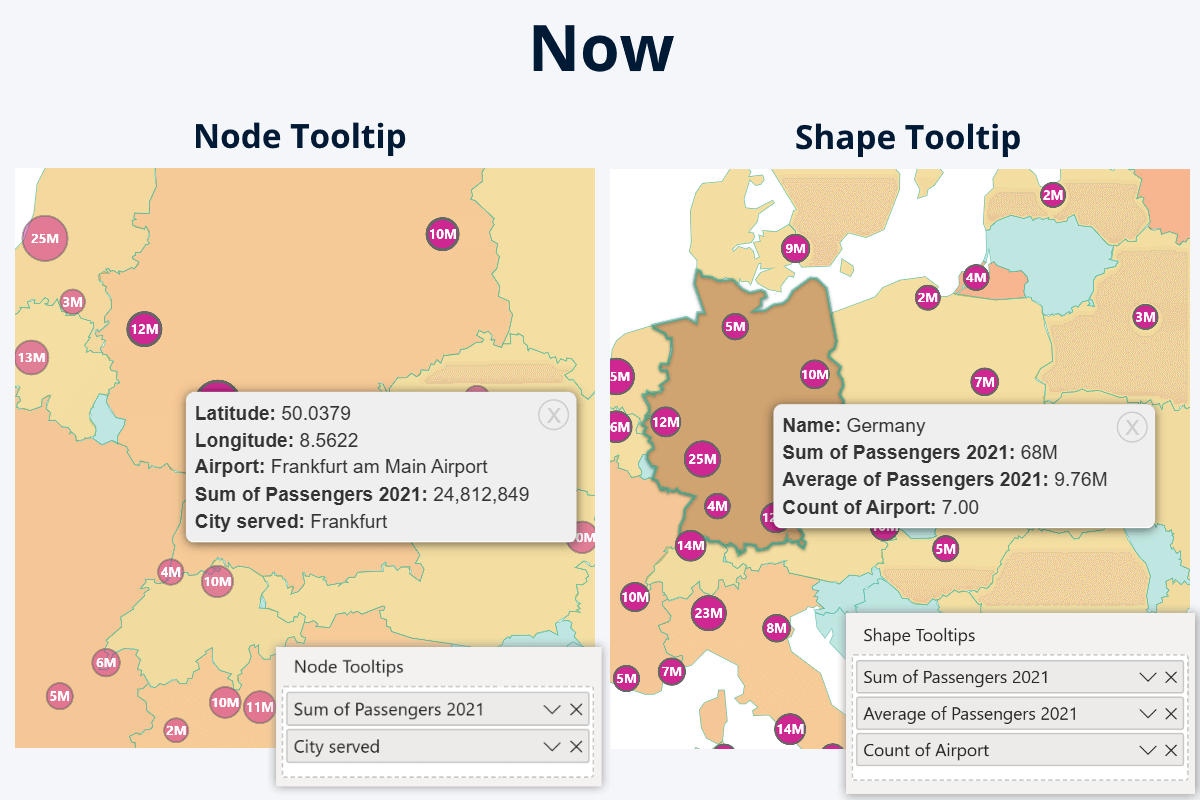
Node Tooltip and Shape Tooltip fields in Drill Down Map PRO for Power BI

If you wish, you can use different columns or measures to display different insights for each. Alternatively, you can add the same column or measure to both fields, in which case the node tooltip will show the individual value for the row, but the shape tooltip will show aggregated value of all nodes within that shape. Some use cases for shape tooltip fields:

  • Sum: show the total revenue of all retail locations in a country.
  • Average: average income, user spending, rating, or age in the region.
  • Count: show how many nodes (retail locations, users, traffic reports etc.) are within the region.
  • Minimum/maximum: highlight the best-performing retail location in the country.
  • ZoomCharts Drill Down Shape Map PRO Icon ZoomCharts Drill Down Map PRO Icon ZoomCharts Drill Down Map Pin IconDocumentation: Map PRO, Shape Map PRO, Map PIN
  • Node Tooltips
  • Shape Tooltips

All Visuals: Vector Icons in 'Visualizations' Pane
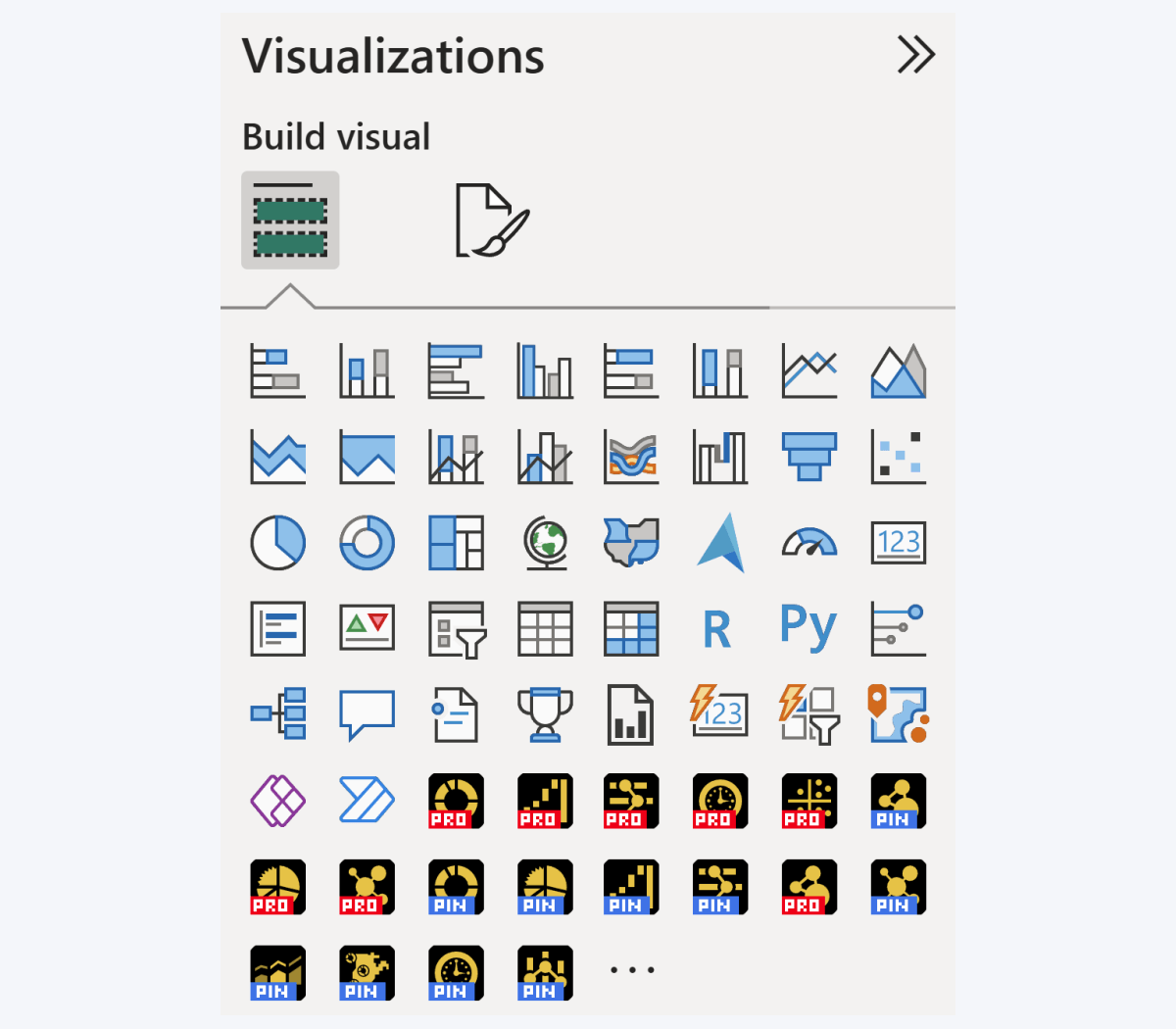
Visual icons in Power BI visualizations pane

Here’s a nice-to-have quality improvement to all our visuals – we have upgraded the product icons from raster PNGs to vector SVGs. Now, the icons will look sharp and crystal-clear on any screen size and DPI setting. Note the product version label font, which appears ‘blocky’ – that is an intentional design choice to ensure readability at any zoom level.

Get Started with ZoomCharts

Be sure to download the latest version of ZoomCharts Visuals to enjoy these new additions, along with hundreds of other features! With a free trial available, you can see for yourself how these powerful visuals can take your Power BI reports to the next level.

  • Get Drill Down Map PRO & Shape Map PRO
  • View All Drill Down Visuals for Power BI
envelope icon

Want more info like this?

Subscribe to our newsletter and be the first to read our latest articles and expert data visualization tips!

Find out more

Apr 13, 2026

Blog Thumbnail
Tutorials
Data visualization

How to Build 4U Executive KPI Reports

Any developer can publish a report. But building a report that executives actually open, navigate confidently, and use to make decisions requires a different approach. This guide walks through how to apply the 4i principles in Power BI and achieve 4U Reports, using a real executive KPI dataset as a working example.

Apr 08, 2026

Blog Thumbnail
Data visualization

4U Reports: Unique, User Friendly, Uncovering, Understandable

Most organizations have invested heavily in business intelligence tools, data platforms, and analytics teams. Yet the reports go unused, and decisions are still made based on intuition and speculation. 4U Reports are built to close that gap by putting user experience at the center of every reporting decision.

Mar 24, 2026

Blog Thumbnail
Product updates

March Update: Dynamic Thresholds and Filtering From Legend Categories

This product update focuses on two key improvements: 1. dynamic thresholds that adapt automatically to data context 2. More precise interaction through subcategory selection

Mar 02, 2026

Blog Thumbnail
Product updates

February Update: Breadcrumbs, Multiple Change Thresholds and Full Tooltip Styling Control

This release focuses on something our users care about deeply: reducing manual work and improving report clarity. We improved the way analysts build reports and how users understand them. Here’s what’s new.

Feb 12, 2026

Blog Thumbnail
Power BI tutorials

How to Explore Power BI Data Without Adding More Report Pages

Most Power BI developers improve their reports by adding more: more pages, more slicers, more drill-through pages, more bookmarks. It rarely works.

Jan 20, 2026

Blog Thumbnail
Product updates

January Update: Fewer Workarounds, More Control for Power BI Developers

If you build Power BI reports for others, analysts, managers, executives, you already know the real challenge is not creating visuals. The challenge is making reports that explain themselves, scale to dense data, survive handover to other developers, and work without hidden hacks.
  • «
  • 1
  • 2
  • 3
  • 4
  • 5
  • 6
  • ...
  • 16
  • »

Contents

Share this article

Want more info like this?

Subscribe to our newsletter and be the first to read our latest articles and expert data visualization tips!

Thank you!

Check your inbox to verify your email address.

logo
[email protected]
+44 204 577 3993
logo

Products

Drill Down Bubble PRO Drill Down Line PRO Drill Down Network PRO Drill Down Waterfall PRO Drill Down Graph PRO Drill Down Combo PRO Drill Down Combo Bar PRO Drill Down Donut PRO Drill Down Pie PRO Drill Down TimeSeries PRO Drill Down Timeline PRO Drill Down Map PRO Drill Down Scatter PRO All Visuals

Resources

Report Examples Webinars Blog ZoomCharts Academy Visuals Gallery Documentation Custom Visual Development Subscribe to News

Solutions

Custom Visual Development

Company

Pricing About Us Partners Leave feedback Join PowerGroup EU Funding

Help

ZoomCharts Assistance Contact Sales Contact Support FAQ AI Information

Drill Down Line PRO Drill Down Bubble PRO Drill Down Network PRO Drill Down Waterfall PRO Drill Down Graph PRO Drill Down Combo PRO Drill Down Combo Bar PRO Drill Down Donut PRO Drill Down Pie PRO Drill Down TimeSeries PRO Drill Down Timeline PRO Drill Down Map PRO Drill Down Scatter PRO All Visuals

Report Examples Webinars Blog ZoomCharts Academy Visuals Gallery Documentation Custom Visual Development Subscribe to News

Custom Visual Development

Pricing About Us Partners Leave feedback Join PowerGroup EU Funding

ZoomCharts Assistance Contact Sales Contact Support FAQ AI Information
+44 204 577 3993
[email protected]

Ready to get in touch?

Contact our experts with any question about Power BI and ZoomCharts for Free!

Contact us

© 2026, Data Visualization Software Lab

U.S. Patents No. 11,645,343; 11,921,804; 12,346,389

Cookies
Privacy Policy
Global
Legal
Patent
warning

Error message

success

Success info: Done!

ZoomCharts AI Assistant

We noticed you're using an old OS version.

For the best experience, we recommend upgrading to ensure that all website features display correctly.

Cookie settings

We use necessary cookies for site functionality, as well as statistic, marketing, and preference cookies to enhance your experience. For more information and to manage your preferences, please visit our Cookie policy