Oct 27, 2026
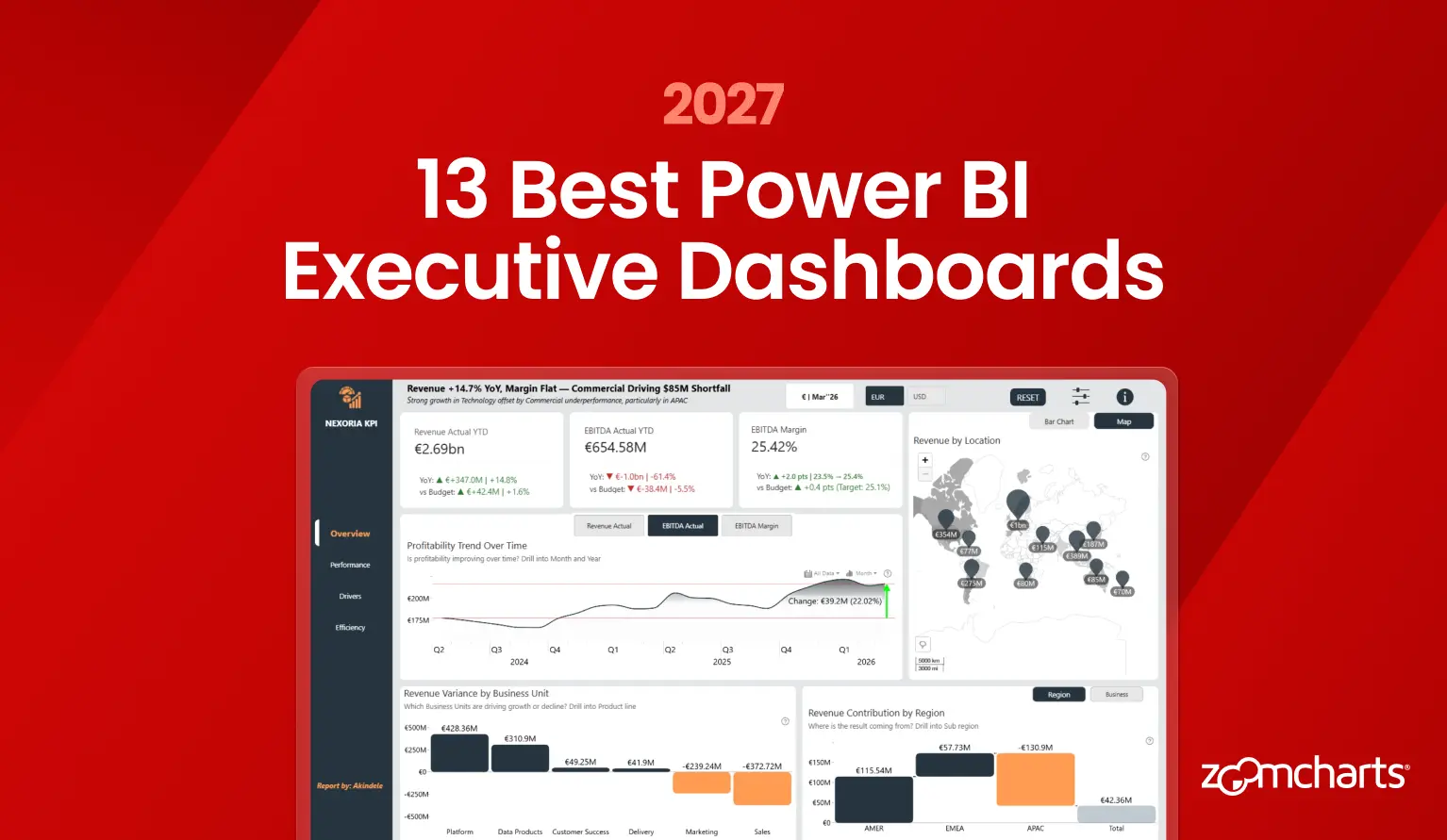
13 Best Power BI Executive Dashboard Examples and Templates for 2027
Explore 13 strong Power BI executive dashboards for financial, operational, regional, workforce, and customer reporting. See practical design ideas and preview customizable PBIX templates.
Explore 13 strong Power BI executive dashboards for financial, operational, regional, workforce, and customer reporting. See practical design ideas and preview customizable PBIX templates.
A strong executive dashboard should make three questions easy to answer: Are we on plan? Where is performance changing? What part of the business is driving the change?
The 13 examples below are real Power BI reports from the ZoomCharts Template Gallery. They were selected for clear visual hierarchy, consistent layouts, and useful paths from high-level KPIs to regional, financial, customer, workforce, and operational detail. You can preview each report online and open its PBIX template page.
1. Power BI Business KPI Dashboard
Best for: Connecting executive KPIs with regional and root-cause analysis
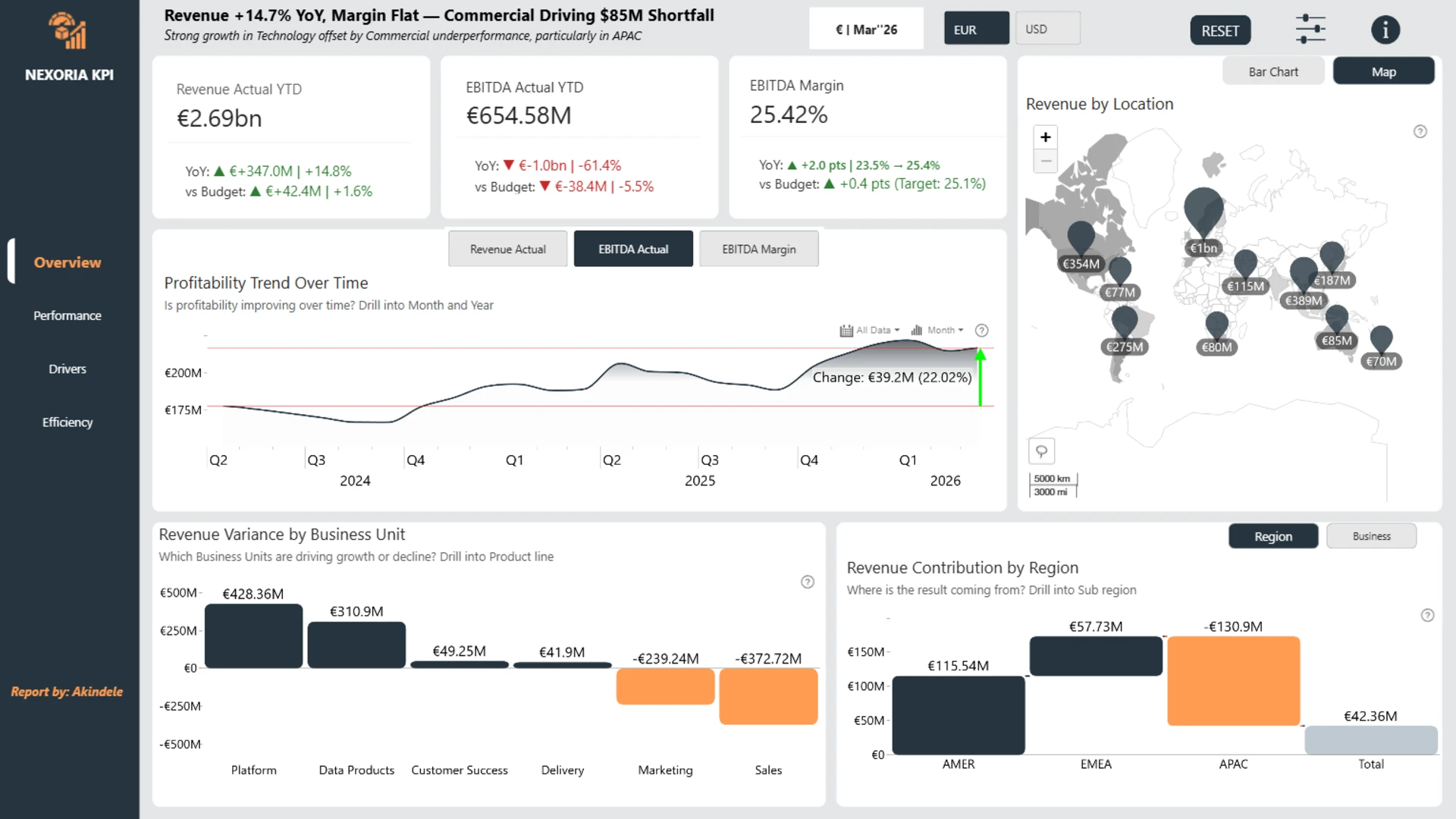
Akindele Omolayo created this five-page report for the April 2026 ZoomCharts 4U Reports Challenge. It connects Revenue, EBITDA, Margin, Headcount, and Customer Growth with Actual, Budget, and Forecast comparisons. Regional and organizational views help users move from the headline result to the business area driving it.
The dashboard uses several visual types, but the layout remains controlled and easy to scan. Each chart has a clear role, including trends, variance, geography, category comparison, and relationships. This is a useful reference for broad executive reporting that still needs a calm, consistent visual system.
Explore this dashboard template
ZoomCharts visuals used:
Drill Down Scatter PRO, Drill Down Combo PRO, Drill Down Waterfall PRO, Drill Down Combo Bar PRO, Drill Down Map PRO, and Drill Down Timeline PRO.
2. Power BI Operational KPI Dashboard
Best for: Moving from executive performance review to operational detail
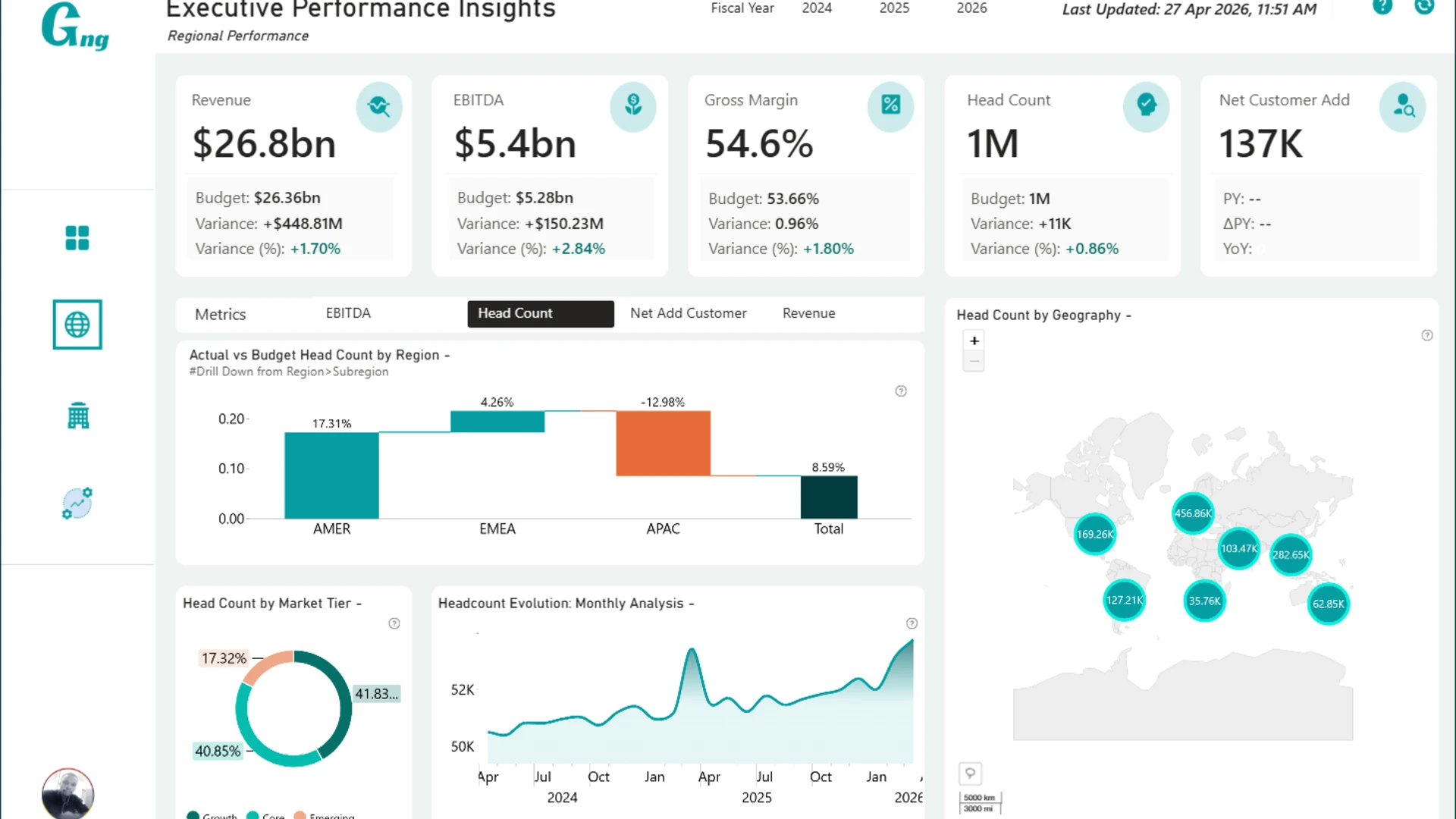
Agbata Dickson Ukolojo created the winning report in the April 2026 ZoomCharts 4U Reports Challenge. The dashboard combines financial, customer, workforce, and operational analysis. Users can compare Actual performance with Budget, Plan, and Forecast, then explore regional, divisional, organizational, and customer detail.
The design works because the overview and the investigation path are clearly connected. A KPI does not sit alone. Users can follow it into a trend, variance, map, category, or operational breakdown without losing the wider executive context.
Explore this dashboard template
ZoomCharts visuals used:
Drill Down Scatter PRO, Drill Down Combo PRO, Drill Down Waterfall PRO, Drill Down Combo Bar PRO, Drill Down Map PRO, Drill Down Timeline PRO, and Drill Down Donut PRO.
3. Power BI Executive Dashboard
Best for: Board-ready reporting with light and dark viewing modes
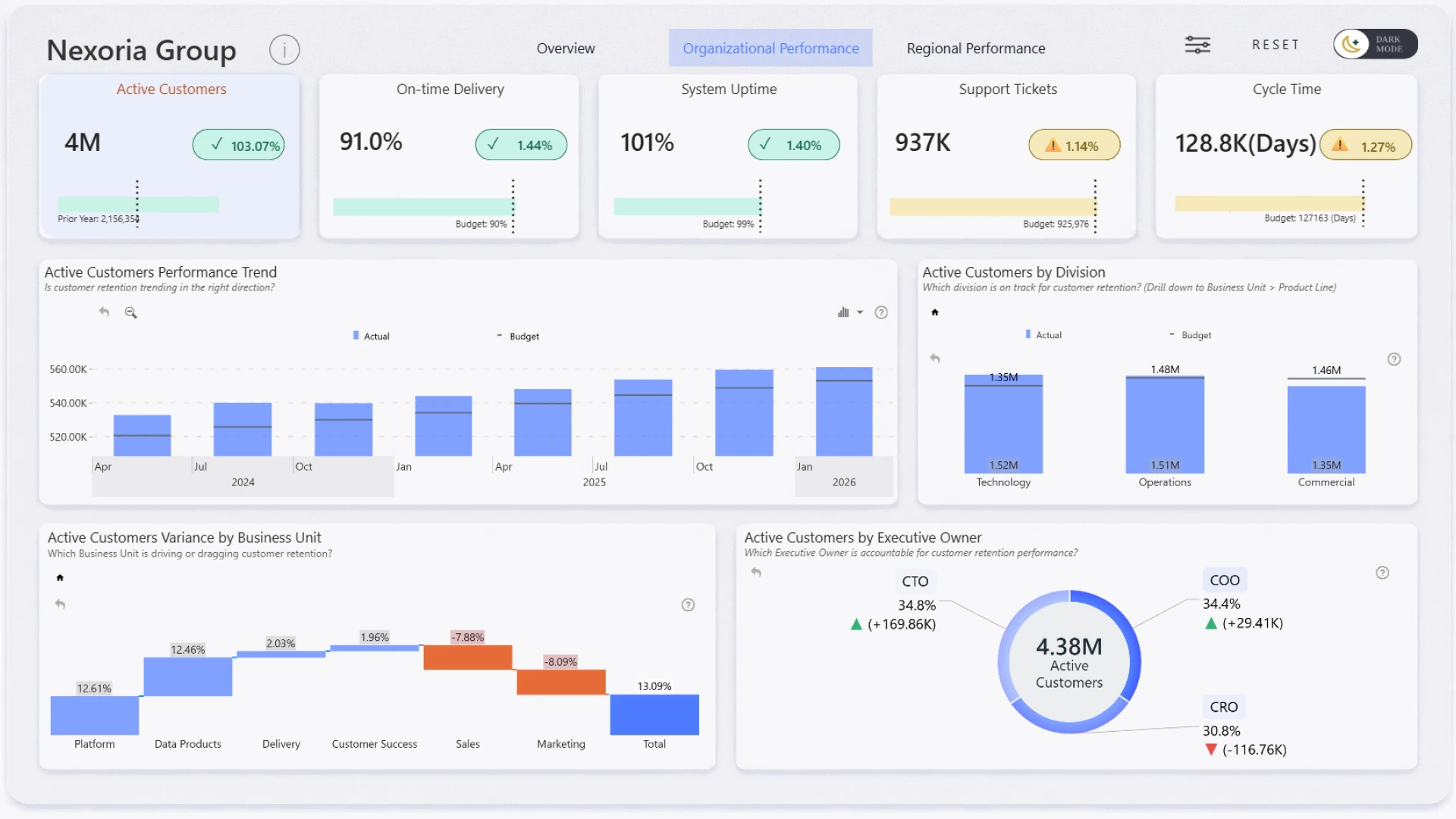
Odunlami Zainab built this four-page dashboard for a fictional global enterprise operating across Technology, Operations, and Commercial divisions in AMER, EMEA, and APAC. It combines executive KPIs with Actual, Budget, and Forecast comparisons, organizational drill-down, and regional analysis.
The report includes light and dark themes. More importantly, the hierarchy, KPI structure, labels, and interactions remain consistent in both modes. It is a good example of treating dark mode as a complete design system rather than a simple background-color change.
Explore this dashboard template
ZoomCharts visuals used:
Drill Down Combo PRO, Drill Down Waterfall PRO, Drill Down Timeline PRO, and Drill Down Donut PRO.
4. KPI Dashboard for Executives Power BI
Best for: A focused executive report with a small visual toolkit
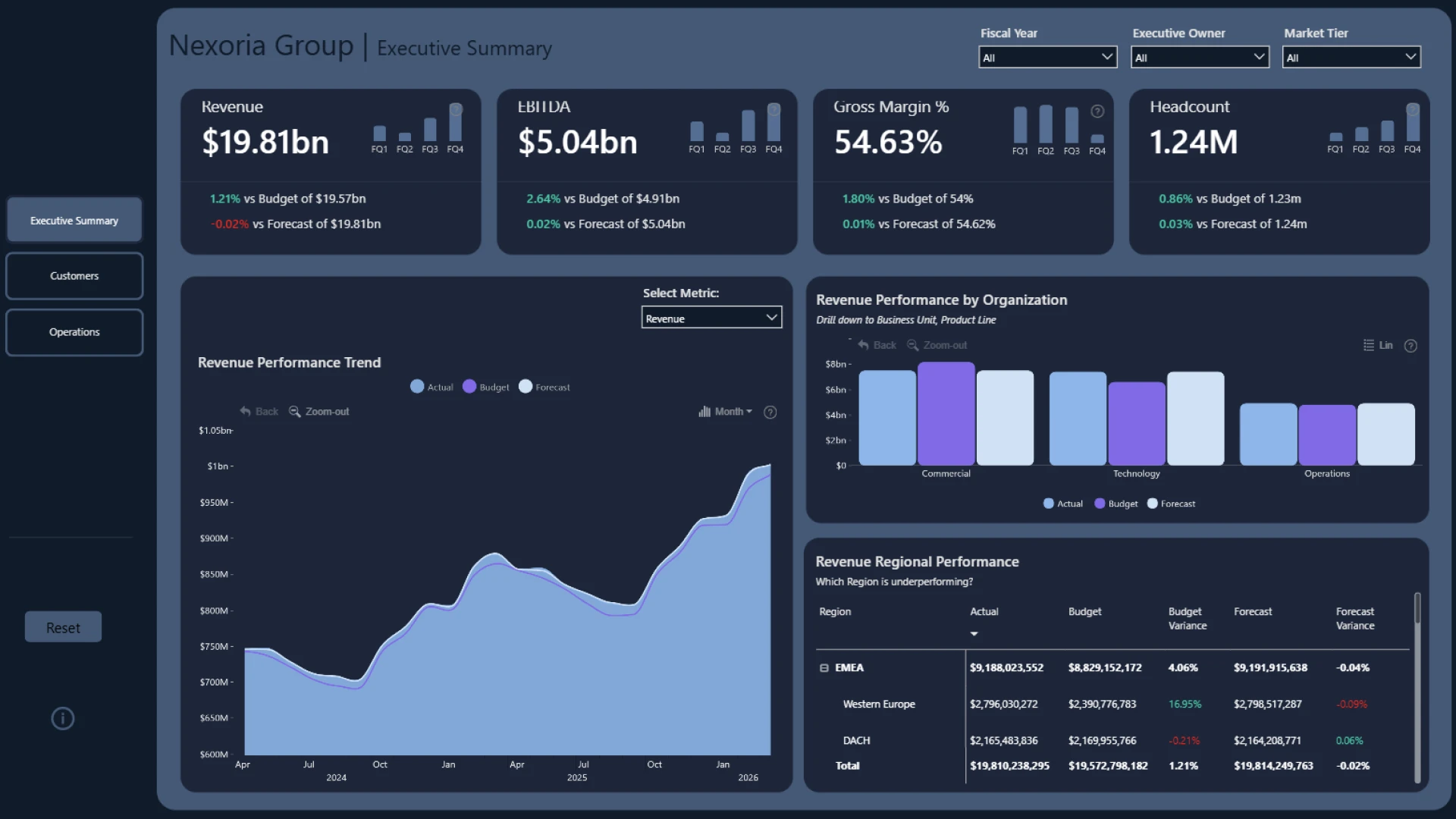
Eniola Kayode created this report to track Revenue, EBITDA, Margin, Headcount, and Customer Growth. Actual, Budget, and Forecast comparisons are supported by organizational drill-down and regional performance analysis.
The report is visually restrained. Combo and timeline charts provide comparison and time-based exploration without introducing too many visual patterns. This approach can make a multi-page report easier for executives to learn and easier for developers to maintain.
Explore this dashboard template
ZoomCharts visuals used:
Drill Down Combo PRO and Drill Down Timeline PRO.
5. KPI Dashboard Example for Power BI Financial Performance
Best for: Comparing Actual, Budget, and Forecast in one reporting framework
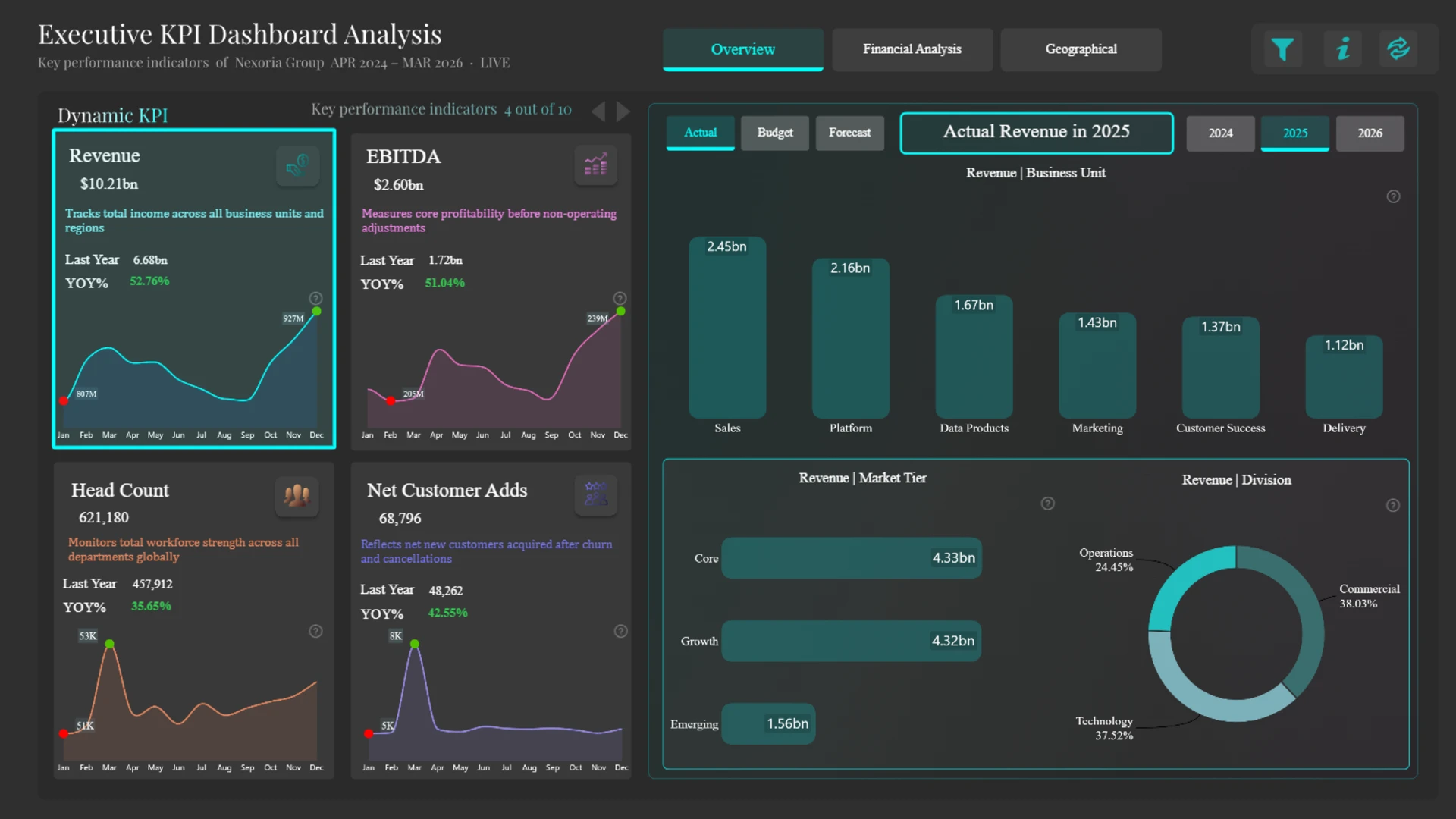
Aakash M created this four-page template for financial and operational reporting. It tracks Revenue, EBITDA, Margin, Headcount, and Customer Growth against budget and forecast targets. Regional and organizational views help users investigate where performance differs across the business.
The dashboard keeps plan comparison visible instead of hiding it in tooltips or secondary pages. That makes it a useful reference for finance reviews where variance is the main question. Consistent colors and labels help users compare scenarios across different KPIs.
Explore this dashboard template
ZoomCharts visuals used:
Drill Down Shape Map PRO, Drill Down Combo PRO, Drill Down Combo Bar PRO, and Drill Down Donut PRO.
6. Executive Performance Dashboard Power BI
Best for: Combining financial performance with regional context
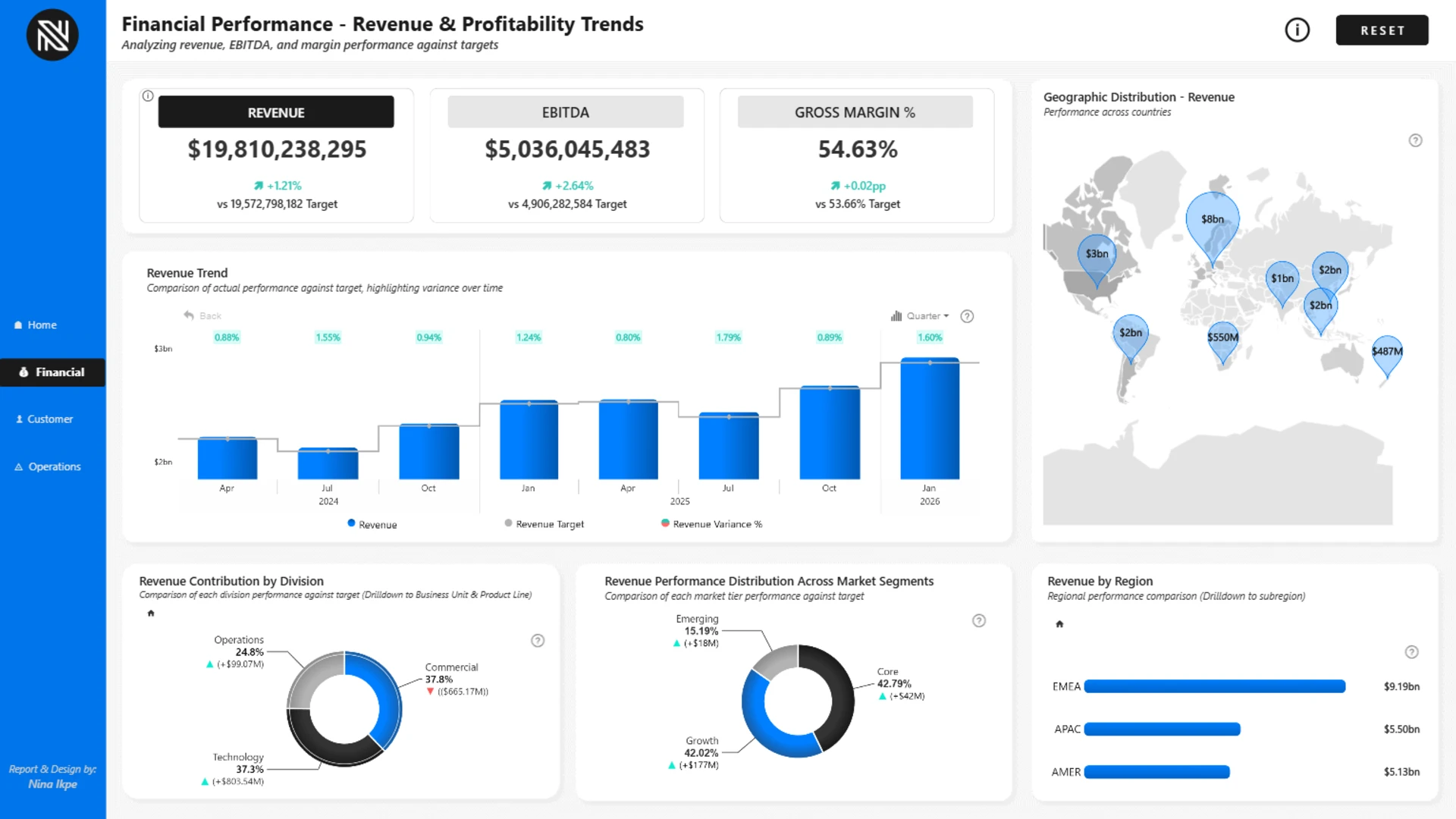
Nina Ikpe created this four-page report to bring financial, regional, customer, and operational performance into one executive view. The gallery description highlights positive revenue and profitability trends alongside target gaps in APAC and operational measures that require attention.
The timeline, map, ranked comparison, and composition views each answer a different question. The map adds geographic context without taking over the page, while the other charts help users compare magnitude and change over time.
Explore this dashboard template
ZoomCharts visuals used:
Drill Down Combo Bar PRO, Drill Down Map PRO, Drill Down Timeline PRO, and Drill Down Donut PRO.
7. 4U Executive KPI Power BI Report
Best for: Moving from board-level metrics to region and division detail
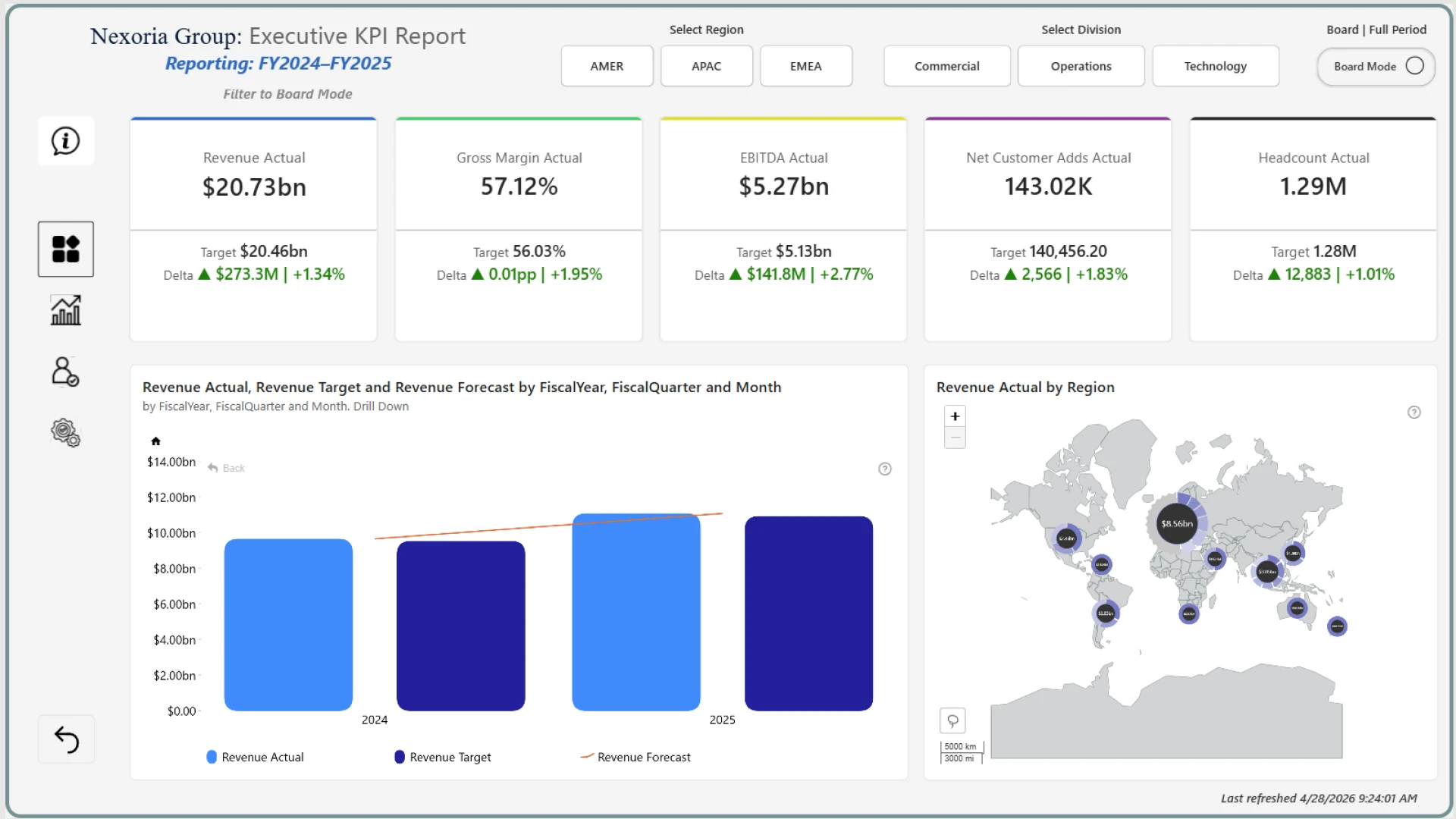
Ugochukwu Nwasuruba created this five-page report around Revenue, EBITDA, Margin, Headcount, and Customer Growth. Actual, Budget, and Forecast comparisons are supported by geographic and organizational views for region, division, and business-unit analysis.
The dashboard uses a compact visual language across its pages. Reusing combo, combo bar, map, and donut charts helps executives predict how the report will respond. Consistent selection and drill-down behavior is especially valuable during a live review.
Explore this dashboard template
ZoomCharts visuals used:
Drill Down Combo PRO, Drill Down Combo Bar PRO, Drill Down Map PRO, and Drill Down Donut PRO.
8. Executive KPI Report Power BI
Best for: Consistent KPI cards and executive narratives across multiple pages
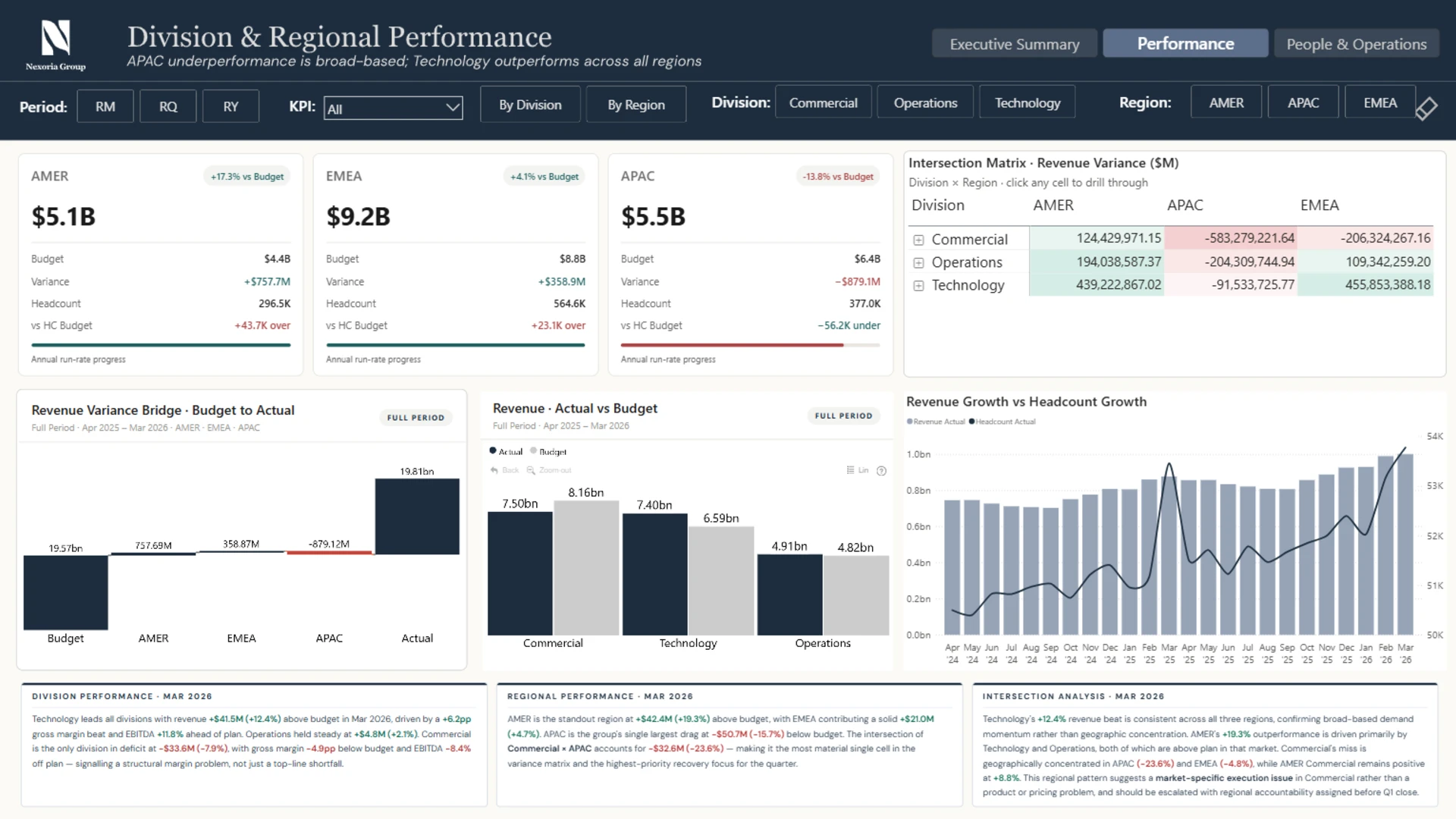
Tina Okonkwo built this three-page report with 24 months of financial, customer, people, and operational KPI data. Page one provides an executive summary, page two explores division and regional performance, and page three focuses on workforce productivity and operations.
The gallery notes that custom HTML DAX measures support consistent KPI cards and narrative elements. This is a practical approach when the same card structure and explanation pattern must remain aligned across several pages.
Explore this dashboard template
ZoomCharts visuals used:
Drill Down Combo PRO and Drill Down Waterfall PRO.
9. Executive Budget KPI Performance Power BI Dashboard
Best for: Making budget and forecast variance the center of an executive review
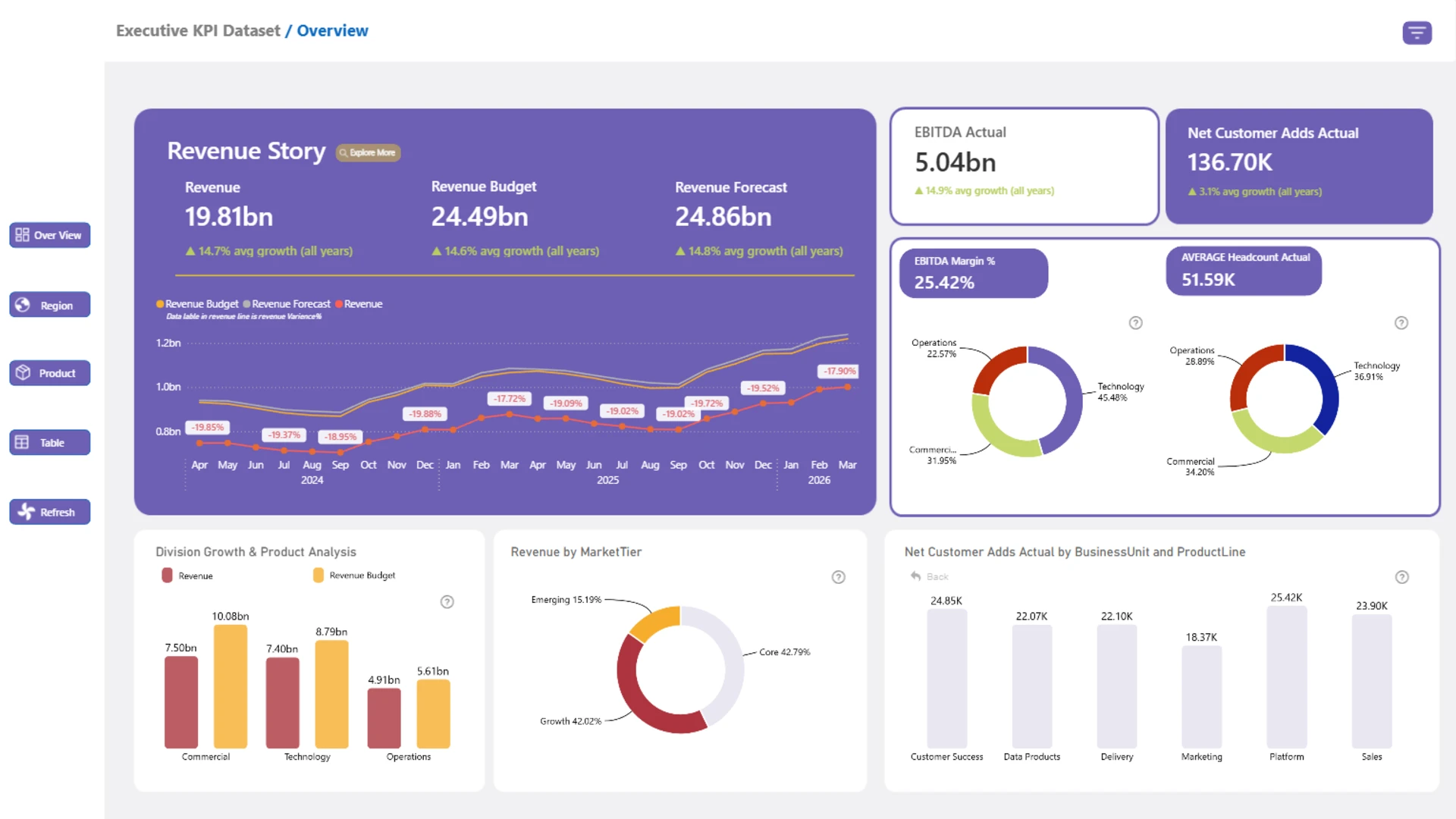
Abubakar Iwan created this four-page report to compare Actual, Budget, and Forecast performance for Revenue, EBITDA, Margin, Headcount, and Customer Growth. Regional analysis and organizational drill-down help users trace a performance gap to a more specific business area.
The dashboard gives budget performance enough visual weight to guide attention. Leaders can see where the plan is missed before searching through supporting detail. This is a useful approach for recurring planning and variance meetings.
Explore this dashboard template
ZoomCharts visuals used:
Drill Down Shape Map PRO, Drill Down Combo PRO, Drill Down Combo Bar PRO, and Drill Down Donut PRO.
10. Business Performance Dashboard Power BI
Best for: Combining an executive overview with division and country drill-through
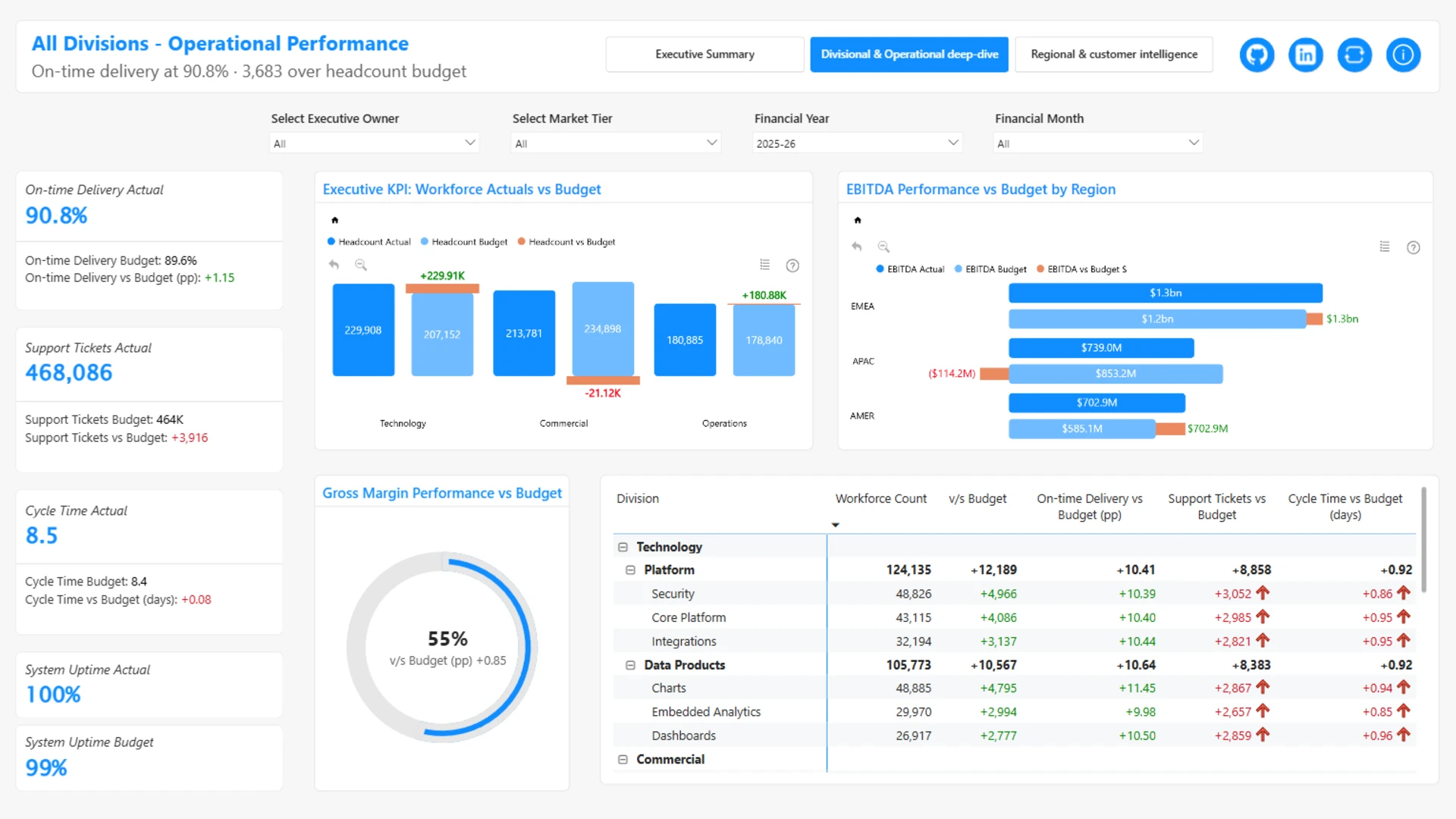
Crystal Andrea Dsouza created this report to cover Finance, Operations, Customers, and People over 24 months. Three main pages and two drill-through views provide executive KPIs, division and operational insights, regional analysis, and customer detail.
The page structure protects the executive overview from excessive detail. Country- and division-level analysis moves to dedicated drill-through views, giving analysts a detailed answer without crowding the first page.
Explore this dashboard template
ZoomCharts visuals used:
Drill Down Shape Map PRO, Drill Down Combo PRO, Drill Down Combo Bar PRO, and Drill Down Timeline PRO.
11. Executive KPI Dashboard Power BI 2
Best for: A compact three-page report covering time, comparison, and geography
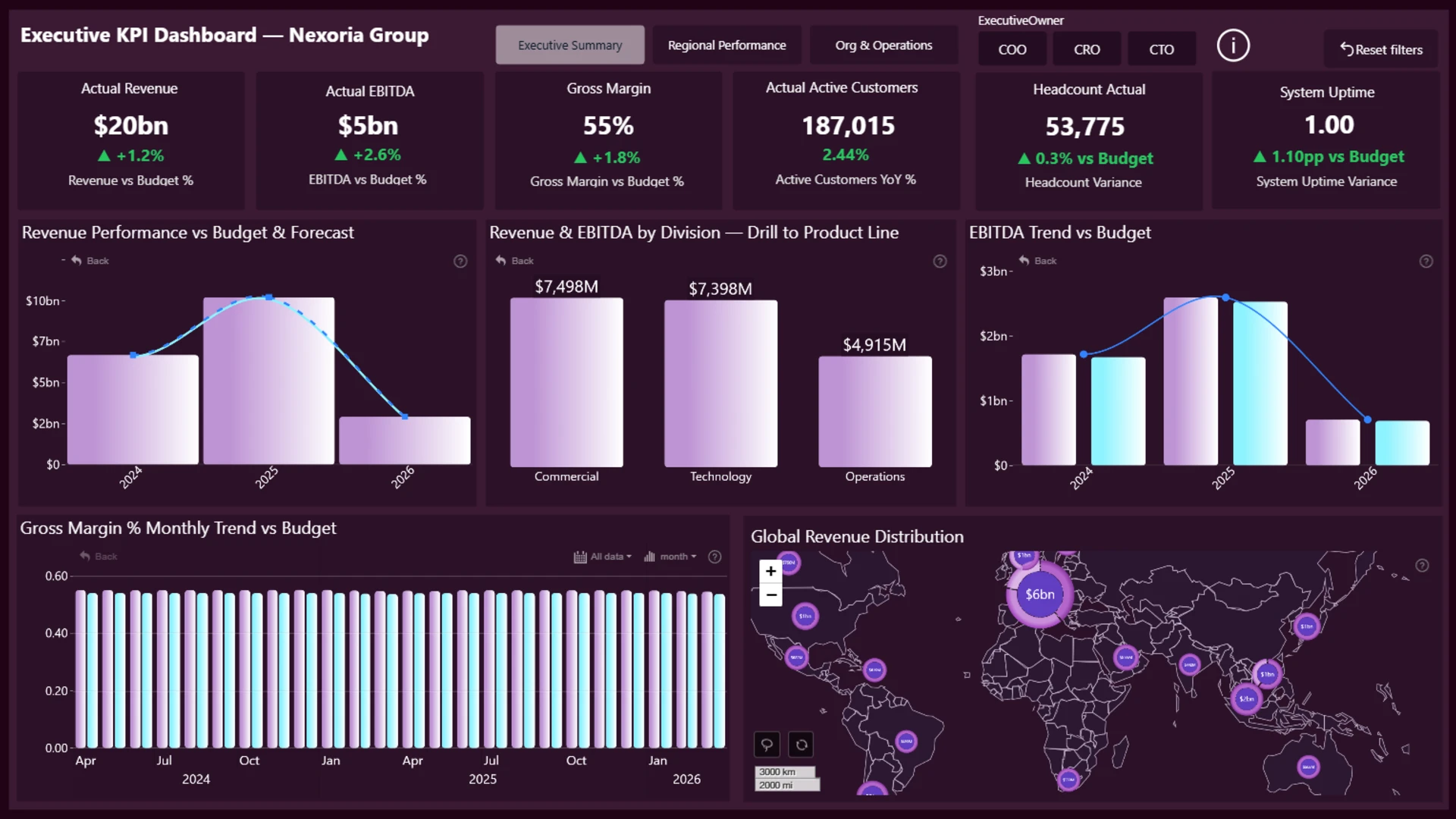
Hasan Ayaz created this three-page dashboard to provide a high-level view of financial, regional, and operational performance. Interactive drill-down lets users move from summary metrics to more detailed business insights.
The report uses a small visual toolkit. Combo and time-series charts handle performance over time, while the map adds regional context. It shows how a compact chart set can support several analytical routes without making the dashboard feel visually busy.
Explore this dashboard template
ZoomCharts visuals used:
Drill Down Combo PRO, Drill Down TimeSeries PRO, and Drill Down Map PRO.
12. Power BI Executive KPI Dashboard
Best for: A guided report with a landing page and focused analytical sections
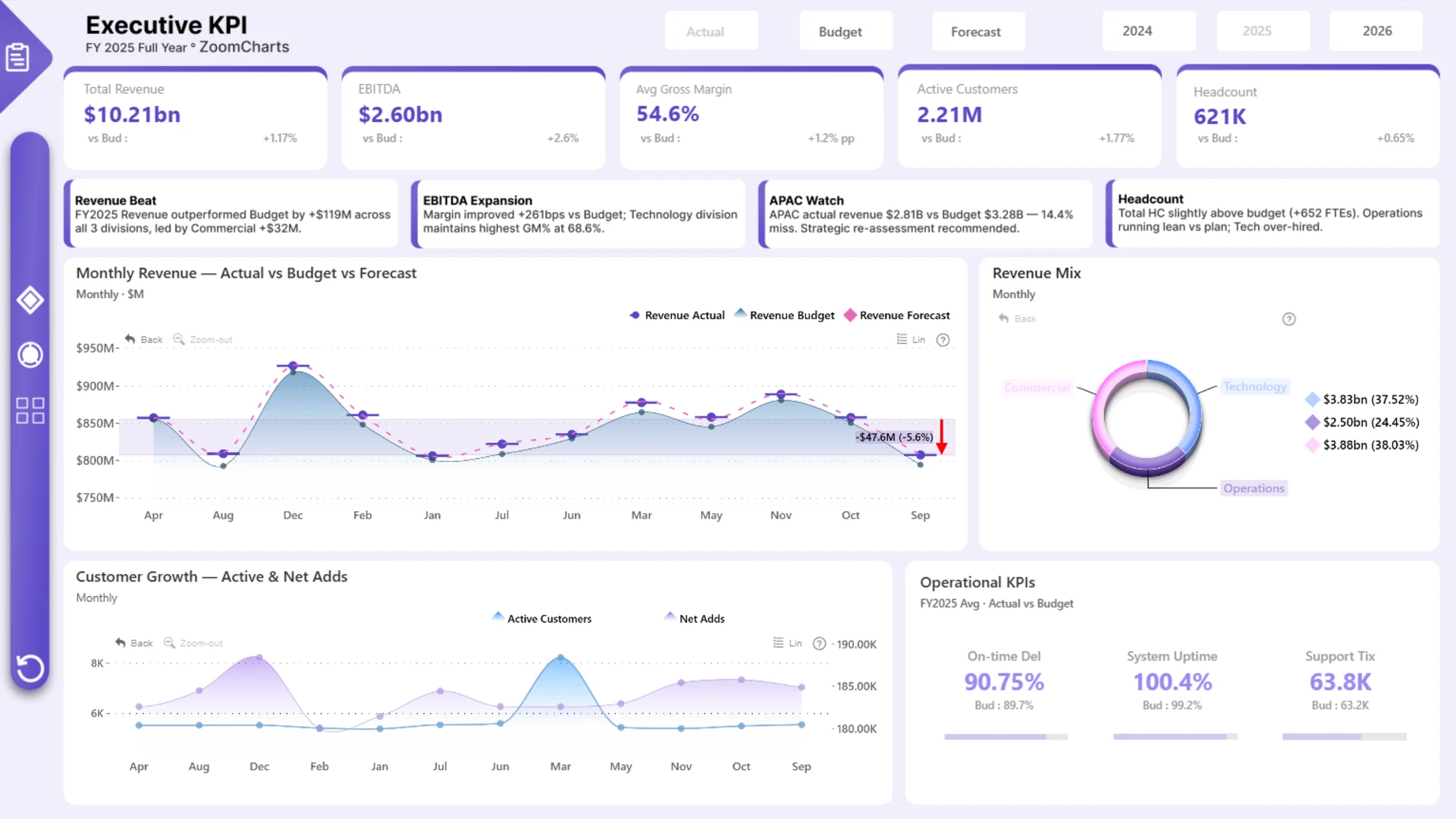
Abhijit Basak created this five-page dashboard with a landing page, executive summary, financial KPIs, regional analysis, and organizational drill-down. It covers revenue mix, customer growth, EBITDA trends, operational KPIs, and Actual, Budget, and Forecast comparisons.
The landing page provides a clear entry point, while the remaining pages keep each decision context focused. This structure can work well when the report serves both occasional executive users and analysts who return to it frequently.
Explore this dashboard template
ZoomCharts visuals used:
Drill Down Bubble PRO, Drill Down Combo PRO, Drill Down Combo Bar PRO, and Drill Down Donut PRO.
13. Power BI KPI Insights Dashboard
Best for: A consistent multi-page layout for senior executives
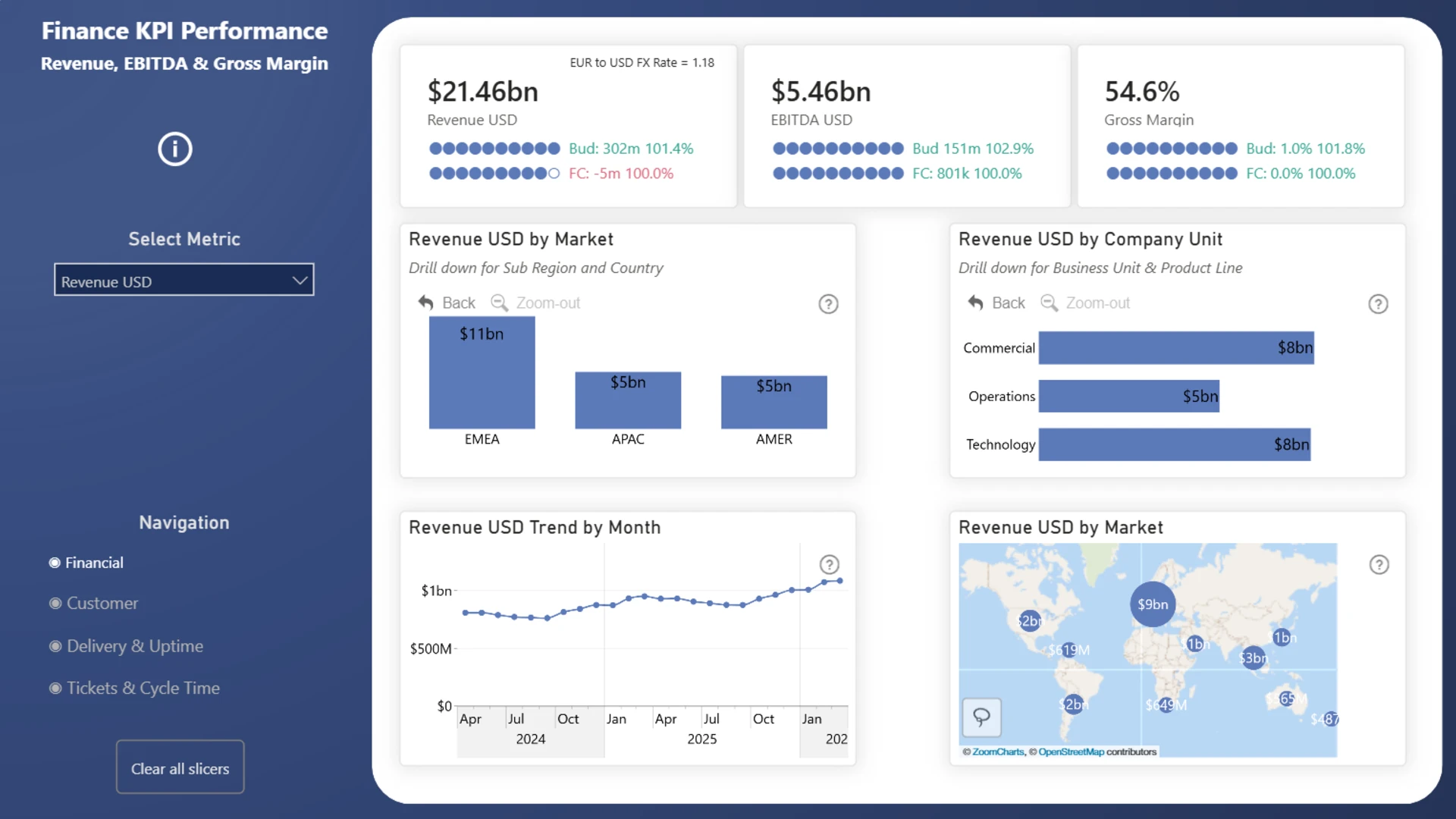
Steven Stanford created this four-page report with a uniform structure for senior executives. Consistent KPI cards and a shared information pane help users assess status, then drill down into markets, business units, and products without reinterpreting the layout on every page.
The business calculations remain straightforward, including Actual, Budget, Forecast, monthly totals, and variance. The greater complexity sits in the filtering logic. This balance keeps the dashboard easy to understand while preserving analytical depth.
Explore this dashboard template
ZoomCharts visuals used:
Drill Down Combo PRO, Drill Down TimeSeries PRO, Drill Down Combo Bar PRO, and Drill Down Map PRO.
Ideas for Your Next Power BI Executive Dashboard
- Lead with exceptions: Make it easy to see which KPIs are off plan before users scan the supporting detail.
- Keep comparisons consistent: Use the same labels and colors for Actual, Budget, Forecast, prior period, and target across every page.
- Build a route to the cause: Connect each KPI to the trend, variance, region, division, or business unit that explains it.
- Use the right chart for the question: Use timelines for change, waterfalls for contribution, maps for location, scatter charts for relationships, and compact composition charts only when the number of categories is limited.
- Keep navigation predictable: Use clear active states, stable filter placement, and obvious back-navigation in multi-page reports.
- Test the data model and performance: Validate KPI definitions, date logic, relationship direction, drill paths, security roles, and performance with production-sized data before publishing.
A good template can accelerate the design process, but it still needs to match your own KPI definitions, reporting calendar, data grain, and decision process. Replace the sample data connection, reconcile every headline measure to a trusted total, and test each interaction in Power BI Desktop and Power BI Service.
Browse more Power BI KPI dashboard examples and templates in the ZoomCharts Power BI Template Gallery.
Try ZoomCharts Drill Down Visuals Free for 30 Days
Use ZoomCharts Drill Down Visuals to add direct chart selection, filtering, cross-highlighting, and drill-down to your own Power BI executive reports. The free trial lasts 30 days and can be used while you build and test your report.
Start your free 30-day trial or explore more Power BI report templates.

Want more info like this?
Subscribe to our newsletter and be the first to read our latest articles and expert data visualization tips!