861
App Store Game Trends: A Decade of Insights (2008-2019)
App Store Game Trends: A Decade of Insights (2008-2019)
Report Author: Zakaria Fadili
861
Share template with others
Report submitted for FP20 Analytics ZoomCharts Challenge 18 (August 2024). The report was built with the Mobile Game Analysis dataset and includes ZoomCharts custom Drill Down PRO visuals for Power BI.
Author's description:
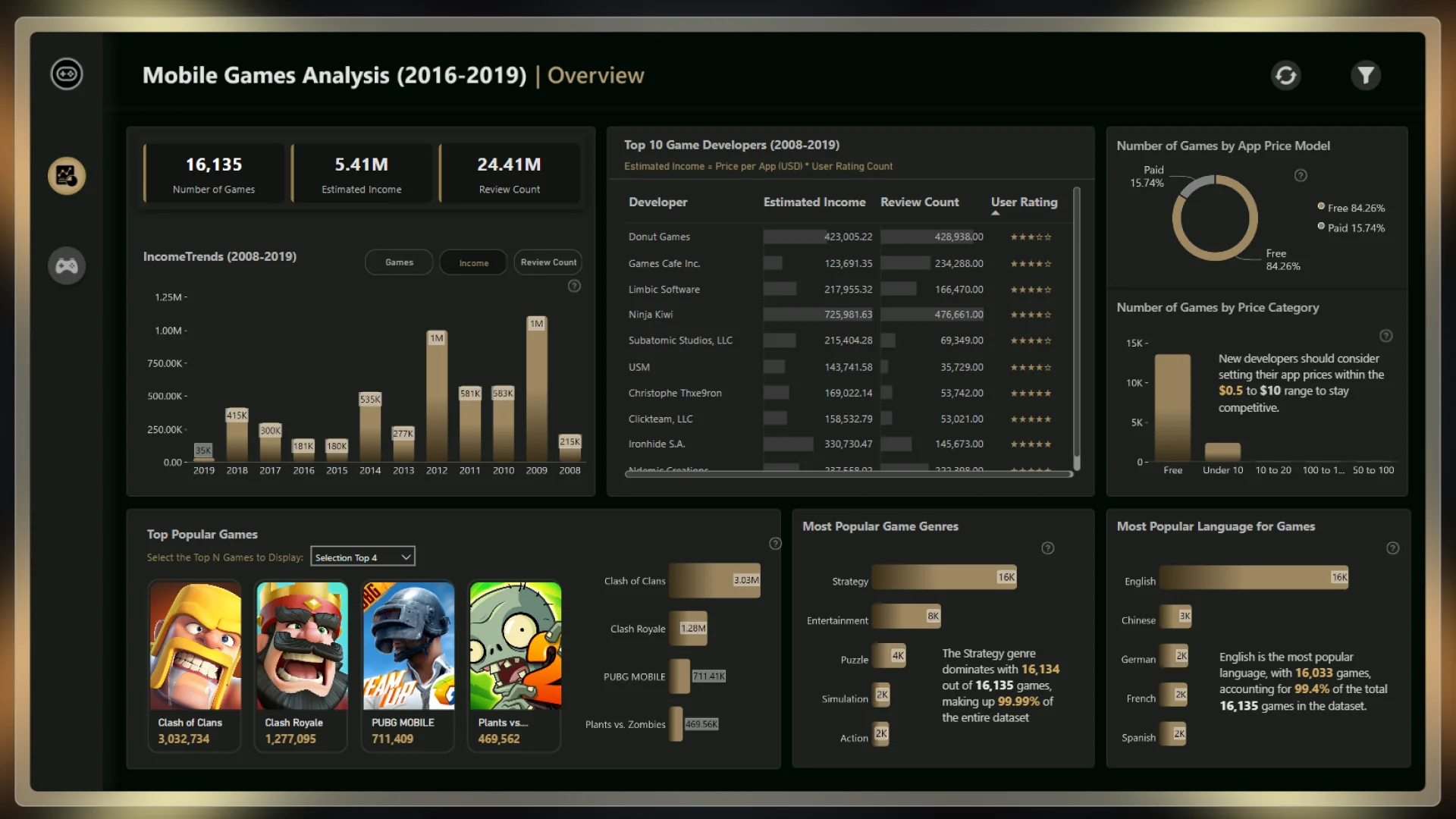
App Store Game Analysis report offers a detailed analysis of the App Store Games dataset across three pages: Overview, Developer Insights, and Games Details.
Overview: This page provides a snapshot of key metrics, such as user ratings, game prices, and popular genres over time. It highlights trends and insights, like the dominance of the Strategy genre, allowing stakeholders to quickly understand market dynamics from 2008 to 2019.
Games Details: This page offers a granular view of individual games, including user ratings, prices, and language availability. Interactive visuals, such as tables and slicers, allow users to filter and analyze data easily, making this page a valuable tool for in-depth analysis.
Overall, this report provides a comprehensive view of the App Store games market, enabling stakeholders to extract actionable insights and make strategic decisions.



4U Report Challenges
Participate in data challenges, build and submit reports to get free template downloads.
Join CommunityMobile view allows you to interact with the report. To Download the template please switch to desktop view.
How to use a PBIX template
Preview the interactive report, download the PBIX file, open it in Power BI Desktop, and replace the same data connection with your own dataset.
Preview and download
Explore the report online and download the PBIX template file.
Open in Power BI Desktop
Open the downloaded PBIX file in Power BI Desktop.
Connect your data
Replace the sample data source with your own dataset.
Refresh and adjust
Refresh the model and update fields or visual were needed.
Save and share
Save your report and publish it for your audience.


