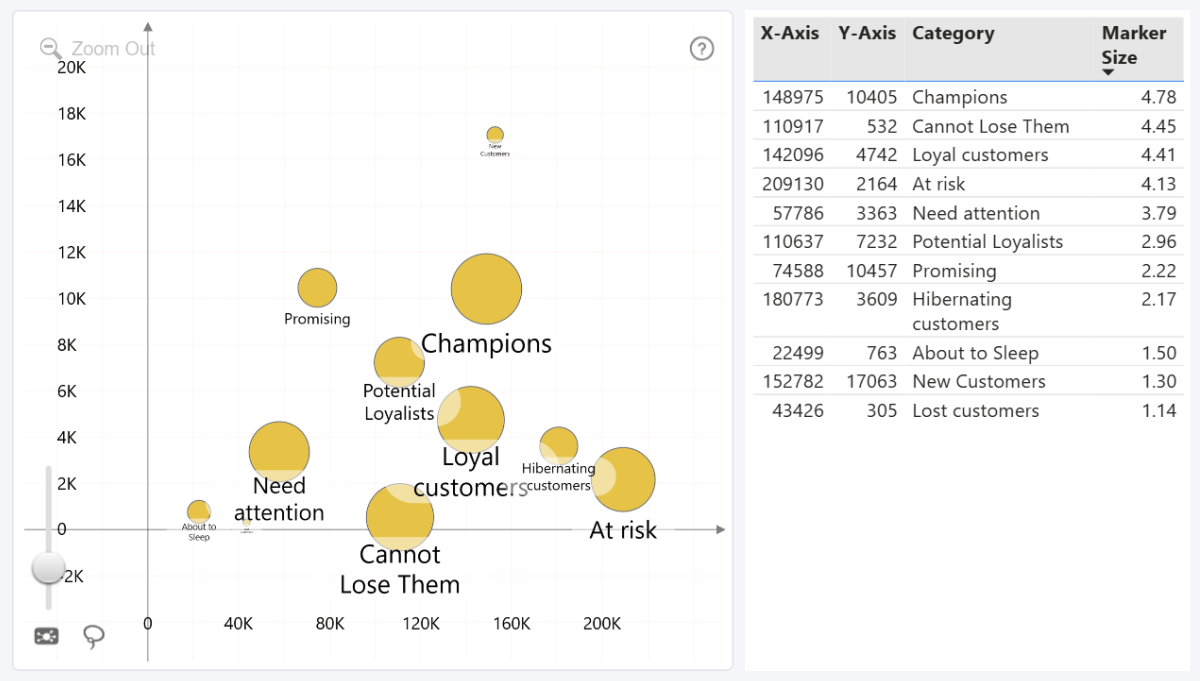
Drill Down Bubble PRO expands on our Scatter PRO visual for Power BI by introducing the Marker Size field, which will automatically scale node sizes based on the values in this field.
This will allow you to create bubble charts that can compare data across three dimensions, using x coordinate, y coordinate, and the marker size as methods to visualize the differences. Some examples:
| Use Case | Data points | X-Axis | Y-Axis | Marker Size |
|---|---|---|---|---|
| Sales analysis | Product lines | Cost of goods sold | Sold units | Profit |
| Customer Service | Agents | Average response time | Number of tickets | Average rating |
| Marketing | Campaigns | Total campaign cost | Engagements | Conversion rate |
You can set the minimum and maximum allowed marker size which will be applied to the lowest and highest values in the column/measure, and all values in between them will be scaled accordingly.
Was this helpful? Thank you for your feedback!
Sorry about that.
How can we improve it?