928
Urban Growth in South America
Urban Growth in South America
Report Author: Sweety Antoni David
928
Share template with others
Report submitted for Onyx Data DataDNA ZoomCharts Mini Challenge, February 2025. The report is based on the Demographic and Urbanization dataset and includes ZoomCharts custom Drill Down PRO visuals for Power BI.
Authors Description
Urban Growth in South America: A Generational Perspective
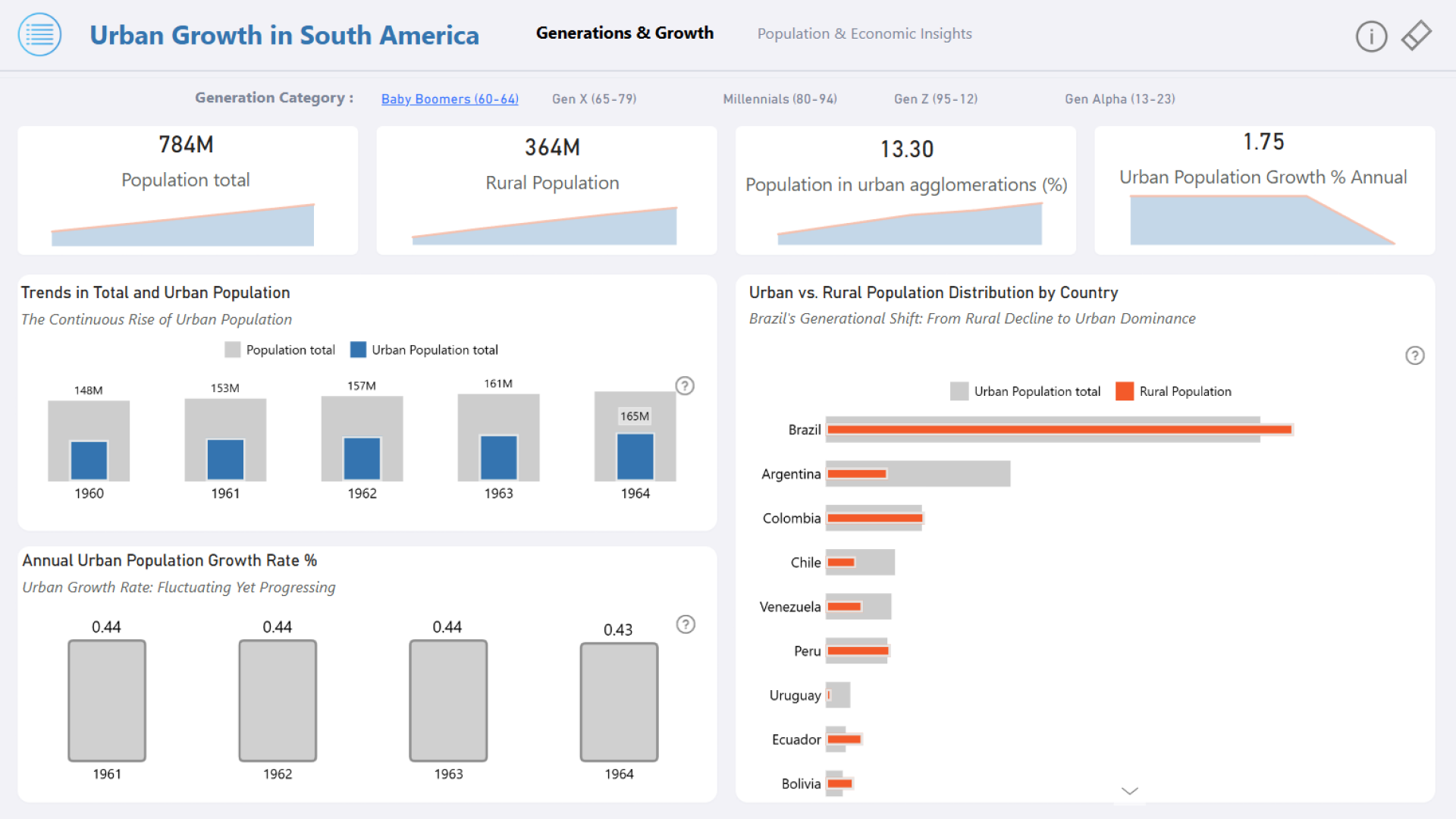
Urbanization in South America has accelerated over the years, transforming the region into one of the most urbanized in the world. Each generation has witnessed significant shifts:
Baby Boomers saw the early stages of urban growth.
Gen X experienced the fastest expansion, with Brazil's urban population surpassing its rural counterpart.
Millennials and Gen Z solidified urban dominance, with over 66% of the population residing in cities.
By Gen Alpha, urban growth continued but fluctuated, underscoring the need for sustainable urban planning.
Key Takeaways:
🔹 Rapid & Consistent Urbanization – Urbanization jumped from 13.3% during the Baby Boomers to over 66% by Gen Z, with a sharp decline in rural populations.
🔹 Urban vs. Rural Divide – Upper middle-income nations lead urbanization (13B urban, 4B rural), while high-income nations have minimal rural populations.
🔹 Income Group Trends – 91.57% of the population falls in the upper middle-income category, with Brazil leading in this segment.
🔹 Sustainable Growth Planning – With annual urban growth at 16.55%, cities must prioritize infrastructure and resource management for long-term sustainability.
This generational shift highlights the urgent need for adaptive urban policies that support economic growth while ensuring social and environmental balance.



4U Report Challenges
Participate in data challenges, build and submit reports to get free template downloads.
Join CommunityMobile view allows you to interact with the report. To Download the template please switch to desktop view.
How to use a PBIX template
Preview the interactive report, download the PBIX file, open it in Power BI Desktop, and replace the same data connection with your own dataset.
Preview and download
Explore the report online and download the PBIX template file.
Open in Power BI Desktop
Open the downloaded PBIX file in Power BI Desktop.
Connect your data
Replace the sample data source with your own dataset.
Refresh and adjust
Refresh the model and update fields or visual were needed.
Save and share
Save your report and publish it for your audience.


