logo
For Power BI Report Templates
  • Products
    • Custom Visuals for Power BI
    • Report Templates
  • Resources

      Resources

    • Documentation
    • Report Examples
    • Blog
    • Webinars
    • Video Tutorials
    • Visuals Gallery

    Support

    • ZoomCharts Assistance
    • Contact Sales
    • Contact Support
    • FAQ

    Challenges

    Challenges

    Improve your report creation skills by participating in free challenges for report creators.

    Learn more
    Get Developer License
  • Services
    • Power BI Report Development
    • Custom Visual Development
  • Challenges
  • Pricing
Get started
Get started
Get it now
Go back

Contents

Dashboard and report examples Power BI Finance Report for Revenue, EBITDA, and Margin Analysis
Go back

1363

Power BI Finance Report for Revenue, EBITDA, and Margin Analysis

Power BI Finance Report for Revenue, EBITDA, and Margin Analysis

Report
Report
Report
Report

More Report pages

Report
Report
Report
Report
Report Interact

Report Author: Jude Onuh

1363

Combo Timeline Donut KPI

Share template with others

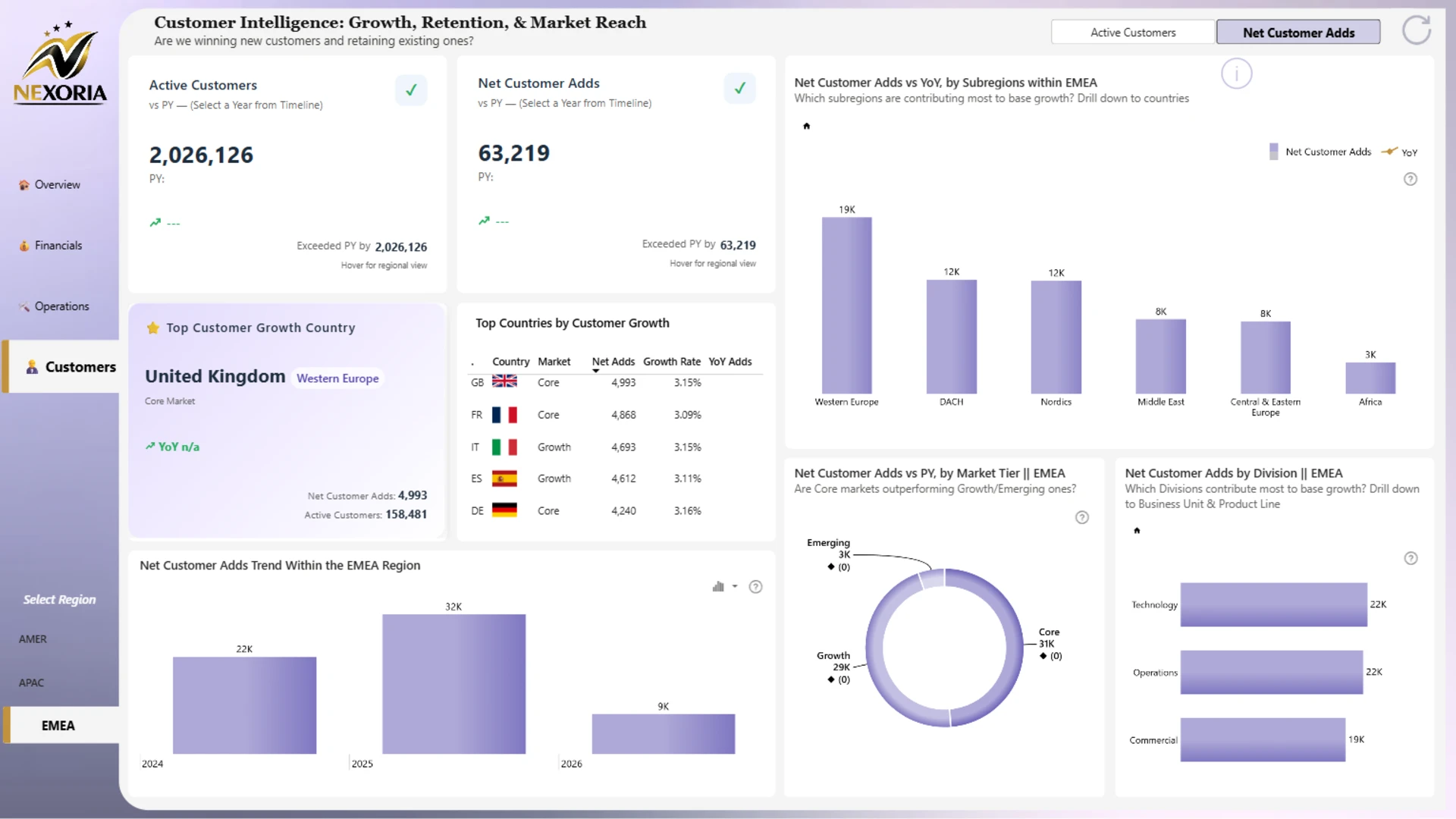
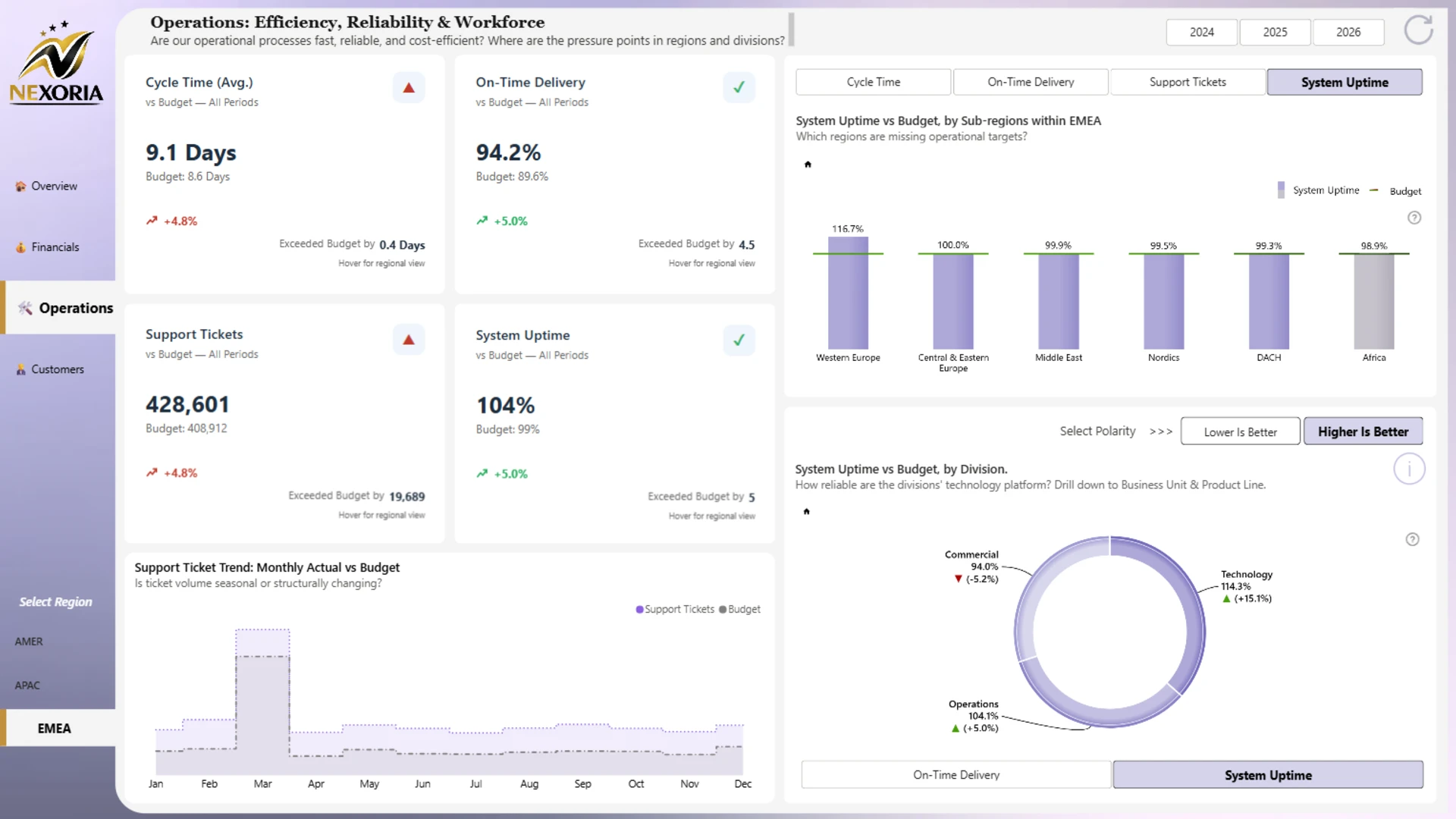
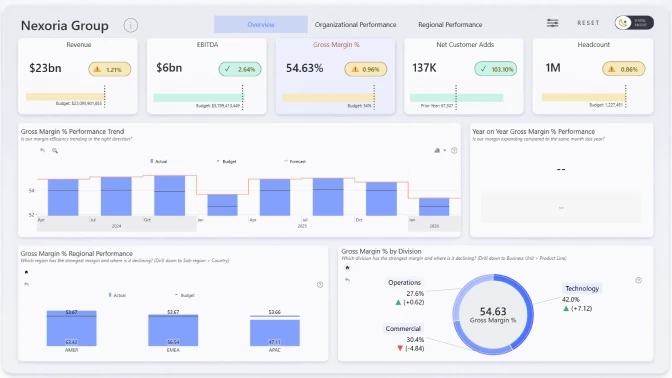
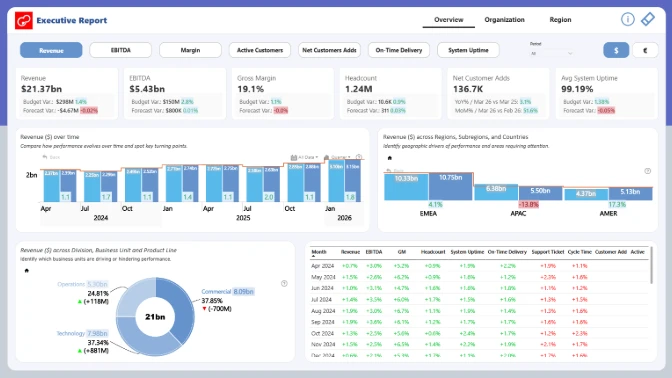
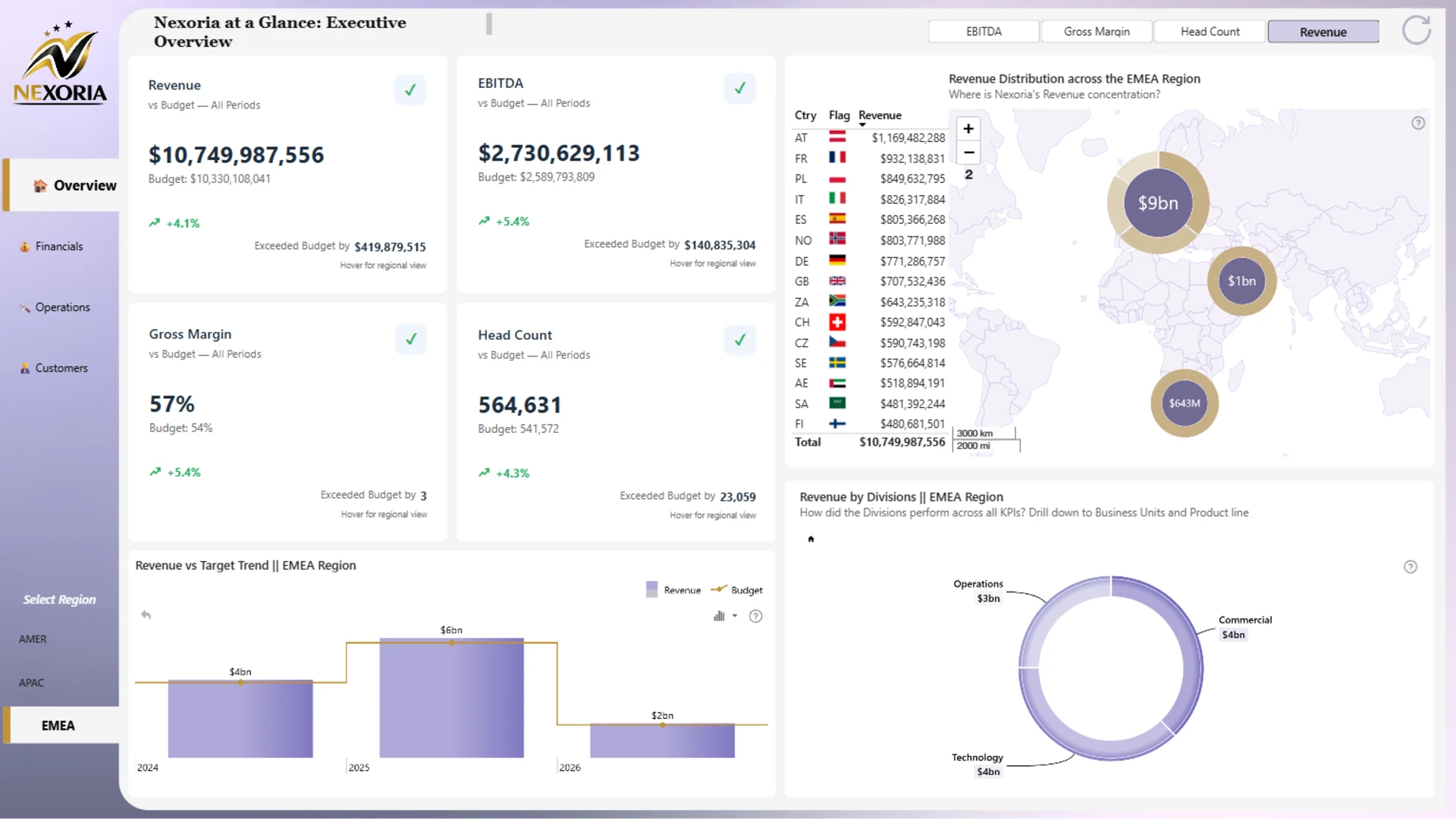
This finance dashboard example shows how Power BI can be used to analyze executive KPIs, financial performance, regional results, operational efficiency, and customer growth in one interactive report.

Built with ZoomCharts Drill Down custom visuals for Power BI, the report helps users track key finance and business metrics such as revenue, EBITDA, gross margin, headcount, active customers, net customer adds, on-time delivery, system uptime, support tickets, and cycle time. The report was submitted to the ZoomCharts “4U Reports Challenge” in April 2026.

The dashboard is designed for finance teams, executives, business analysts, operations leaders, and regional managers who need a clear way to compare actual results vs. budget vs. forecast, review performance by region, and understand which business areas are driving growth or pressure.

What you can analyze

Use this Power BI finance dashboard to track:

  • Revenue vs. budget
  • EBITDA vs. budget
  • Gross margin performance
  • Headcount vs. budget
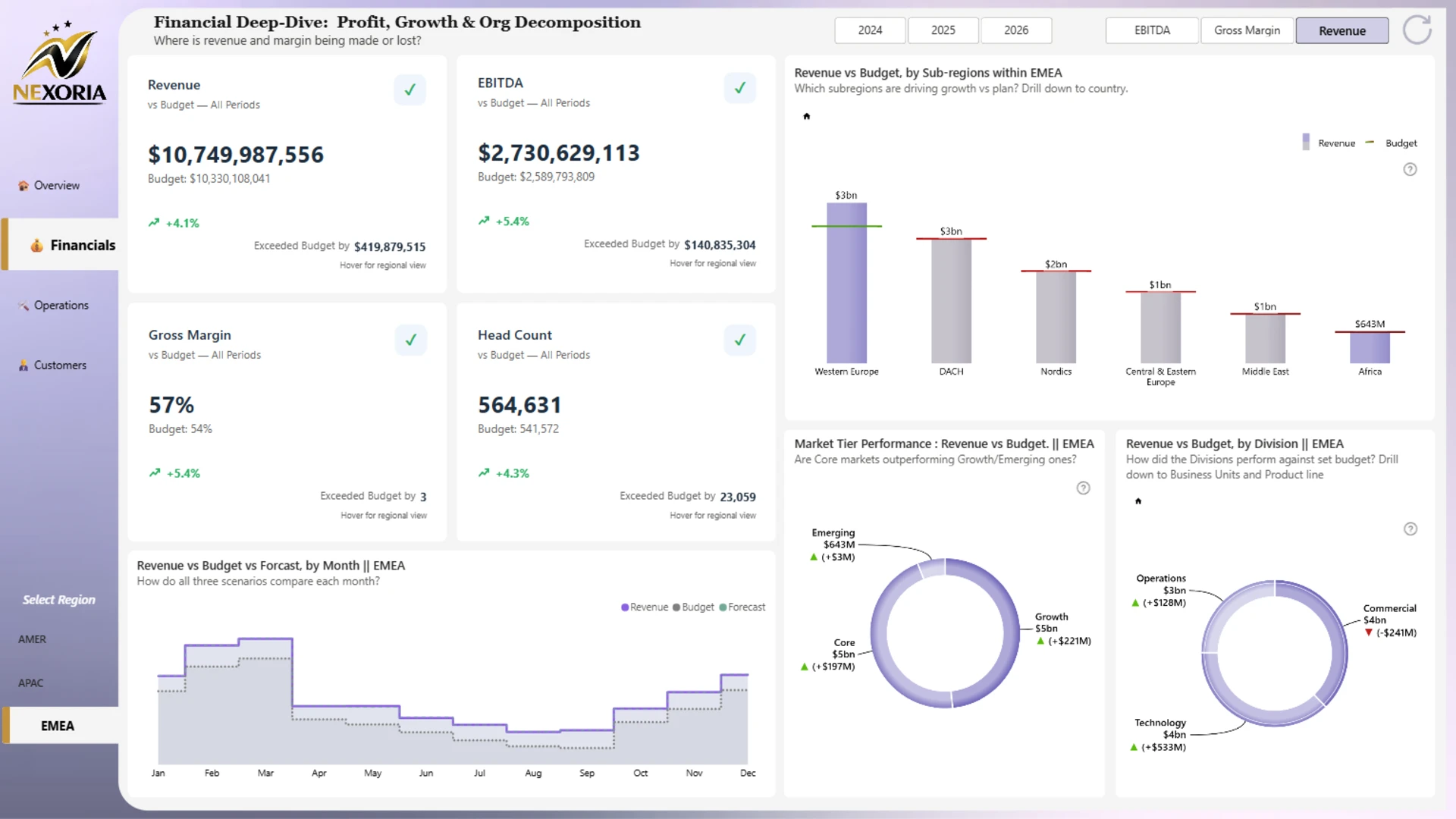
  • Actual vs. budget vs. forecast trends
  • Revenue distribution by region
  • Revenue by division, business unit, and product line
  • Operational KPIs such as cycle time, on-time delivery, support tickets, and system uptime
  • Customer KPIs such as active customers and net customer adds
  • Regional performance across AMER, APAC, and EMEA

Report pages

  • Executive overview: monitor revenue, EBITDA, gross margin, headcount, regional revenue distribution, and revenue vs. target trends.
  • Financials: compare revenue, EBITDA, gross margin, and headcount against budget and forecast across regions, subregions, divisions, and market tiers.
  • Operations: review operational efficiency, reliability, support tickets, cycle time, on-time delivery, and system uptime.
  • Customers: analyze active customers, net customer adds, customer growth by country, market tier, and division.

Interactive features

This report uses ZoomCharts Drill Down custom visuals for Power BI to make finance and KPI analysis easier to explore. Users can switch between KPIs, select regions, compare years, drill down from divisions to business units and product lines, and review regional performance with interactive charts, maps, and KPI cards.

Explore this Power BI finance dashboard example to see how interactive reporting can support executive reviews, finance performance analysis, budget tracking, regional analysis, and strategic decision-making.
 

ZoomCharts visuals used

Drill Down Combo PRO Drill Down Combo PRO
Drill Down Timeline PRO Drill Down Timeline PRO
Drill Down Donut PRO Drill Down Donut PRO

4U Report Challenges

Participate in data challenges, build and submit reports to get free template downloads.

Join Community

Mobile view allows you to interact with the report. To Download the template please switch to desktop view.

Similar reports

All Reports 4 results
New
Report Card

Enterprise Executive KPI Power BI Report

882

New
Report Card

Power BI Data Analytics Dashboard

331

New
Report Card

Power BI Budget Dashboard for Executive Reporting

1396

Explore all reports

Was this helpful? Thank you for your feedback!

Sorry about that.

How can we improve it?

Power BI Finance Report for Revenue, EBITDA, and Margin Analysis

Report Author: Jude Onuh

1363

ZoomCharts

Welcome to ZoomCharts

You’re almost there! Create an account to download reports.

or
Sign up with Microsoft

Verify your email address

We have sent a code to your email address. Please input the code below.

Didn't receive code? Request again (after 30 seconds)

Already have an account? Log in

ZoomCharts

Log in to your ZoomCharts account

Log in with Microsoft
or
Forgot password?

Reset your password

We'll email you instructions on how to reset your password

Don't have an account? Sign up

Please add credits

You have 0 available downloads.
Get more credits or upgrade your plan to continue.

View pricing
logo
[email protected]
+44 204 577 3993
logo

Products

Drill Down Bubble PRO Drill Down Line PRO Drill Down Network PRO Drill Down Waterfall PRO Drill Down Graph PRO Drill Down Combo PRO Drill Down Combo Bar PRO Drill Down Donut PRO Drill Down Pie PRO Drill Down TimeSeries PRO Drill Down Timeline PRO Drill Down Map PRO Drill Down Scatter PRO All Visuals

Resources

Report Examples Webinars Blog ZoomCharts Academy Visuals Gallery Documentation Custom Visual Development Subscribe to News

Solutions

Custom Visual Development

Company

Pricing About Us Partners Leave feedback Join PowerGroup EU Funding

Help

ZoomCharts Assistance Contact Sales Contact Support FAQ AI Information

Drill Down Line PRO Drill Down Bubble PRO Drill Down Network PRO Drill Down Waterfall PRO Drill Down Graph PRO Drill Down Combo PRO Drill Down Combo Bar PRO Drill Down Donut PRO Drill Down Pie PRO Drill Down TimeSeries PRO Drill Down Timeline PRO Drill Down Map PRO Drill Down Scatter PRO All Visuals

Report Examples Webinars Blog ZoomCharts Academy Visuals Gallery Documentation Custom Visual Development Subscribe to News

Custom Visual Development

Pricing About Us Partners Leave feedback Join PowerGroup EU Funding

ZoomCharts Assistance Contact Sales Contact Support FAQ AI Information
+44 204 577 3993
[email protected]

Ready to get in touch?

Contact our experts with any question about Power BI and ZoomCharts for Free!

Contact us

© 2026, Data Visualization Software Lab

U.S. Patents No. 11,645,343; 11,921,804; 12,346,389

Cookies
Privacy Policy
Global
Legal
Patent
warning

Error message

success

Success info: Done!

ZoomCharts AI Assistant

We noticed you're using an old OS version.

For the best experience, we recommend upgrading to ensure that all website features display correctly.

Cookie settings

We use necessary cookies for site functionality, as well as statistic, marketing, and preference cookies to enhance your experience. For more information and to manage your preferences, please visit our Cookie policy