1023
Movies Across Times (Top 10k)
Movies Across Times (Top 10k)
Report Author: Miikka Karava
1023
Share template with others
Report submitted for Onyx Data DataDNA ZoomCharts Mini Challenge, April 2024. The report was built based on The Movie Database dataset and includes ZoomCharts custom Drill Down PRO visuals for Power BI.
Author's description:
Here is my submission on the onyx-data-april-2024# IMDb Movie Database challenge:
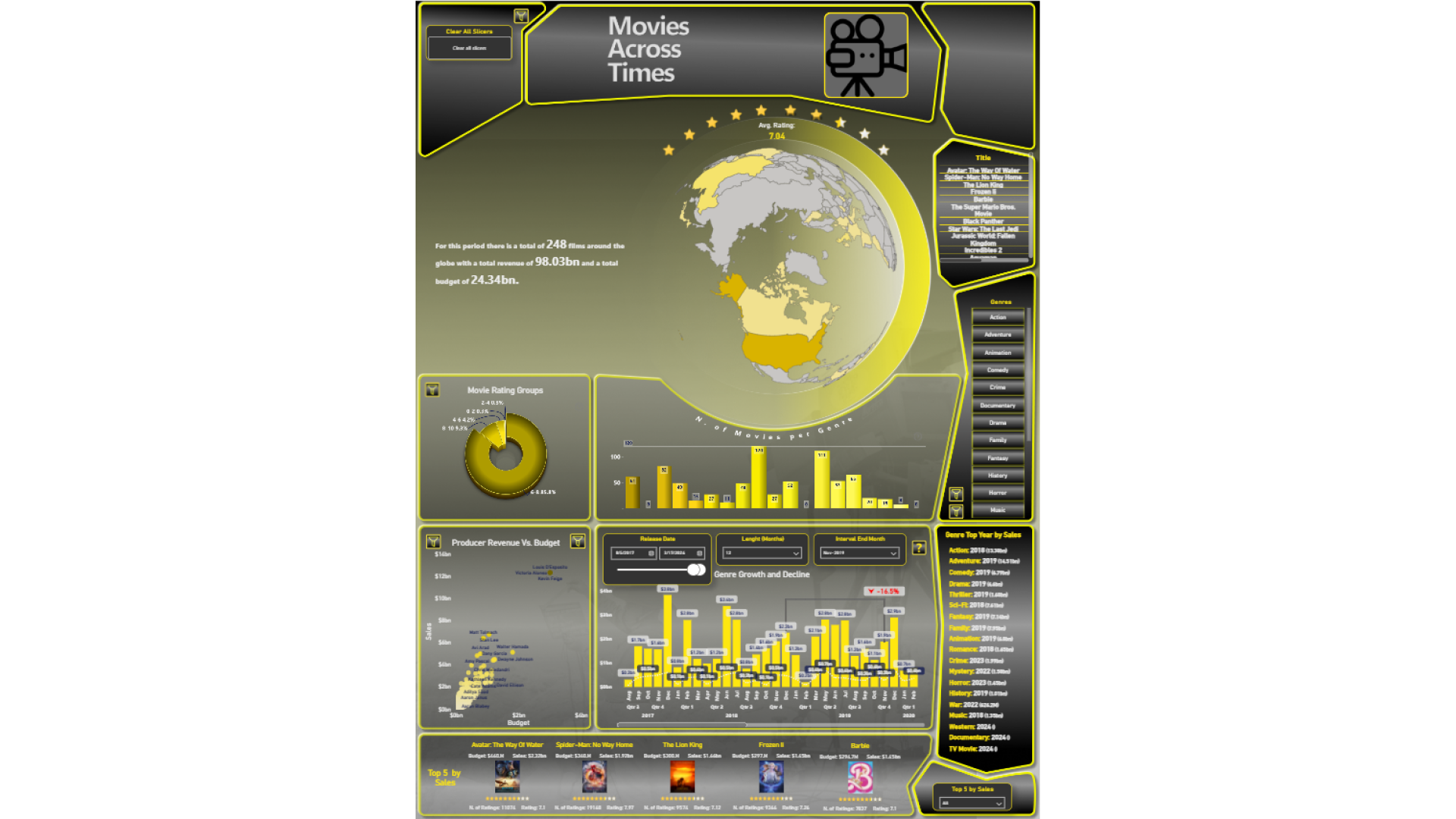
🎥 The Dashboard contains insights and visuals for top 10k movies ranked based on Total Revenue.
🗺 The top section has summarization for the selected movie(s), time period and a globe map showing where the movies were filmed.
🍩 Below on left there is a donut visual for movies by rating groups and movies by runtime. Below is a dynamic scatter plot visual which has a view for both Producers and Directors for comparisons between budget and sales.
🔻 🔺 The right section has top sales and budget comparisons for each genre and option to view growth/decline on each genre within selected time interval.
📜 The bottom section features top 5 KPI statistics for Movies, Genres as well as Producers, Directors and so on.


4U Report Challenges
Participate in data challenges, build and submit reports to get free template downloads.
Join CommunityMobile view allows you to interact with the report. To Download the template please switch to desktop view.
How to use a PBIX template
Preview the interactive report, download the PBIX file, open it in Power BI Desktop, and replace the same data connection with your own dataset.
Preview and download
Explore the report online and download the PBIX template file.
Open in Power BI Desktop
Open the downloaded PBIX file in Power BI Desktop.
Connect your data
Replace the sample data source with your own dataset.
Refresh and adjust
Refresh the model and update fields or visual were needed.
Save and share
Save your report and publish it for your audience.


