Controls whether the Hide Nodes Without Connections/Links action is available in the chart toolbar. The setting is turned off by default.
Drill Down Graph PRO allows report viewers to hide nodes that have no connections or links to other nodes. This helps reduce visual clutter and makes it easier to focus on connected relationships.
To hide isolated nodes, click Hide Nodes Without Connections/Links in the chart toolbar. All nodes without connections or links will be hidden from the current graph view.
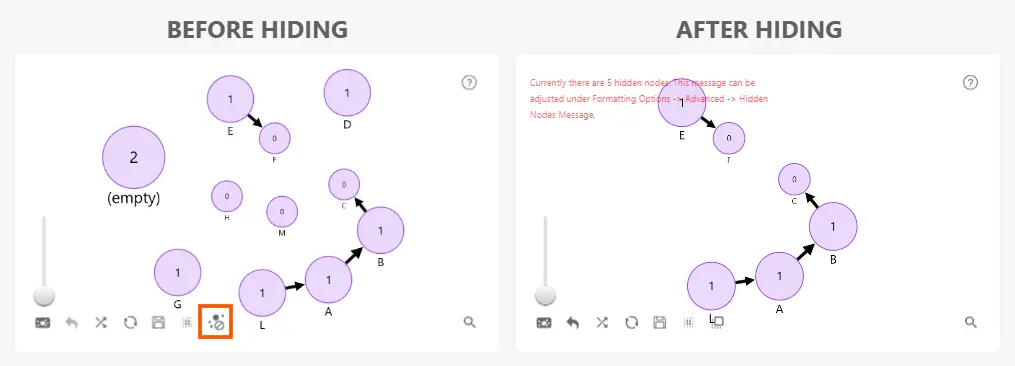
When nodes are hidden, a message indicating the number of hidden nodes can be displayed in the upper-left corner of the chart. This message can be enabled, disabled, or customized under Advanced → Hidden Nodes Message.
To restore hidden nodes, use the existing Unhide Nodes action in the chart toolbar.
Was this helpful? Thank you for your feedback!
Sorry about that.
How can we improve it?