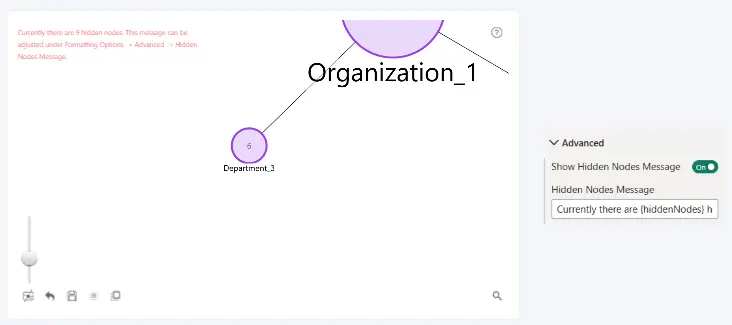
When one or more nodes are hidden, Drill Down Graph PRO can display a message in the upper-left corner of the chart indicating the number of hidden nodes.
The message can be enabled or disabled, and its text can be customized using the following settings.
Show Hidden Nodes Message
Controls whether the hidden-node count message is displayed on the chart.
- On: Displays the message when at least one node is hidden.
- Off: Hides the message.
Hidden Nodes Message
Defines the text displayed when nodes are hidden.
Default message:
Currently there are {hiddenNodes} hidden nodes. This message can be adjusted under Formatting Options -> Advanced -> Hidden Nodes Message.
Use the {hiddenNodes} placeholder to dynamically display the current number of hidden nodes. You can customize the surrounding text to match the terminology used in your report.
Was this helpful? Thank you for your feedback!
Sorry about that.
How can we improve it?