Create clear and visually engaging organizational charts and hierarchy reports with the Card node type in Drill Down Graph PRO. Instead of displaying each node as a simple shape or text label, Card nodes present hierarchy items as structured cards that can contain text, images, and additional contextual information.
When Node Type is set to Card, the visual is especially effective when combined with the Hierarchy layout. This makes it ideal for scenarios such as:
- Organizational charts
- Team structures
- Department hierarchies
- Responsibility maps
- People directories
- Product or asset hierarchies
If an image field is provided, each card can display an image alongside its content, making it easier for users to identify people, departments, or other entities at a glance.
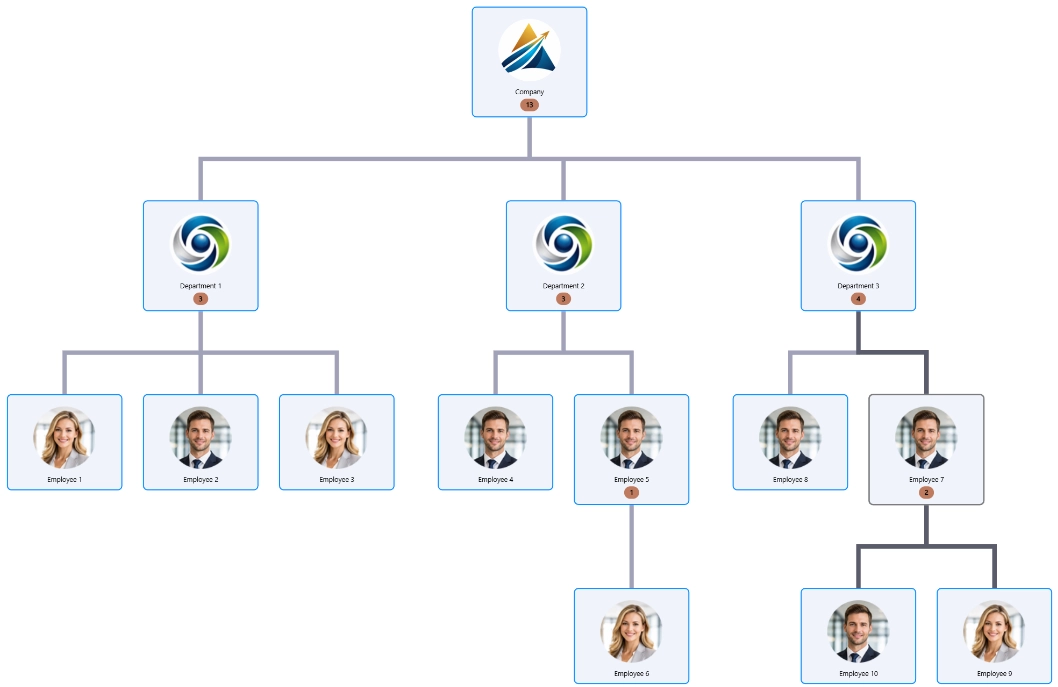
Customize Card Appearance
Card nodes provide dedicated formatting options so you can match the visual to your report design.
Available customization includes:
- Card padding to control spacing around card content.
- Image padding for adjusting the spacing around images.
- Image scaling and alignment to control image size and position.
- Corner radius to create square or rounded cards.
These settings make it easy to create clean, modern hierarchy reports that align with your organization's branding.
Display Child Node Counts
For larger hierarchies, you can enable Child Node Count to display the number of child nodes contained within each parent card. This gives users immediate insight into the size of a hierarchy branch without expanding it.
You can choose whether the count represents:
- Direct children only, or
- All descendants within the branch
The appearance of the count badge can also be customized to match the report's visual style.
Best Use Cases
The Node Type is set to Card node type is designed for scenarios where hierarchy information should be both informative and visually rich. Combined with the Hierarchy layout, it helps transform complex relationships into clear, easy-to-navigate reports, making it an excellent choice for organizational structures, people-focused reporting, and other hierarchical datasets.
Was this helpful? Thank you for your feedback!
Sorry about that.
How can we improve it?