This setting controls label font (color, size, family, style) and provides a toggle to manually order inside label items.
Label visibility settings are available for both Outside Labels and Inside Labels. However, the same label type cannot be enabled in both settings at the same time. Enabling a label type in one setting will automatically disable it in the other setting.
Text
- Font Family
Defines the font family used for label text.
The default value for this property is “Segoe UI”, but it can be any other Power BI supported Font family. - Font Size
This is the default font size for all labels.
The default value for this property is 9pt, but it can be any value between 8 and 60. - Font Style
Defines font weight and style. The default value for this property is “Regular”, but it can be any of the following:- Regular
- Bold
- Italic
- Bold and Italic
- Font Color
Sets the text color of labels.
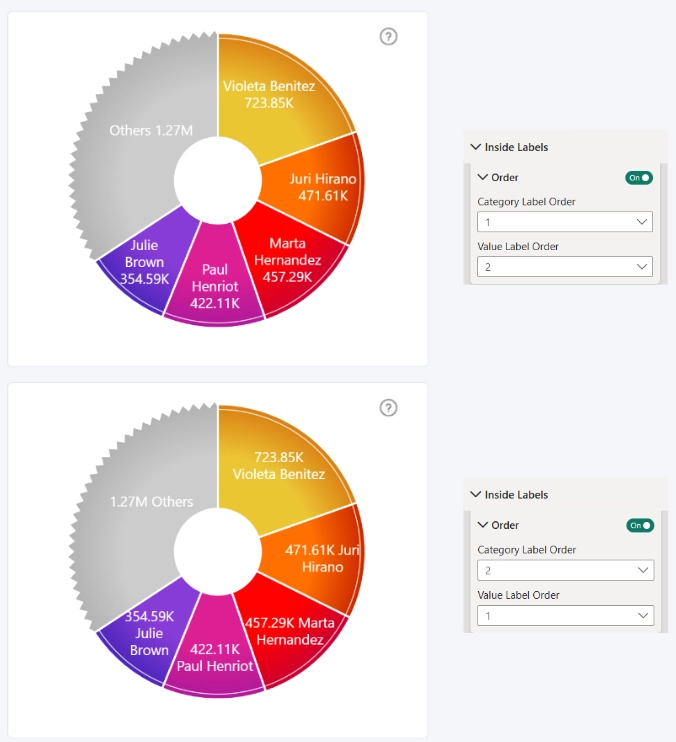
Adjust Inside Label Order (Toggle)
Allows manual control over the order of label items inside the slice.
Order Settings:
- Category Label Order
- Value Label Order
- Percentage Label Order
- Change Label Order
Was this helpful? Thank you for your feedback!
Sorry about that.
How can we improve it?