1957
Used Car Sales Data Analysis
Used Car Sales Data Analysis
Report Author: Rashmi Gandhe
1957
Share template with others
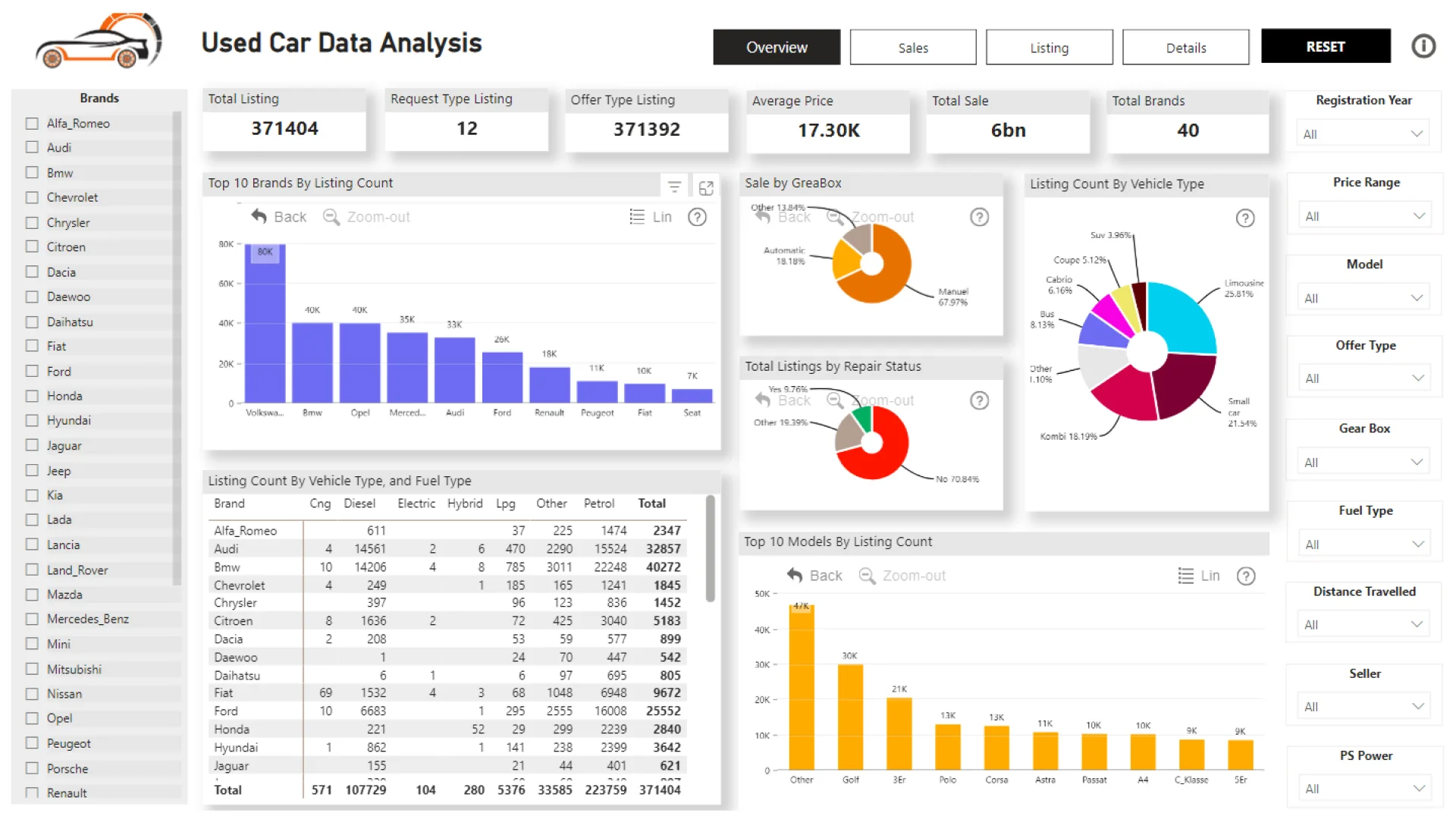
Report submitted for Onyx Data DataDNA ZoomCharts Mini Challenge, March 2024. The report was built based on eBay Used Car Sales Analysis dataset and includes ZoomCharts custom Drill Down PRO visuals for Power BI.
Author's description:
Steps followed to do analysis of the "Used Car data" Data cleaning: Converted the German language text/words to English to make report more readable. Checked duplicates changed data type, removed unwanted columns from the dataset. Converted flat file data set into Fact Table and Dimension tables. Created the Star schema data model from the given data set. Created calculated columns and the measures to use on the report.
Data Visualization: Created 4 Page Report to do data analysis of Used car data. Report User Can search/filter through the different filters provided on the report. (Brands, Models, Registration Date, Vehicle type, Fuel type, Greabox Type, Price Range, PS Power Range, Distance travelled by Vehicle etc) Added Drill through feature to navigate from charts to detail page. In this report we are doing the different analysis about the number of listings and the Sale Amount by Brands/Model, Vehicle type, Gearbox, fuel type etc Added the Reset all slicers/filter feature to clear the data. Added Information button to guide user about different areas of the report.
ZoomCharts visuals used




4U Report Challenges
Participate in data challenges, build and submit reports to get free template downloads.
Join CommunityMobile view allows you to interact with the report. To Download the template please switch to desktop view.
How to use a PBIX template
Preview the interactive report, download the PBIX file, open it in Power BI Desktop, and replace the same data connection with your own dataset.
Preview and download
Explore the report online and download the PBIX template file.
Open in Power BI Desktop
Open the downloaded PBIX file in Power BI Desktop.
Connect your data
Replace the sample data source with your own dataset.
Refresh and adjust
Refresh the model and update fields or visual were needed.
Save and share
Save your report and publish it for your audience.


