1539
Onyx Data November 2024 Challenge!
Onyx Data November 2024 Challenge!
Report Author: Md Mizanur Rahman Nayan
1539
Share template with others
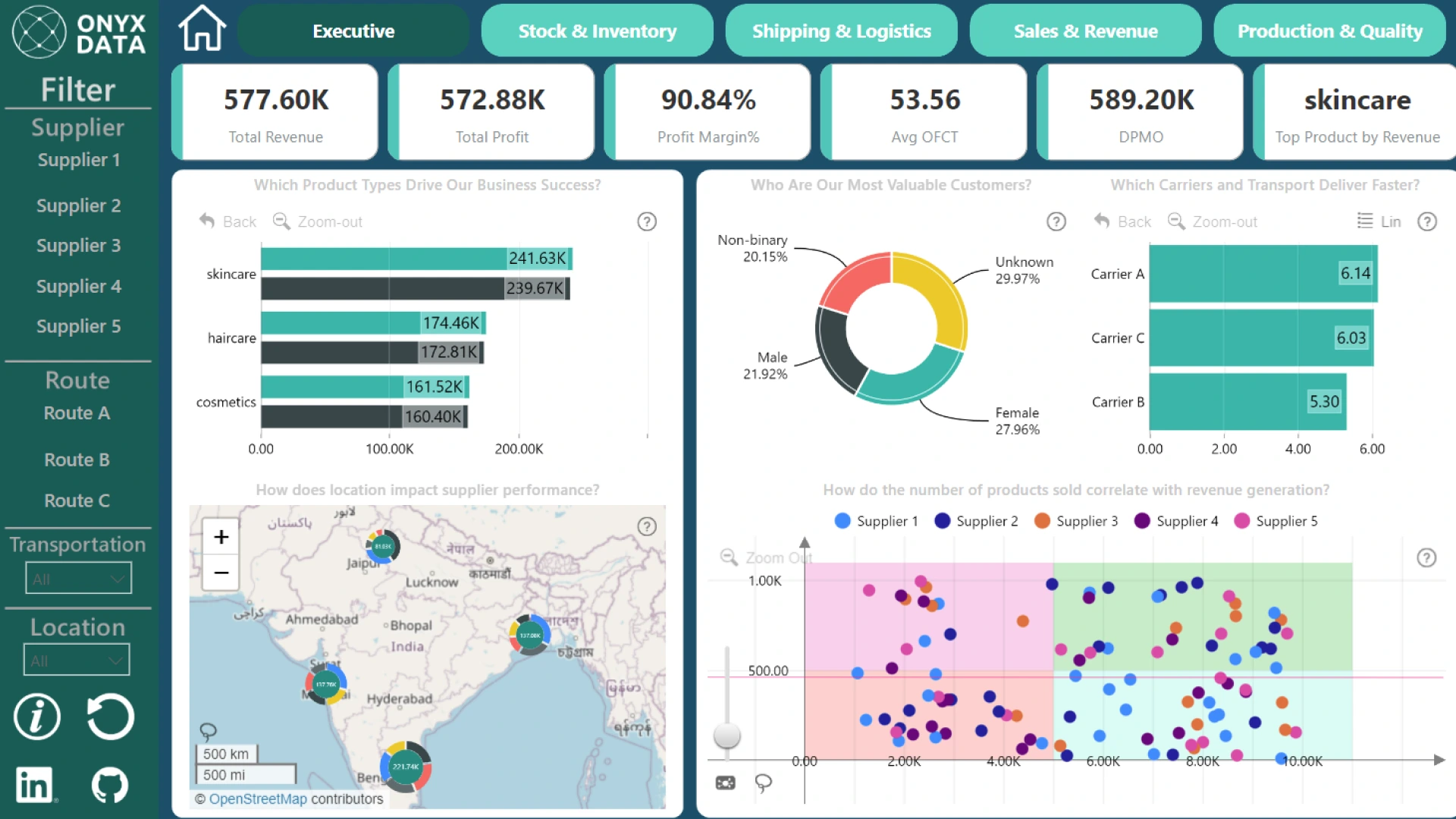
Report submitted for Onyx Data DataDNA ZoomCharts Mini Challenge, November 2024. The report is based on the Supply Chain Analysis dataset and includes ZoomCharts custom Drill Down PRO visuals for Power BI.
Author's description:
🚀 Highlights of My Report I designed a Logistics Report that explores: Stock and Inventory: Tracking stock availability, inventory turnover, and overstocked SKUs with low sales. Shipping & Logistics: Comparing shipping costs by carrier, routes, and transportation modes. Sales & Revenue: Identifying top-performing SKUs and revenue trends across regions. Production & Quality: Analyzing defects per million opportunities (DPMO) and production efficiency.
🔍 Key Insights Discovered Stock Optimization: Identified SKUs with high stock levels but low sales for action. Shipping Performance: Carrier B emerged as the most efficient, reducing both cost and time. Regional Demand Analysis: Pinpointed regions with demand-supply imbalances using map visualizations. Production Metrics: Correlated defect rates with production times to enhance quality control.
ZoomCharts visuals used





4U Report Challenges
Participate in data challenges, build and submit reports to get free template downloads.
Join CommunityMobile view allows you to interact with the report. To Download the template please switch to desktop view.
How to use a PBIX template
Preview the interactive report, download the PBIX file, open it in Power BI Desktop, and replace the same data connection with your own dataset.
Preview and download
Explore the report online and download the PBIX template file.
Open in Power BI Desktop
Open the downloaded PBIX file in Power BI Desktop.
Connect your data
Replace the sample data source with your own dataset.
Refresh and adjust
Refresh the model and update fields or visual were needed.
Save and share
Save your report and publish it for your audience.


