4718
Power BI Employee Performance & Workforce Analytics Dashboard
Power BI Employee Performance & Workforce Analytics Dashboard
More Report pages
Report Author: Arunkumar D
4718
Share template with others
Summary
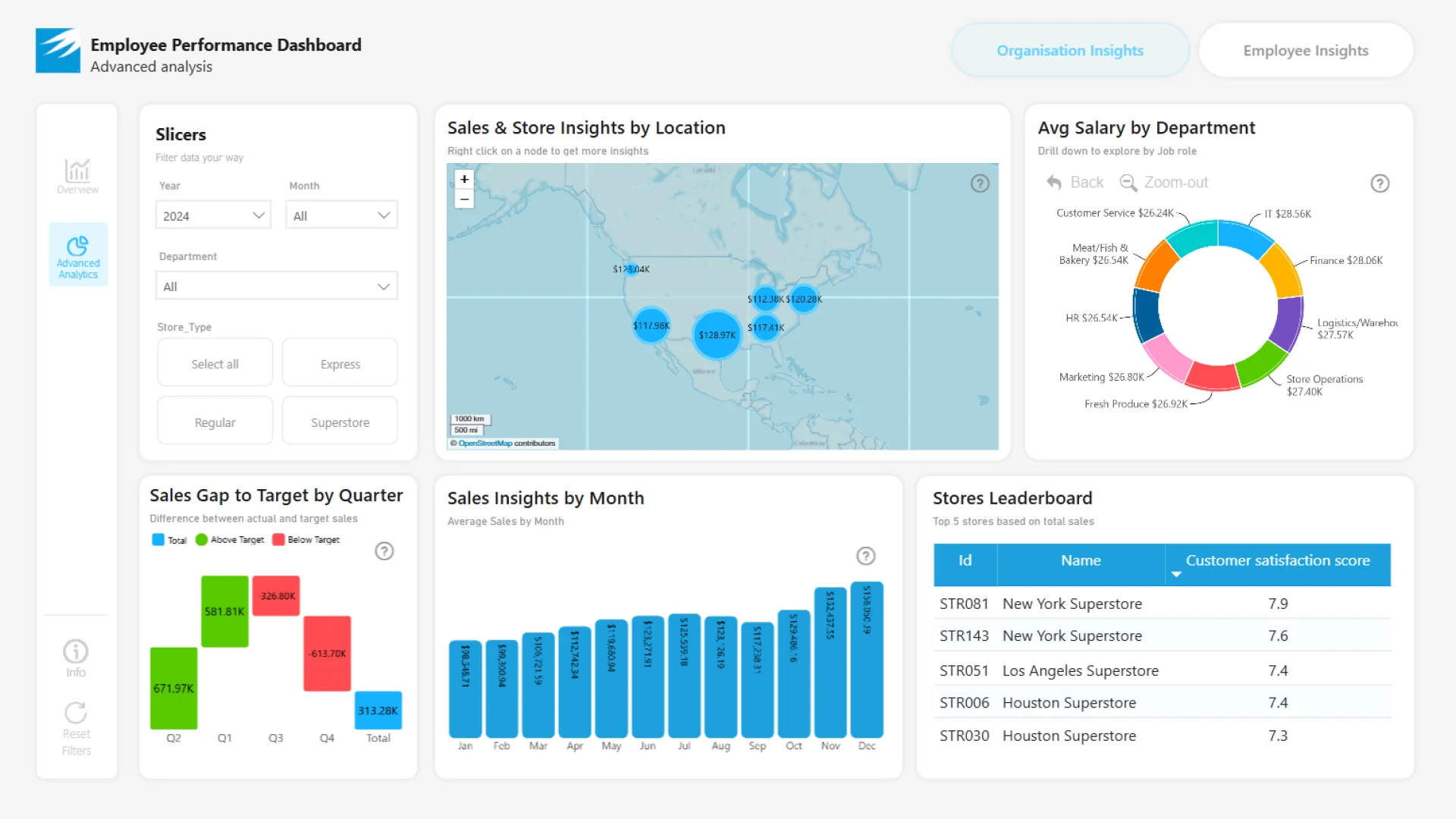
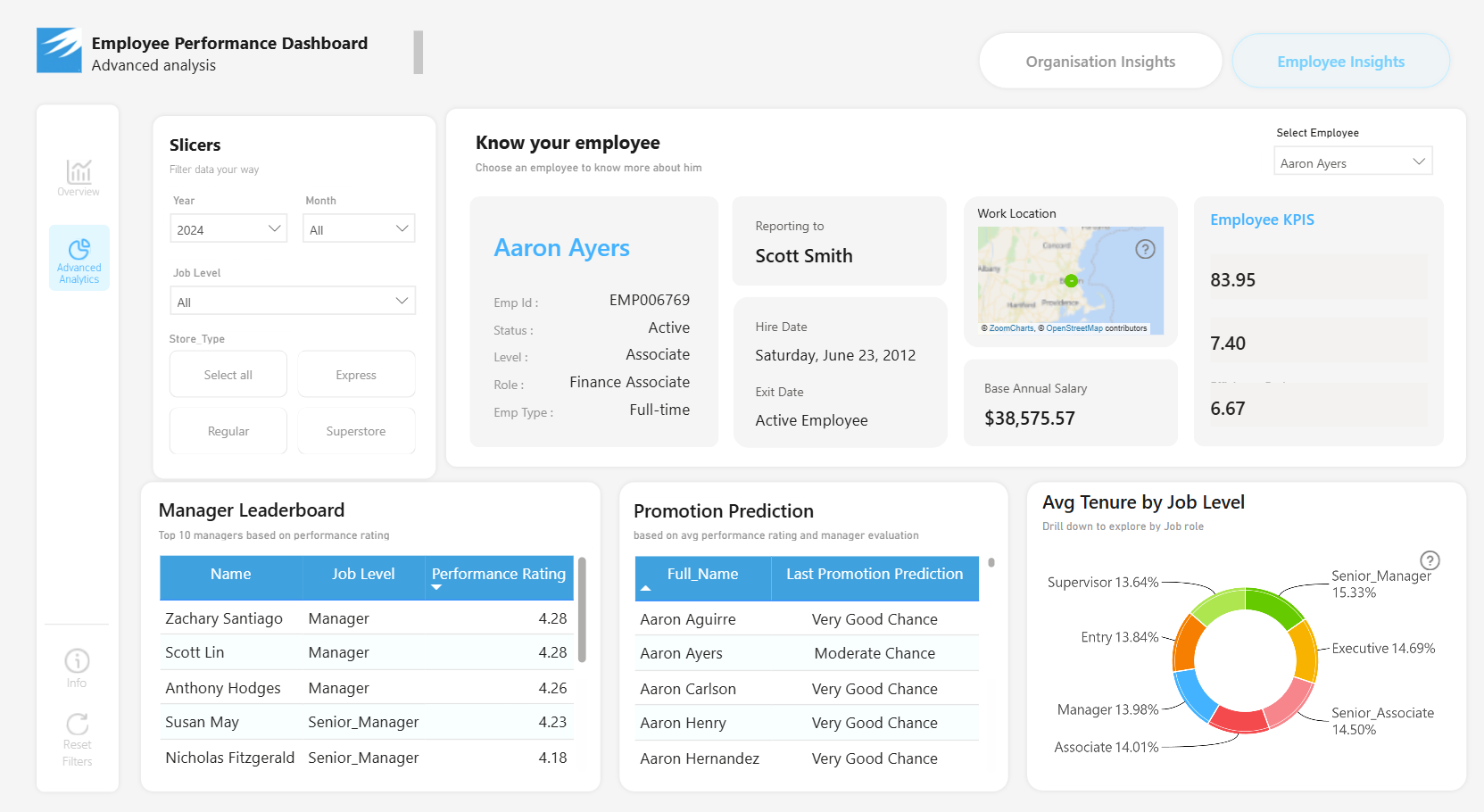
This Power BI employee performance dashboard helps HR and business leaders analyze workforce performance, training impact, compensation effectiveness, salary trends, and organizational health. It combines high-level workforce KPIs with detailed organizational and employee-level analysis.
The report was created by Arunkumar D for FP20 Analytics ZoomCharts Data Challenge 30 in September 2025. It uses the Employee Performance HR dataset, which contains more than 497,000 employee records.
Key Insights of the Power BI Employee Performance & Workforce Analytics Dashboard
The report is structured in two main pages, with additional bookmarks for organizational and employee insights. Its primary areas of analysis include:
- Employee performance: review workforce performance through high-level KPIs and detailed employee breakdowns
- Training impact: examine how training relates to the employee and organizational measures available in the report
- Compensation effectiveness: compare salary information and compensation patterns across the workforce
- Salary trends: analyze how salary measures vary across departments and other organizational groups
- Organizational performance: explore sales performance, departmental salary distribution, and store-level metrics
- Employee profiles: review detailed information and performance measures for individual employees
Combo, Combo Bar, Map, Waterfall, and Donut visuals provide trend, comparison, geographic, change, and category-composition views. Interactive bookmarks, filters, and navigation buttons help users switch between workforce summaries, organizational insights, and employee-level details.
How to Use This Power BI Employee Performance & Workforce Analytics Dashboard
Start with the overview page to review the main workforce KPIs. Open the advanced analysis page and use the organizational and employee bookmarks to switch between departmental, store-level, and individual employee perspectives.
Download the PBIX template to examine the report structure, calculations, bookmarks, data model, and visual settings in Power BI Desktop. Connect it to your own HR data and adjust the employee, training, compensation, department, store, and performance fields as needed.
ZoomCharts visuals used





4U Report Challenges
Participate in data challenges, build and submit reports to get free template downloads.
Join CommunityMobile view allows you to interact with the report. To Download the template please switch to desktop view.
How to use a PBIX template
Preview the interactive report, download the PBIX file, open it in Power BI Desktop, and replace the same data connection with your own dataset.
Preview and download
Explore the report online and download the PBIX template file.
Open in Power BI Desktop
Open the downloaded PBIX file in Power BI Desktop.
Connect your data
Replace the sample data source with your own dataset.
Refresh and adjust
Refresh the model and update fields or visual were needed.
Save and share
Save your report and publish it for your audience.


