834
DataDNA Challenge Dec'23 - Christmas Sales & Trends_Ajay Singh
DataDNA Challenge Dec'23 - Christmas Sales & Trends_Ajay Singh
Report Author: Ajay Singh
834
Share template with others
Report submitted for Onyx Data DataDNA ZoomCharts Mini Challenge, December 2023. The report was built based on Christmas Sales and Trends dataset and includes ZoomCharts custom Drill Down PRO visuals for Power BI.
Author's description:
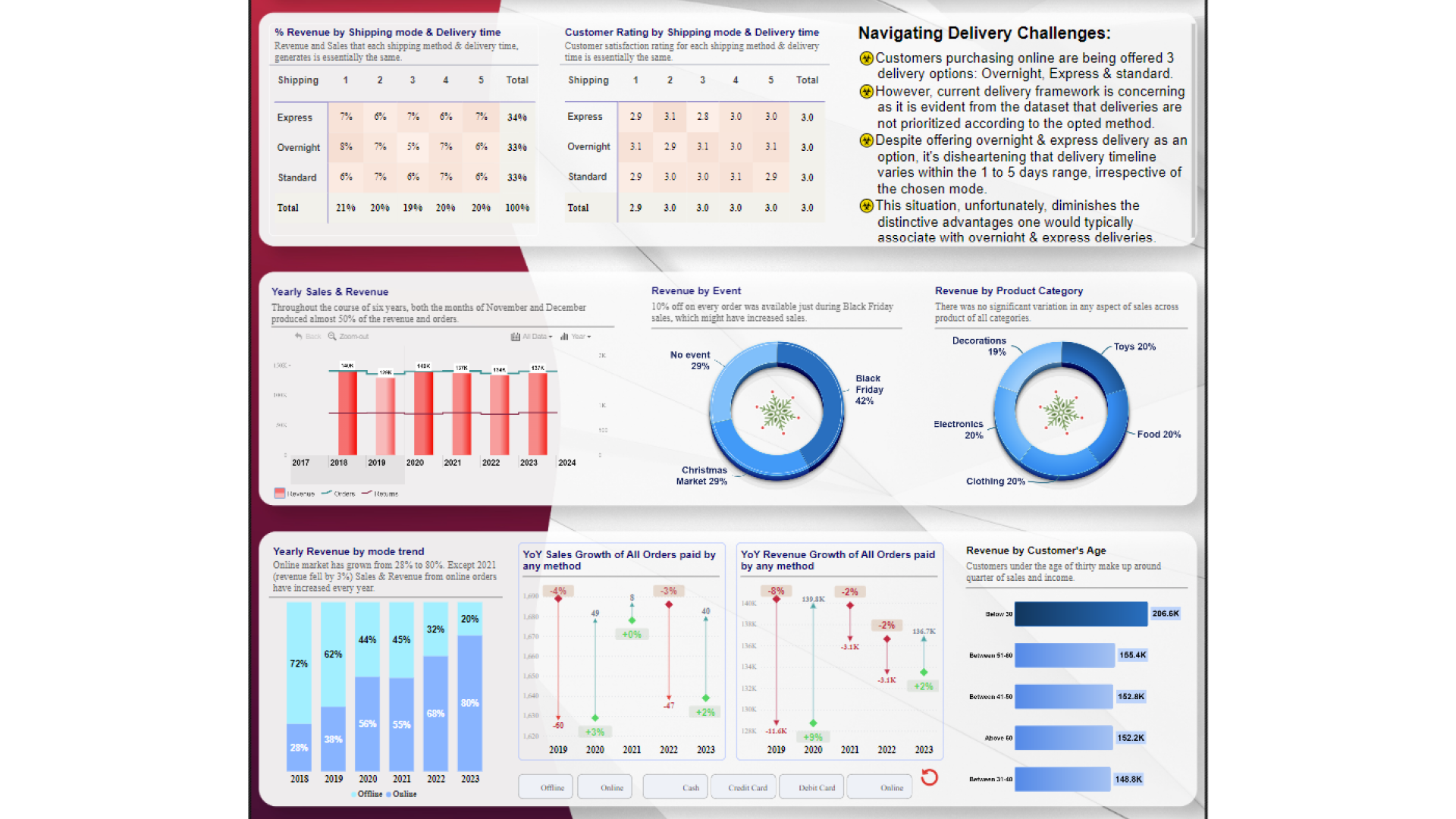
"As the holiday spirit fills the air, I'm thrilled to share my Power BI report using ZoomCharts that delves deep into Christmas sales and trend analysis. 🎁✨. 📈 While the joy of holiday sales is undeniable, this report doesn't shy away from shedding light on the challenges. 🤔 Surprisingly, during the past six years, 50% of orders have been returned. A data-driven investigation reveals important insights underlying this pattern. From product quality concerns to customer expectations not met, understanding the 'why' gives empowerment to improve. 📦🚫 Additionally, this report unveils the impact of a not-so-jolly delivery infrastructure and suggest ways to navigate delays and hiccups, while emphasizing on the importance of streamlining the delivery processes to ensure a seamless customer experience in the upcoming year. 🚚✨ So spread the holiday cheer by checking out the Power BI report ! 🎉📊"



4U Report Challenges
Participate in data challenges, build and submit reports to get free template downloads.
Join CommunityMobile view allows you to interact with the report. To Download the template please switch to desktop view.
How to use a PBIX template
Preview the interactive report, download the PBIX file, open it in Power BI Desktop, and replace the same data connection with your own dataset.
Preview and download
Explore the report online and download the PBIX template file.
Open in Power BI Desktop
Open the downloaded PBIX file in Power BI Desktop.
Connect your data
Replace the sample data source with your own dataset.
Refresh and adjust
Refresh the model and update fields or visual were needed.
Save and share
Save your report and publish it for your audience.


