Use Threshold Mode to choose how change is calculated and displayed in Drill Down Waterfall PRO.
This setting is available when Threshold Type is set to Change.
- First to Last: displays the difference between the first and last subtotal.
- Subtotals (Min to Max): displays the change from the smallest subtotal to the largest subtotal.
- Subtotals (Max to Min): displays the change from the largest subtotal to the smallest subtotal.
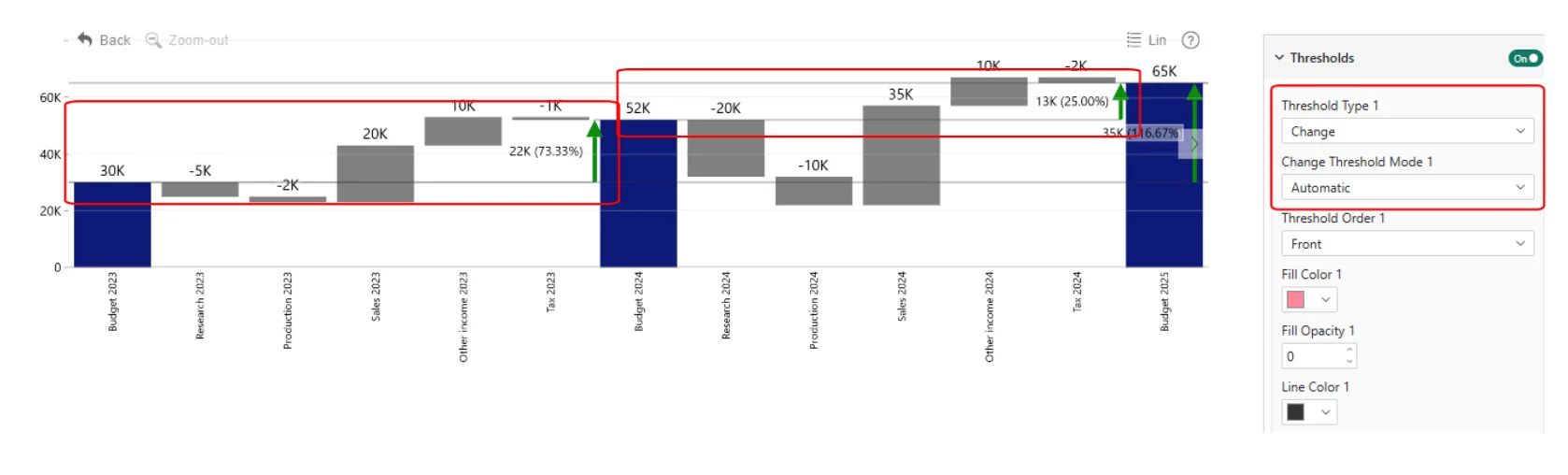
- Automatic: displays change indicators between consecutive subtotals and between the first and last subtotal.
- Custom: lets you define the two values to compare. Enter constant values or calculate them using First, Last, Minimum, Maximum, Average, Median, or Percentile.
For Custom comparisons, use Value Type, Series, Value, and Percentile to configure the From Value and To Value.
Customize the resulting threshold with Style, Label, and Change Arrows.
Was this helpful? Thank you for your feedback!
Sorry about that.
How can we improve it?