This is an optional field that allows you to assign data points to custom formatting groups. You can create up to nine groups, each with its own appearance settings.
This field recognizes the following group values:
- group1
- group2
- group3
- group4
- group5
- group6
- group7
- group8
- group9
Data points with the same group value are assigned to the same customization group.
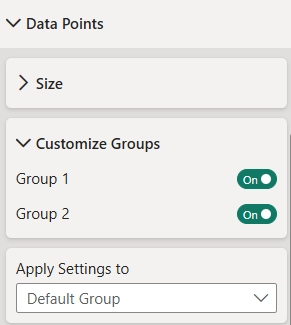
To customize a group, open the Customize Groups settings, select the desired group from the Apply Settings To list, and configure its appearance. Group-specific settings override the Default data point settings, allowing you to customize properties such as marker color, shape, size, opacity, outline, labels, and more.
Was this helpful? Thank you for your feedback!
Sorry about that.
How can we improve it?