If this toggle is enabled, the axis orientation will be inverted. By default, this toggle is disabled.
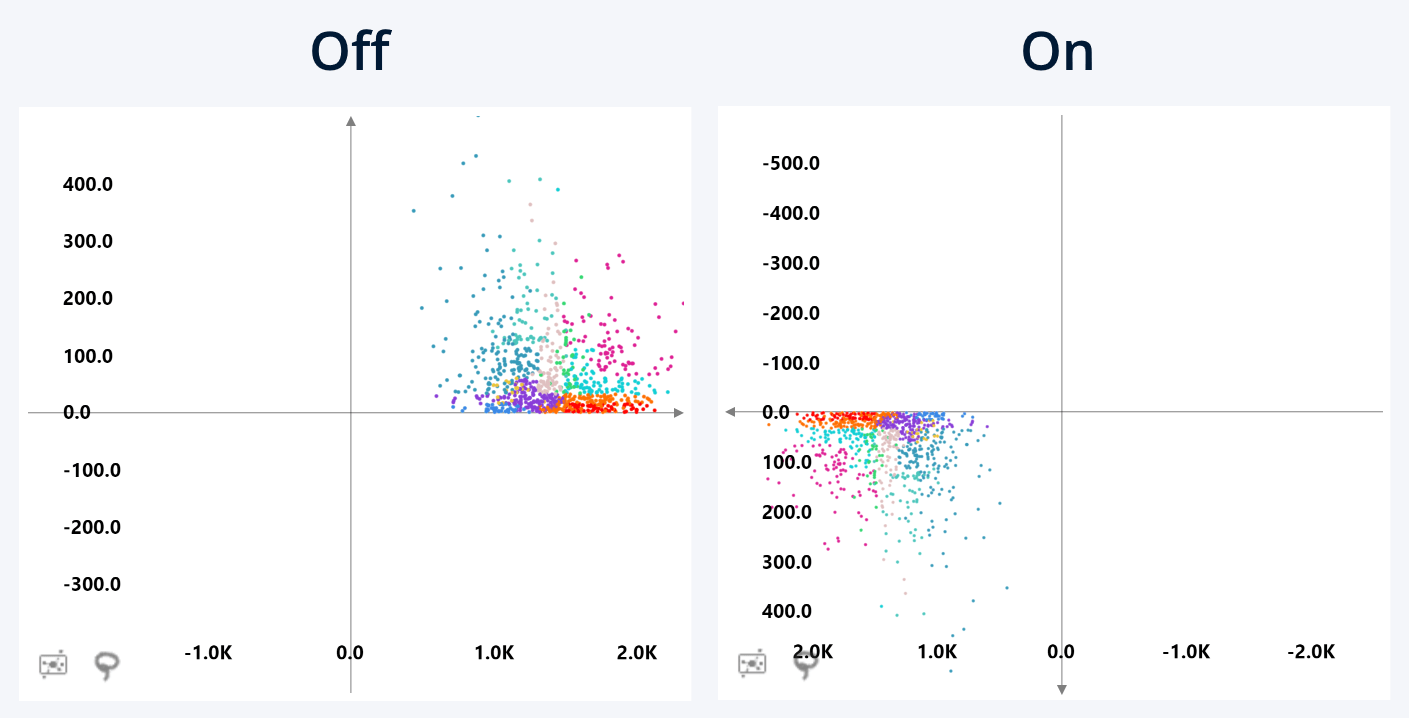
The default axis orientation of Drill Down Scatter PRO is as follows:
- X-Axis: Values increase from left to right. Positive x values are placed on the right side of the origin, negative x values are placed on the left.
- Y-Axis: Values increase upwards. Positive y values are placed above the origin, negative y values are placed below.
If you enable the Invert Axis toggle, the visual will reverse the axis orientation:
- X-Axis: Values increase from right to left. Positive x values are placed on the left side of the origin, negative x values are placed on the right.
- Y-Axis: Values increase downwards. Positive y values are placed below the origin, negative y values are placed above.
By default, this setting affects both value axes. If you have enabled the Configure Axes Separately toggle, this setting will be located in the Value Axis X and Value Axis Y sections of the Format Visual tab, allowing you to adjust each axis separately.
Was this helpful? Thank you for your feedback!
Sorry about that.
How can we improve it?