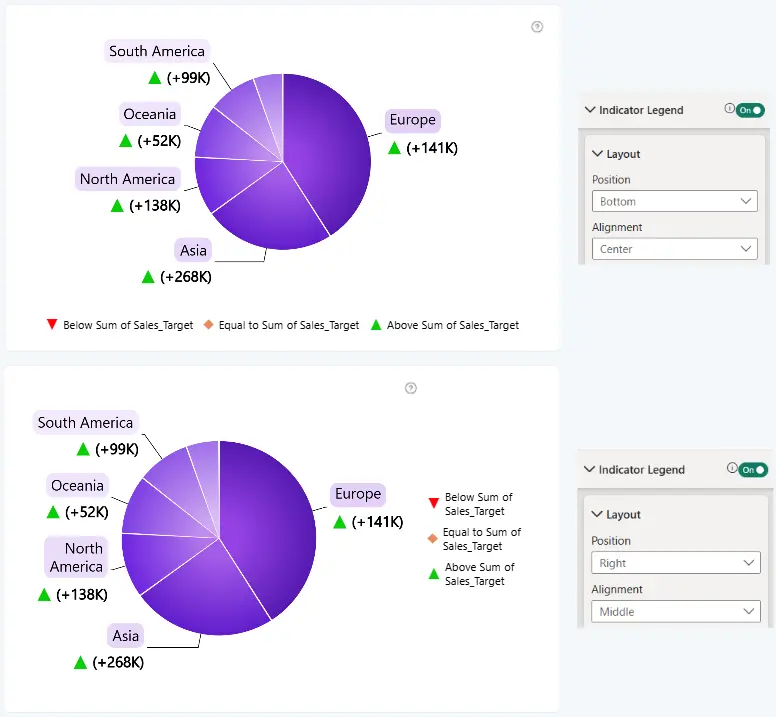
Use the Layout settings to customize the position and alignment of the Indicator Legend within the visual.
Position
Controls where the Indicator Legend is displayed relative to the chart.
- Bottom (Default) – Displays the Indicator Legend below the chart.
- Left – Displays the Indicator Legend on the left side of the chart.
- Right – Displays the Indicator Legend on the right side of the chart.
- Top – Displays the Indicator Legend above the chart.
Alignment
Controls how the Indicator Legend is aligned within its selected position.
The available alignment options depend on the selected Position:
When Position is set to Top or Bottom:
- Left – Aligns the Indicator Legend to the left side of the chart.
- Center (Default) – Centers the Indicator Legend horizontally.
- Right – Aligns the Indicator Legend to the right side of the chart.
When Position is set to Left or Right:
- Top – Aligns the Indicator Legend to the top of the chart.
- Middle – Centers the Indicator Legend vertically.
- Bottom – Aligns the Indicator Legend to the bottom of the chart.
Was this helpful? Thank you for your feedback!
Sorry about that.
How can we improve it?