The Series settings are available when Customize Tooltip Style is enabled.
Use these settings to customize the appearance of series names and values in the tooltip.
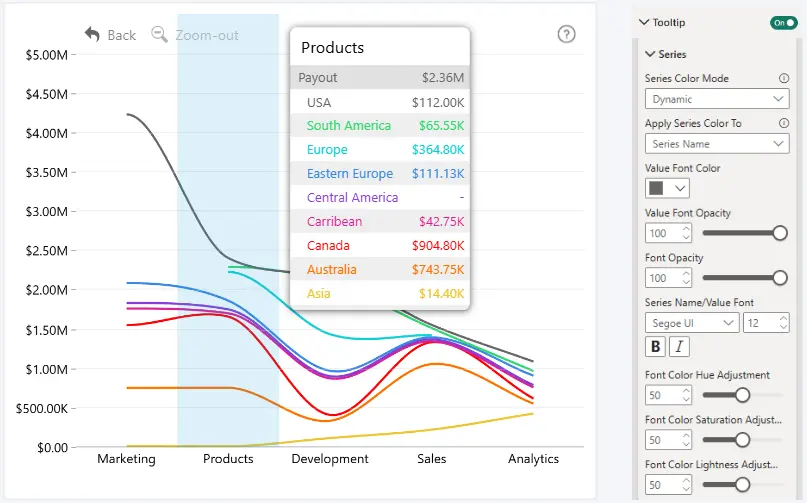
Series Color Mode
Choose how colors are applied to series information in the tooltip.
- Dynamic Color Mode (Default) - Uses the series color dynamically and provides additional controls for adjusting its hue, saturation, and lightness..
- Fixed Color Mode - Allows you to choose a specific font color.
Apply Series Color To
Choose which series information uses the series color:
- Series Name
- Series Value
- Series Name and Value
Value Font Color
Choose the font color used for series values.
Value Font Opacity
Set the opacity of the series value text.
- Range: 0–100
- Default: 100
- 0: fully transparent
- 100: fully visible
Font Color
Choose the series font color. This setting is available when Series Color Mode is set to Fixed Color.
Font Opacity
Set the opacity of the text using the series color.
- Range: 0–100
- Default: 100
- 0: fully transparent
- 100: fully visible
Series Name/Value Font
Customize the typography of series names and values. You can configure:
- Font Family
- Font Size
- Bold and/or Italic
Dynamic Color Adjustments
When Series Color Mode is set to Dynamic, additional settings are available to adjust the dynamically generated color:
- Font Color Hue Adjustment - Adjust the hue. Range: 0–100; Default: 50.
- Font Color Saturation Adjustment - Adjust the saturation. Range: 0–100; Default: 50.
- Font Color Lightness Adjustment - Adjust the lightness. Range: 0–100; Default: 50.
Was this helpful? Thank you for your feedback!
Sorry about that.
How can we improve it?