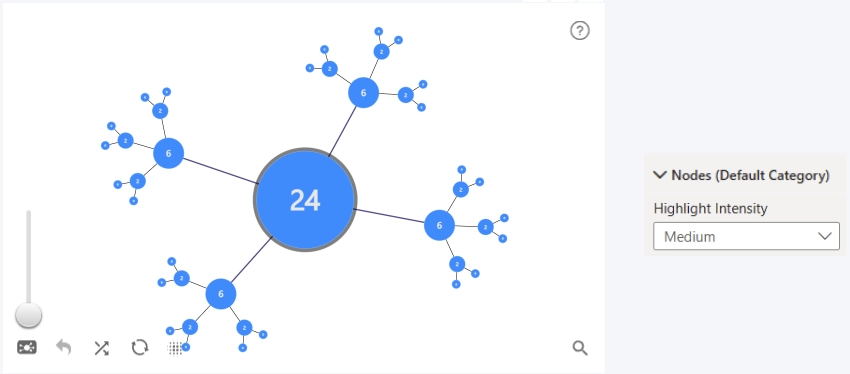
Controls how prominent the outline appears when a node is hovered over or selected. This option is available only when either Customize Hover Outline or Customize Selection Outline is enabled.
Available options:
- Light: Displays a thin, subtle outline.
- Medium(Default): Displays a more visible outline with moderate emphasis.
- Heavy: Displays a thicker outline for stronger emphasis.
- Custom: Enables additional settings for manually adjusting the outline effect.
Custom settings
When Highlight Intensity is set to Custom, the following settings become available:
- Outline Radius Multiplier: Controls how much the outline scales relative to the node’s current radius. Larger values produce a thicker outline around larger nodes.
- Outline Zoom Multiplier: Controls how much the outline thickness scales with the chart zoom level, helping the highlight remain visible when zooming in.
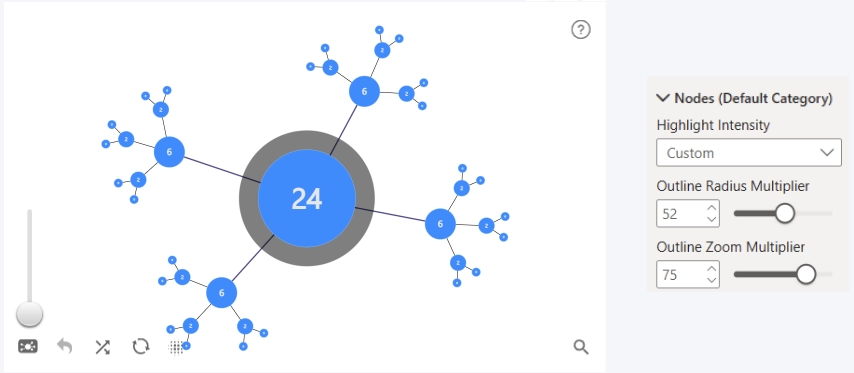
Together, these settings fine-tune the thickness of the hover/selection ring around each node. The final outline size is calculated from the node’s current radius and the chart zoom level, using both multiplier values.
Was this helpful? Thank you for your feedback!
Sorry about that.
How can we improve it?