Use the Markers settings to customize the size, colors, and symbols of the change indicators displayed in the Indicator Legend.
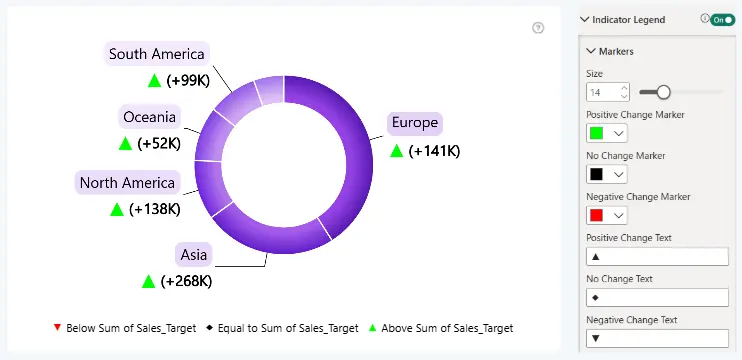
Size
Controls the size of the change-indicator markers displayed in the Indicator Legend.
Positive Change Marker
Defines the color of the marker representing a positive change, when the category value is greater than its reference value.
No Change Marker
Defines the color of the marker representing no change, when the category value is equal to its reference value.
Negative Change Marker
Defines the color of the marker representing a negative change, when the category value is lower than its reference value.
Positive Change Text
Specifies the symbol displayed for a positive change indicator. The default value is “▲”.
No Change Text
Specifies the symbol displayed when there is no change. The default value is “◆”.
Negative Change Text
Specifies the symbol displayed for a negative change indicator. The default value is “▼”.
Marker settings are shared between the Indicator Legend and the corresponding change indicators in chart labels. Updating these settings in either location automatically applies the changes to both, ensuring a consistent appearance across the visual.
Was this helpful? Thank you for your feedback!
Sorry about that.
How can we improve it?