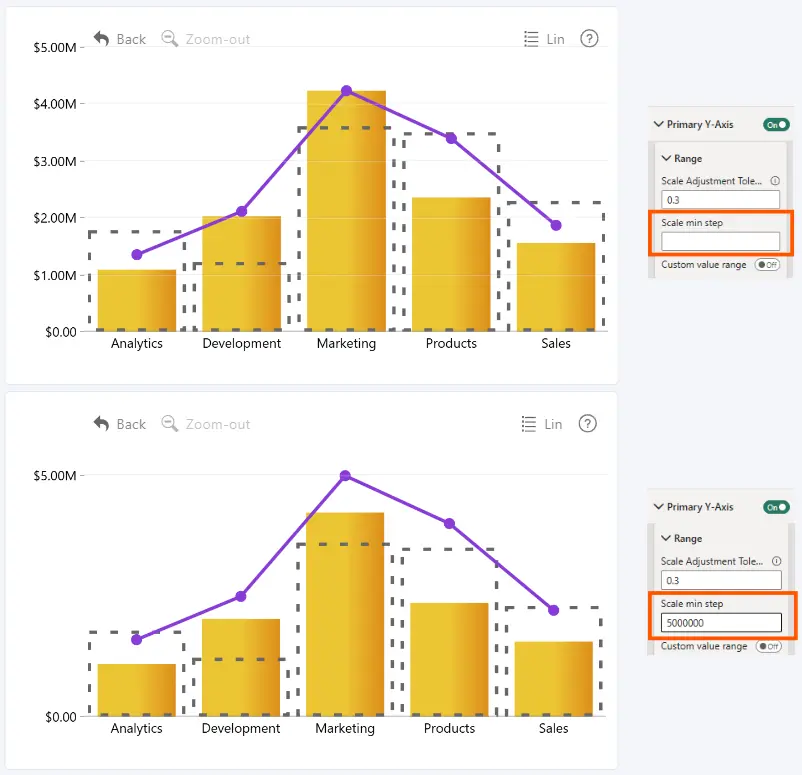
Set the minimum interval between consecutive tick values on the Primary Y-Axis.
Enter a numerical value to specify the minimum step size. If the field is left empty, the visual automatically determines the step size.
For example, if the Y-axis ranges from 0 to 1,000:
- 100: displays ticks at 0, 100, 200, 300, and so on, up to 1,000.
- 200: displays ticks at 0, 200, 400, 600, 800, and 1,000.
- 500: displays ticks at 0, 500, and 1,000.
Set Scale Min Step to 1 to help prevent fractional values from appearing on axis labels.
Was this helpful? Thank you for your feedback!
Sorry about that.
How can we improve it?