Enable Gridlines to display gridlines associated with the Primary Y-Axis. Gridlines are enabled by default.
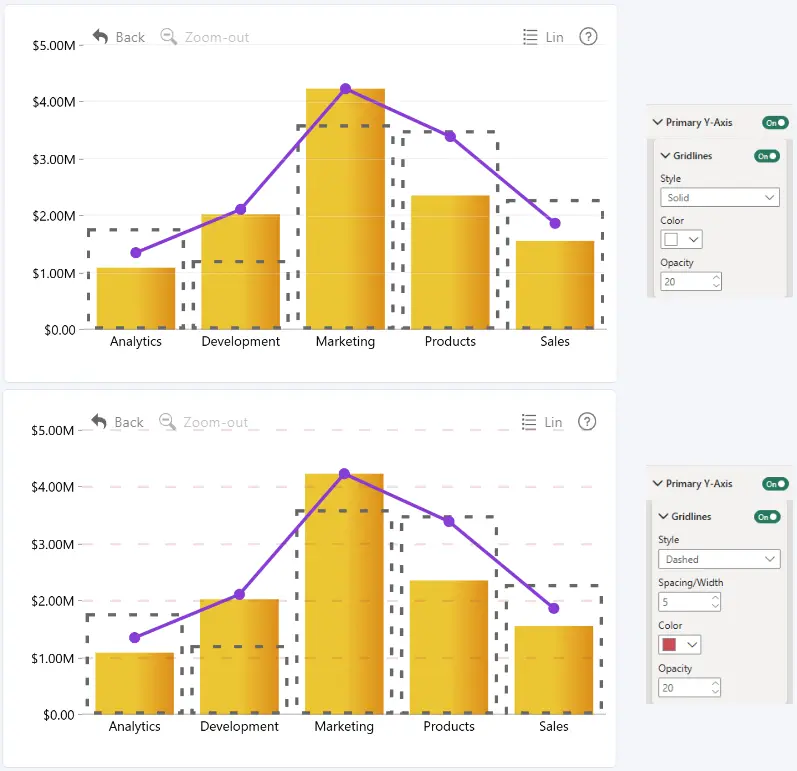
Use the following settings to customize their appearance:
Style
Select the line style used for gridlines.
The following options are available:
- Solid - displays continuous lines.
- Dotted - displays dotted lines.
- Dashed - displays dashed lines.
Spacing/Width
Set the spacing and width of the dashed gridline pattern.
You can choose a value between 0 and 10. A value of 0 uses the default spacing and width.
This setting is available only when Style is set to Dashed.
Color
Select the color of gridlines using the Power BI color picker. You can choose a color from the palette or enter a custom HEX value via More colors.
Opacity
Set the opacity of gridlines.
- Range: 0-100
- Default: 20
- 0: fully transparent
- 100: fully opaque
Was this helpful? Thank you for your feedback!
Sorry about that.
How can we improve it?