Use Apply Settings To to select whether you want to configure shared default settings or customize an individual series.
- Default – configure settings shared by series that use the default configuration.
- Series 1, Series 2, etc. – configure the selected series individually.
When an individual series is selected, Use Default Settings becomes available.
- On (default) – the series uses the shared default settings.
- Off – the series has customized settings that override the shared defaults.
Use Default Settings is enabled initially and switches off automatically when you change a property for an individual series. Turn it back on to restore the shared defaults.
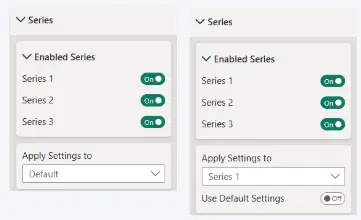
The individual series available under Apply Settings To depend on the data added to the visual.
Was this helpful? Thank you for your feedback!
Sorry about that.
How can we improve it?