1197
Power BI Financial Statement Analysis Dashboard
Power BI Financial Statement Analysis Dashboard
Report Author: Eniola Adekoya
1197
Share template with others
Summary
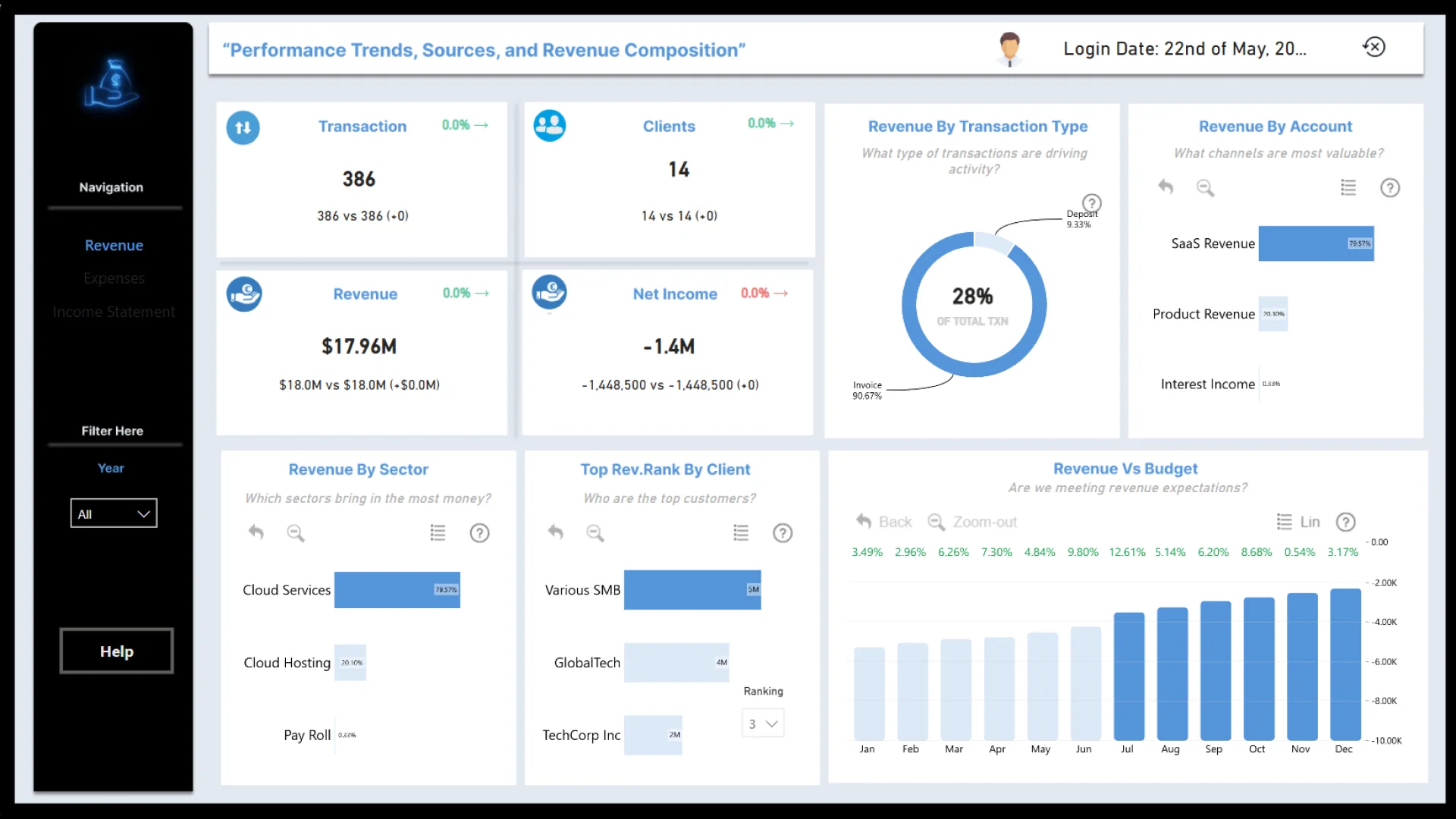
This Power BI financial statement dashboard provides an interactive view of revenue, expenses, profitability, and financial performance. It helps finance teams review overall results, understand the composition of key figures, and investigate changes across reporting periods and business categories.
Created by Eniola Adekoya using the Financial Statements Analysis dataset, the two-page report was submitted to the FP20 Analytics ZoomCharts Challenge in May 2025. It combines trend, category, composition, and waterfall visuals for structured financial analysis.
Key Insights of the Power BI Financial Statement Analysis Dashboard
- Financial performance: Review high-level statement results and compare important financial measures.
- Revenue and expense trends: Examine how income and costs change across available reporting periods.
- Profitability analysis: Evaluate the relationship between revenue, expenses, and resulting financial performance.
- Change breakdown: Use waterfall analysis to understand the positive and negative contributions behind financial results.
- Category composition: Explore how business categories or financial statement lines contribute to overall totals.
- Interactive comparisons: Select chart elements and drill into the data to investigate specific periods or categories.
How to Use This Power BI Financial Statement Analysis Dashboard
Preview the report online and navigate between its two pages to explore financial results from different perspectives. Use the available chart selections and drill-down interactions to focus on particular periods, statement categories, or performance drivers.
Download the PBIX template and open it in Power BI Desktop to review the report structure, calculations, and visual configuration. Replace the sample financial statement data with your own dataset, map the corresponding fields, refresh the model, and customize the dashboard for internal finance or management reporting.
ZoomCharts visuals used




4U Report Challenges
Participate in data challenges, build and submit reports to get free template downloads.
Join CommunityMobile view allows you to interact with the report. To Download the template please switch to desktop view.
How to use a PBIX template
Preview the interactive report, download the PBIX file, open it in Power BI Desktop, and replace the same data connection with your own dataset.
Preview and download
Explore the report online and download the PBIX template file.
Open in Power BI Desktop
Open the downloaded PBIX file in Power BI Desktop.
Connect your data
Replace the sample data source with your own dataset.
Refresh and adjust
Refresh the model and update fields or visual were needed.
Save and share
Save your report and publish it for your audience.


