3909
Power BI Employee Performance, Productivity & Attrition Dashboard
Power BI Employee Performance, Productivity & Attrition Dashboard
Report Author: Ugochukwu Nwasuruba
3909
Share template with others
Summary
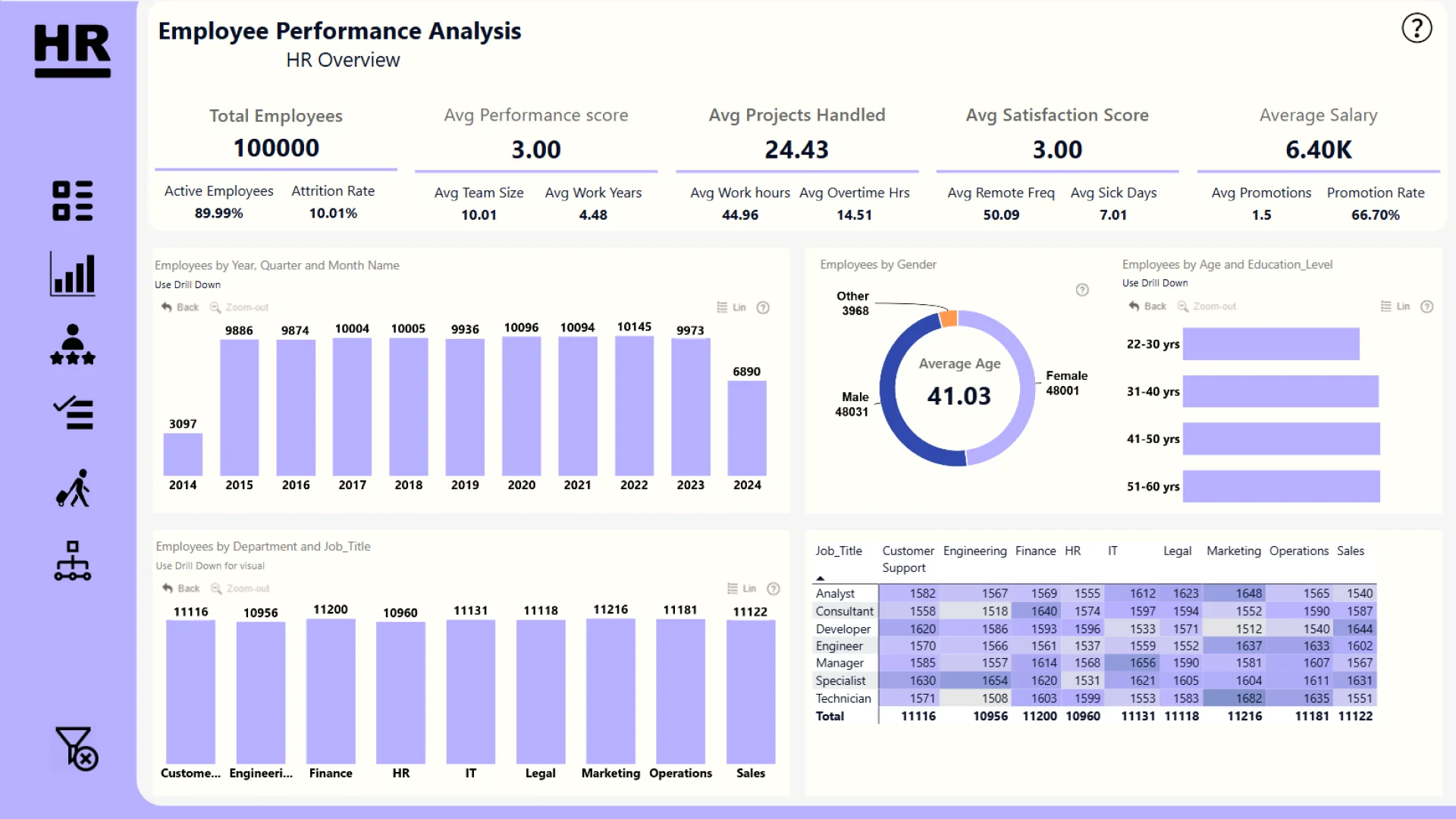
This Power BI HR analytics dashboard examines employee performance, productivity, job satisfaction, and attrition across a workforce of 100,000 employees. It helps HR teams compare workforce outcomes across departments, roles, and demographic groups.
Created by Ugochukwu Nwasuruba, the report is organized into five sections: HR Overview, Performance Evaluation, Productivity Metrics, Job Satisfaction, and Churn Analysis.
Key Insights of the Power BI Employee Performance, Productivity & Attrition Dashboard
The report brings workforce KPIs and detailed HR analysis together in one interactive experience. Its main insights include:
- HR overview: monitor a total workforce of 100,000 employees, an active employee rate of 89.99%, and an attrition rate of 10.01%
- Employee performance: compare performance across departments, job titles, roles, and demographic groups
- Promotions: review promotion patterns and the reported promotion rate of 66.70%
- Productivity: analyze working hours, project workloads, team sizes, and remote-work frequency
- Job satisfaction: explore satisfaction trends, salary distribution, sick leave, overtime, and work-life balance indicators
- Employee churn: examine attrition patterns by department, role, demographics, and employee tenure
The headline averages include satisfaction and performance scores of 3.00, salary of 6.40K, 44.96 working hours, 24.43 projects, 14.51 overtime hours, and 4.48 years of tenure.
The report uses Drill Down Combo, Combo Bar, and Donut PRO visuals. Interactive filtering and drill-down allow users to move from workforce-level KPIs to more focused comparisons between employee groups.
This report was submitted to the Onyx Data DataDNA ZoomCharts Mini Challenge in October 2024.
How to Use This Power BI HR Analytics Dashboard
Move between the five report sections and click active chart elements to filter the analysis. Use the drill-down controls to compare departments, roles, demographic groups, work patterns, satisfaction indicators, and attrition results.
Download the PBIX template to review the report structure, calculations, and visual settings in Power BI Desktop. Replace the sample connection to adapt the dashboard for your own employee performance and workforce data.



4U Report Challenges
Participate in data challenges, build and submit reports to get free template downloads.
Join CommunityMobile view allows you to interact with the report. To Download the template please switch to desktop view.
How to use a PBIX template
Preview the interactive report, download the PBIX file, open it in Power BI Desktop, and replace the same data connection with your own dataset.
Preview and download
Explore the report online and download the PBIX template file.
Open in Power BI Desktop
Open the downloaded PBIX file in Power BI Desktop.
Connect your data
Replace the sample data source with your own dataset.
Refresh and adjust
Refresh the model and update fields or visual were needed.
Save and share
Save your report and publish it for your audience.


