logo
For Power BI Report Templates
  • Products

    Drill Down Visuals for Power BI

    Discover the most customizable custom visuals for Power BI.

    Pricing & licensing
    • Drill Down Donut Pro
      Drill Down Donut Category Composition
    • Drill Down Pie Pro
      Drill Down Pie Proportional Breakdown
    • Drill Down Combo Pro
      Drill Down Combo Multi-Metric Trends
    • Drill Down Combo Bar Pro
      Drill Down Combo Bar Cross-Metric Trends
    • Drill Down Line Pro
      Drill Down Line Trend Analysis
    • Drill Down Bubble Pro
      Drill Down Bubble Value Relationships
    • Drill Down Scatter Pro
      Drill Down Scatter Correlation Analysis
    • Drill Down Network Pro
      Drill Down Network Entity Connections
    • Drill Down Graph Pro
      Drill Down Graph Relationship Mapping
    • Drill Down Map Pro
      Drill Down Map Geographic Insights
    • Drill Down Waterfall Pro
      Drill Down Waterfall Change Breakdown
    • Drill Down Timeline Pro
      Drill Down Timeline Time-Based Metrics
    • Drill Down TimeSeries Pro
      Drill Down TimeSeries Temporal Patterns
    • Drill Down Line Pro
      Drill Down Line Trend Analysis

    Visuals in Planning

    Discover visuals we’re exploring, share your feedback, and help us decide what to build next.

    Browse concepts
  • Template Reports
    • Browse Report Templates
      Browse Report Templates Explore 2000+
      Power BI reports
    • Pricing Report Templates
      unlimited access

    Explore Report Templates

    Industry

    • Logistics
    • Education
    • Healthcare
    • Transportation
    • Banking
    • Ecommerce
    • Crime analytics
    • Retail
    • Manufacturing

    Business Domain

    • Sales
    • Marketing
    • Accounting & Finance
    • Human Resources
    • Research
    • Project Management
    • CRM
    • Support
    • Customer experience
  • Resources

      Learn

    • Video Tutorials Step-by-step Power BI guides
    • Webinars Live and recorded expert sessions
    • Visuals Gallery Explore all custom Power BI visuals
    • Blog Power BI tips, updates, and guides
    • Documentation Setup, features, and API reference

    Support

    • ZoomCharts Assistance Help from our product experts
    • Contact Sales Questions about pricing or licensing
    • Contact Support Technical help and troubleshooting
    • FAQ Quick answers to common questions
  • Services
    • Power BI Report Development
      Power BI Report Development End-to-end custom
      Power BI reports.
    • Custom Visual Development
      Custom Visual Development Custom visuals for
      your business needs.
  • Challenges
  • Pricing
Request a quote Get Developer License Sign in
Request a quote Book a Demo Get Developer License Sign in
Get it now
Go back

Contents

Go back

Onyx Marketing Campaign Analysis

Report Author: Balu Chelluri

Report
Report Interact

Feel free to leave your vote:

13

Share template with others

Summary

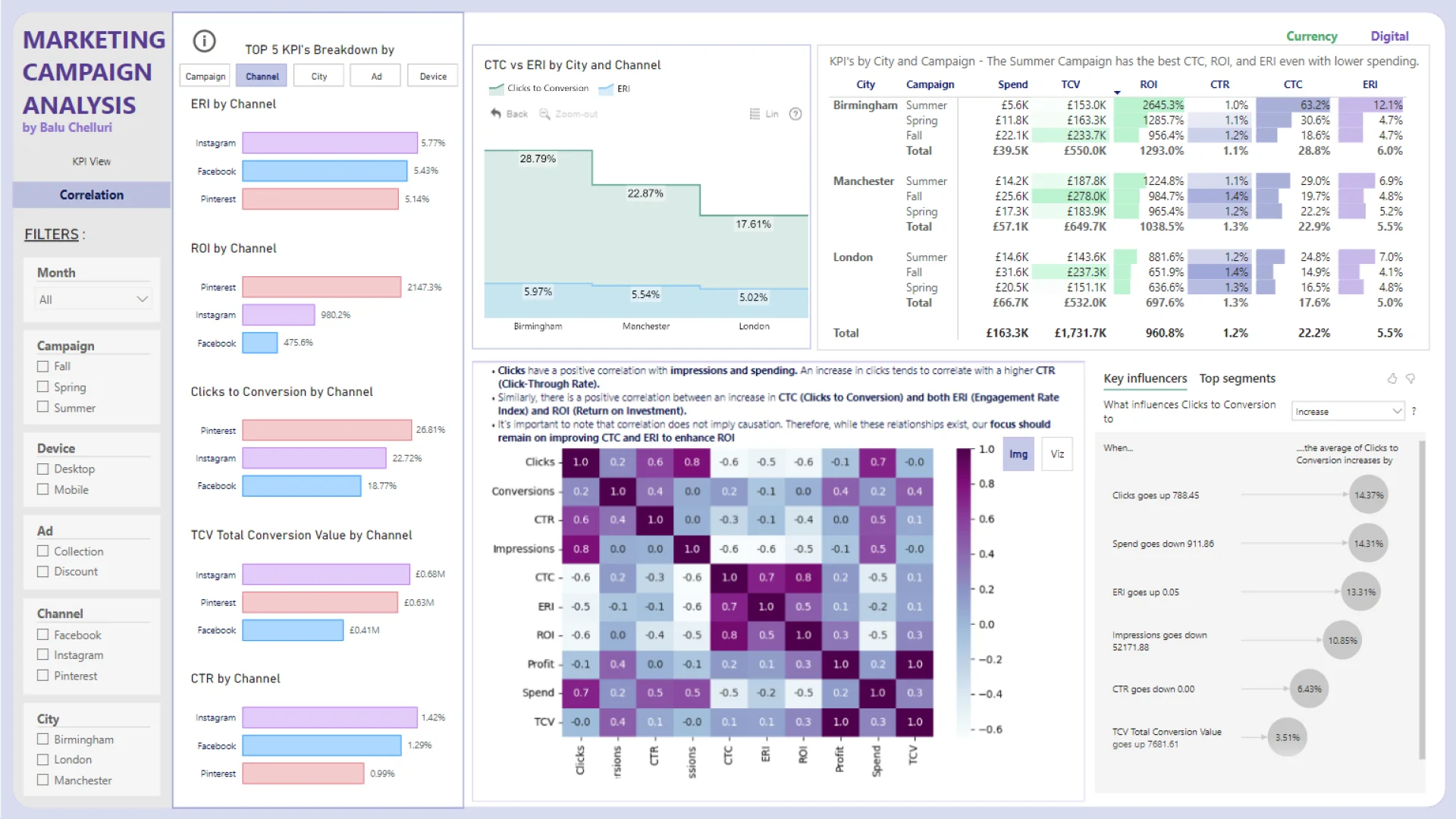
Report submitted for OnyxData and ZoomCharts Challenge June 2024. The report was built with the Marketing Campaing Datase and includes ZoomCharts custom Drill Down PRO visuals for Power BI.

Author's description:

Financial KPIs:

  • Spend: Total amount of money spent on advertising or campaigns.
  • Total Conversion Value: Total monetary value generated from conversions.
  • Profit: Difference between Total Conversion Value and Spend.
  • ROI (Return on Investment): Ratio of Profit to Spend, indicating efficiency and profitability.

Digital KPIs:

  • Impressions: Number of times an ad is displayed or seen by users.
  • Clicks: Number of times users click on an ad.
  • CTR (Click-Through Rate): Percentage of users who click on an ad after seeing it.
  • CPC (Cost-Per-Click): Average cost incurred for each click on an ad.
  • ERI (Engagement Rate by Impressions): Percentage of impressions that result in engagement (comments, likes, shares, etc.).

Performance/Effectiveness KPIs:

  • Clicks to Conversion (CTC): Ratio of clicks to conversions, measuring conversion efficiency.
  • Conversions: Number of desired actions completed by users, such as purchases or sign-ups.

This report contains two pages:

KPI View:

  • Tracks KPI performance across periods with a comparison of the latest month to the previous month to identify underperforming KPIs.
  • Analyzes KPIs by social media channels to optimize campaign effectiveness and identify high-traffic areas.
  • Compares financial and digital KPIs across different geographical locations.

Correlation Page:

  • Provides top KPI comparisons across categories and assesses campaign performance in each city.
  • Identifies influencers affecting Clicks to Conversion (CTC) for improved ROI and ERI.
  • Examines correlations among different KPIs.

Key Findings Include:

  • Fall campaigns perform best, possibly due to seasonal markets.
  • Summer campaigns excel in CTC, ROI, and ERI despite lower spending.
  • Collection ads show high engagement but lack value; discount-based ads lead in CTC.
  • Mobile drives higher impressions; desktops have better CTR and CTC.
  • Instagram leads in engagement; Pinterest tops in profit and CTC in Birmingham and Manchester.
  • Despite London's high population, it shows lower CTC but higher CTR, while Birmingham leads in ROI and ERI.


ZoomCharts visuals used

Drill Down Donut PRO (Pin) Drill Down Donut PRO (Pin)
Drill Down Combo PRO Drill Down Combo PRO

Mobile view allows you to interact with the report. To Download the template please switch to desktop view.

Try it in your Power BI!

New here? Fill up the form below and download!

Enjoy!

Success

Thank you for downloading the template!
We have sent a download link to your email.

For any questions, please contact us at ZoomCharts Assistance

Log in

Forgot password

Reset Password

Onyx Marketing Campaign Analysis

Share

Unfortunately this report file could not be downloaded. Please try again later.

You can contact support using chat or via email [email protected]

logo
[email protected]
+44 204 577 3993
logo

Products

Drill Down Bubble PRO Drill Down Line PRO Drill Down Network PRO Drill Down Waterfall PRO Drill Down Graph PRO Drill Down Combo PRO Drill Down Combo Bar PRO Drill Down Donut PRO Drill Down Pie PRO Drill Down TimeSeries PRO Drill Down Timeline PRO Drill Down Map PRO Drill Down Scatter PRO All Visuals

Resources

Report Examples Webinars Blog ZoomCharts Academy Visuals Gallery Documentation Custom Visual Development Subscribe to News

Solutions

Custom Visual Development

Company

Pricing About Us Partners Leave feedback Join PowerGroup EU Funding

Help

ZoomCharts Assistance Contact Sales Contact Support FAQ AI Information

Drill Down Line PRO Drill Down Bubble PRO Drill Down Network PRO Drill Down Waterfall PRO Drill Down Graph PRO Drill Down Combo PRO Drill Down Combo Bar PRO Drill Down Donut PRO Drill Down Pie PRO Drill Down TimeSeries PRO Drill Down Timeline PRO Drill Down Map PRO Drill Down Scatter PRO All Visuals

Report Examples Webinars Blog ZoomCharts Academy Visuals Gallery Documentation Custom Visual Development Subscribe to News

Custom Visual Development

Pricing About Us Partners Leave feedback Join PowerGroup EU Funding

ZoomCharts Assistance Contact Sales Contact Support FAQ AI Information
+44 204 577 3993
[email protected]

Ready to get in touch?

Contact our experts with any question about Power BI and ZoomCharts for Free!

Contact us

© 2026, Data Visualization Software Lab

U.S. Patents No. 11,645,343; 11,921,804; 12,346,389

Cookies
Privacy Policy
Global
Legal
Patent
warning

Error message

success

Success info: Done!

ZoomCharts AI Assistant

We noticed you're using an old OS version.

For the best experience, we recommend upgrading to ensure that all website features display correctly.

Cookie settings

We use necessary cookies for site functionality, as well as statistic, marketing, and preference cookies to enhance your experience. For more information and to manage your preferences, please visit our Cookie policy